Purpose
The purpose of this report description is to explain how to generate the Retroactive Position Time Setting Changes – Metric report.
Report Description
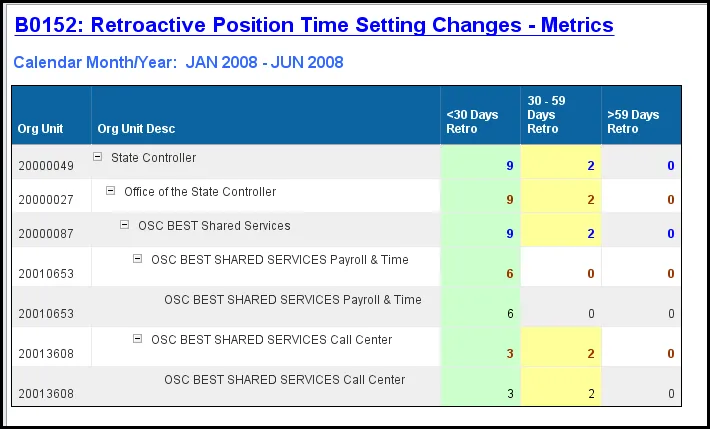
This report displays metrics derived from retroactive position time settings that are pay-impacting for the organizational unit and calendar month/year interval selected. Metrics are displayed in the ranges of <30 days, 30-59 days and >59days.
Report Location
Agency Performance Metrics
Report Uses
- This report can be used as a monitoring tool to evaluate retroactive position time setting changes which impact employee pay.
- This report helps the agencies narrow down at the Org Unit level where the retroactive position setting time setting changes were done and helps them take corrective action if necessary.
How to Generate This Report
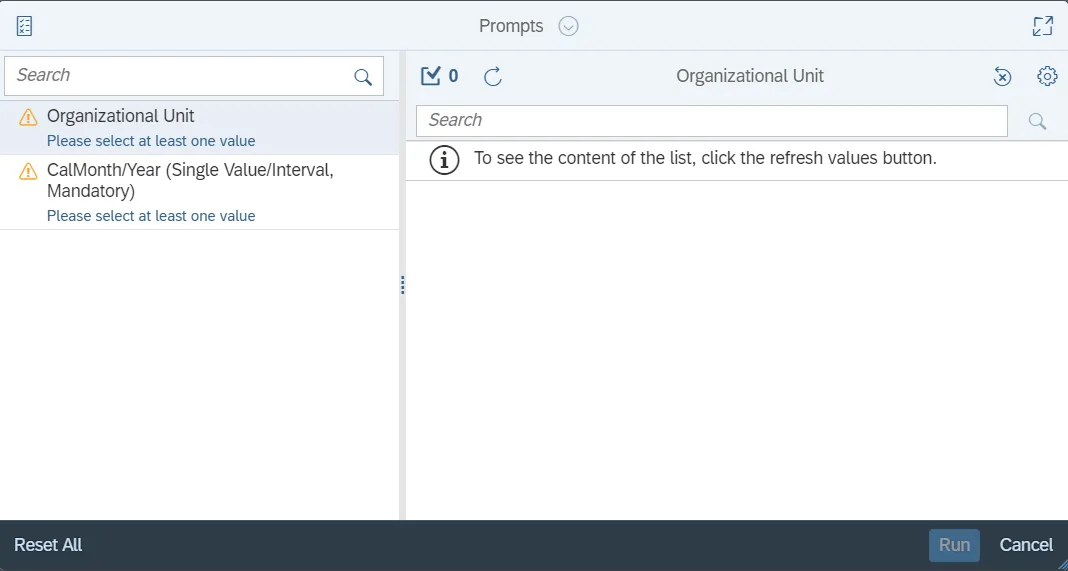
This report is generated after selecting values for the mandatory prompts. All mandatory prompts must have values selected before the Run Icon can be used to generate the report. Mandatory prompts can be identified as mandatory by the exclamation mark inside of the yellow-orange triangle, the square with the checkmark, or the display of (Mandatory). Detailed instructions for interaction with each prompt can be found on the Web Intelligence Prompt List on the OSC website.
The Mandatory prompts for this report are:
- Organizational Unit
- CalMonth/Year (Single Value/Interval, Mandatory)
Initial Layout
This is a sample of the report, which shows the columns available on the base report:
Available Objects
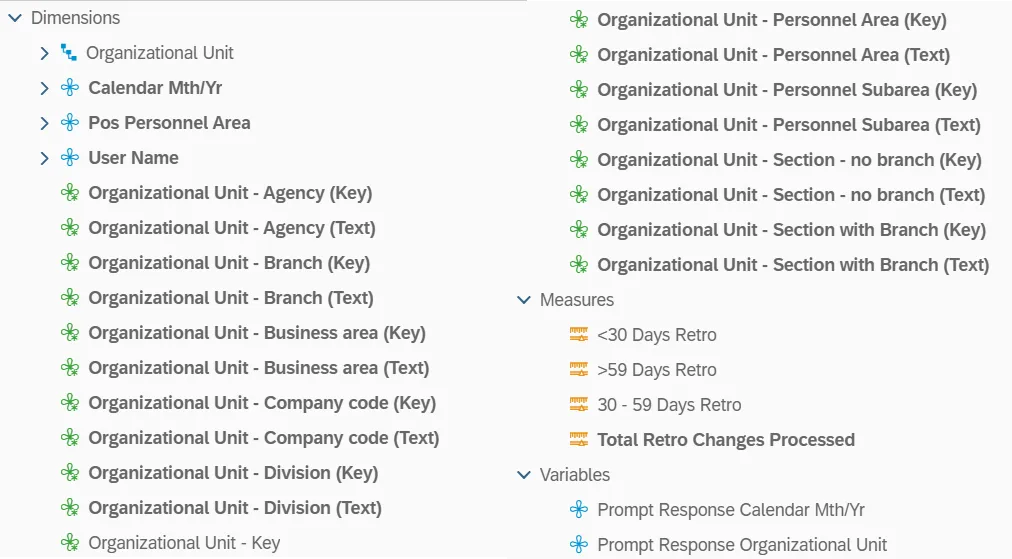
This is a list of the available objects that can be added to the report, from the Document Dictionary once in the Design mode:
Dimensions
- Organizational Unit
- Calendar Mth/Yr
- Pos Personnel Area
- User Name
- Organizational Unit – Agency (Key)
- Organizational Unit – Agency (Text)
- Organizational Unit – Branch (Key)
- Organizational Unit – Branch (Text)
- Organizational Unit – Business Area (Key)
- Organizational Unit – Business Area (Text)
- Organizational Unit – Company code (Key)
- Organizational Unit – Company code (Text)
- Organizational Unit – Division (Key)
- Organizational Unit – Division (Text)
- Organizational Unit – Key
- Organizational Unit – Personnel Area (Key)
- Organizational Unit – Personnel Area (Text)
- Organizational Unit – Personnel Subarea (Key)
- Organizational Unit – Personnel Subarea (Text)
- Organizational Unit – Section – no branch (Key)
- Organizational Unit – Section – no branch (Text)
- Organizational Unit – Section with Branch (Key)
- Organizational Unit – Section with Branch (Text)
Measures
- <30 Days Retro
- >59 Days Retro
- 30 – 59 Days Retro
- Total Retro Changes Processed
Variables
- Prompt Response Calendar Mth/Yr
- Prompt Response Organizational Unit
Special Report Considerations/Features
- Positions assigned to the Contractor employee subgroup are excluded from this report by default.
- The 3 measures on the right-side columns are coded with alternate colors in the report to differentiate the row values appropriate to the level of Org Unit. The leaf nodes (lowest level Org Unit measures) will have the default color (black).
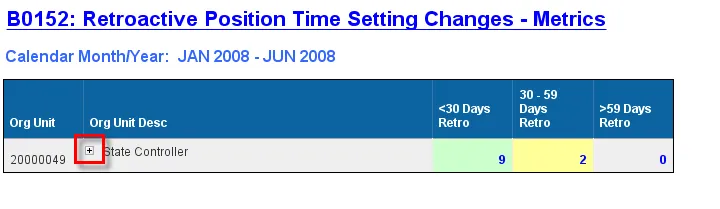
- Click the + to see the Organizational Unit hierarchy levels expanded.
- Position Personnel area was added to this report on August 17, 2017, and began being populated at that time. If the report is run for a date prior to August 2017, then the position personnel area will not be populated, and will display as “#” or as “not assigned”.