Purpose
The purpose of this Report Description is to explain how to generate information on employment retirement eligibility in the Integrated HR-Payroll System.
Report Description
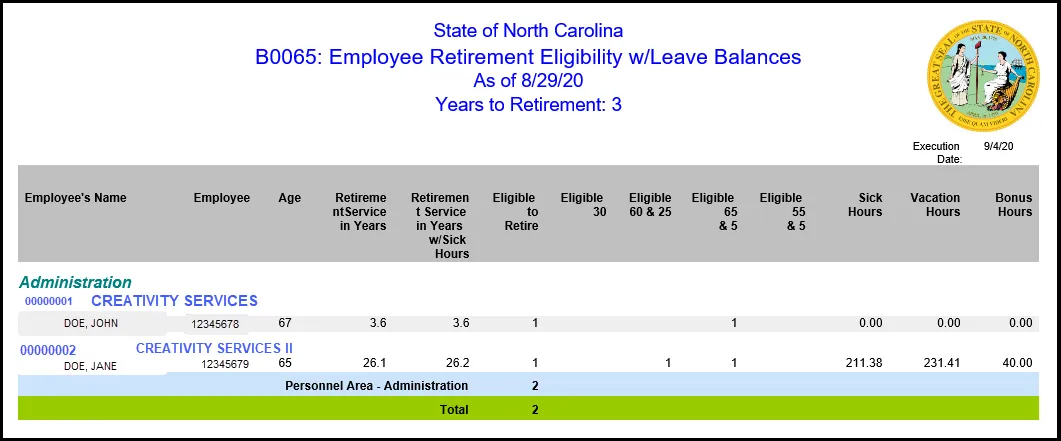
This report shows the number of full-time active employees that meet the criteria to be eligible for unreduced retirement benefits at a future time as specified by the user. This report displays the three categories for unreduced retirement benefits and the category for unreduced retirement benefits for Law Enforcement.
- Service Retirement (Unreduced Benefits)
- Age 65 and complete five years of membership service
- Age 60 and complete 25 years of creditable service
- 30 years of creditable service, at any age
- Age 55 and five years of creditable service (Law Enforcement)
Report also shows outstanding Sick, Vacation, and Bonus hours for each eligible employee. This report also provides employee retirement eligibility with sick leave.
Report Location
PA: Longevity & Retirement
Report Uses
- Assist in projecting when an employee may retire using their sick hours balance.
- Monitor possible risks to staffing levels due to potential retirement.
- Assist in budgeting when Leave balances need to be paid out at retirement.
How to Generate This Report
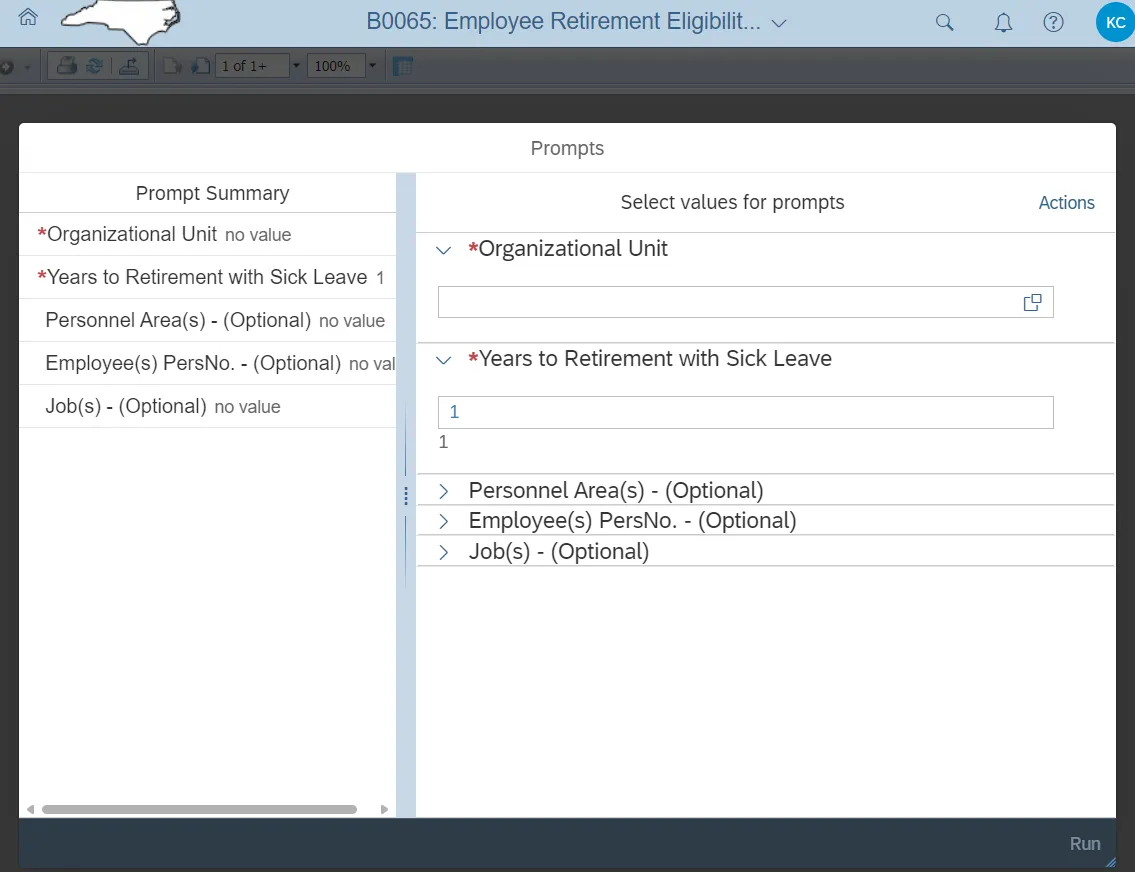
This report is generated after selecting values for the mandatory prompts. All mandatory prompts must have values selected before the Run Icon can be used to generate the report. Mandatory prompts can be identified as mandatory by the exclamation mark inside of the yellow-orange triangle, the square with the checkmark, or the display of (Mandatory). Detailed instructions for interaction with each prompt can be found on the Web Intelligence Prompt List on the OSC website.
The Mandatory prompts for this report are:
- Organizational Unit
- Years to Retirement with Sick Leave
This report can also be further limited by utilizing the Optional prompts to further limiting the amount of data that retrieved into the body of the report. Optional prompts are indicated as option in parentheses beside the prompt.
The Optional prompts are:
- Personnel Area(s) - (Optional)
- Employee(s) PersNo. – (Optional)
- Job(s) – (Optional)
Initial Layout
The report lists all employees eligible for retirement based on the user input criteria. Below is a sample rendering.
Special Report Considerations/Features
- Only active employees are selected.
- Temporary employees are excluded.
- Judicial consolidated employees are excluded.
- The ‘As of’ date represents the date that retirement data was last loaded in BI. This load runs once a week.
- Sick hours are included in the Eligibility determination.