Purpose
The purpose of this Report Description is to explain how to obtain legislative increase details in the Integrated HR-Payroll System.
Report Description
The B0061 Legislative Increase Detail Report displays Legislative Increase (LI) information for the organizational unit(s) and LI effective year selected. The report lists the prior budget and employee salaries, the amount of the employee and budgeted salary increases, the current employee and position salaries, and the job minimum and maximum pay. The report totals on the employee current salary for the organizational unit(s) selected.
Report Location
Legislative Increase
Report Uses
This report is used to validate that the employees and positions received the appropriate increase amounts. This report can be used to determine the cost of the LI for the organizational unit(s) selected.
How to Generate This Report
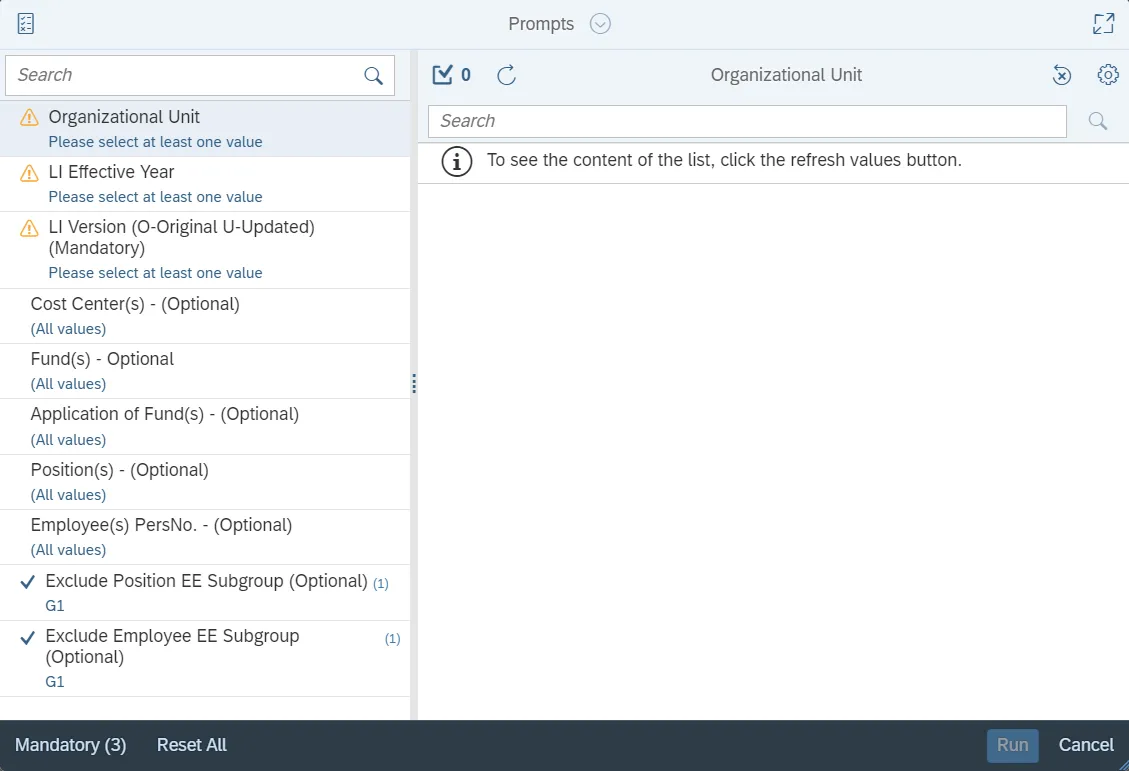
This report is generated after selecting values for the mandatory prompts. All mandatory prompts must have values selected before the Run Icon can be used to generate the report. Mandatory prompts can be identified as mandatory by the exclamation mark inside of the yellow-orange triangle, the square with the checkmark, or the display of (Mandatory). Detailed instructions for interaction with each prompt can be found on the Web Intelligence Prompt List on the OSC website.
The Mandatory prompts for this report are:
- Organizational Unit
- LI Effective Year
- LI Version (O-Original U-Updated) (Mandatory)
This report can also be further limited by utilizing the Optional prompts to further limiting the amount of data that retrieved into the body of the report. Optional prompts are indicated as optional in parentheses beside the prompt.
The Optional prompts are:
- Cost Center(s) - (Optional)
- Fund(s) - Optional
- Application of Fund(s) - (Optional)
- Position(s) - (Optional)
- Employee(s) PersNo. - (Optional)
Exclusion prompts exclude specified data by default while allowing customers the flexibility of changing them when necessary. Exclusion prompts are identified by the term Exclude followed by the prompt.
The Exclusion prompts are:
- Exclude Position EE Subgroup (Optional)
- Exclude Employee EE Subgroup (Optional)
Initial Layout
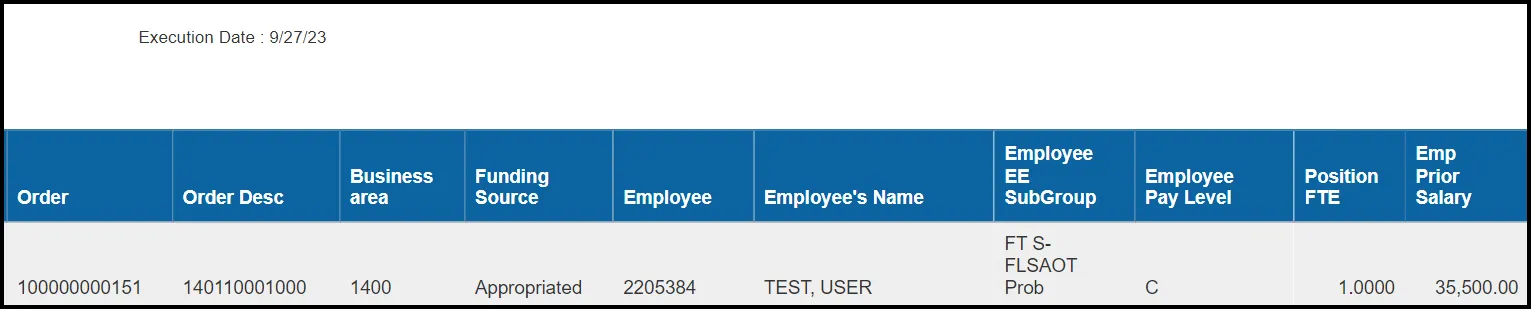
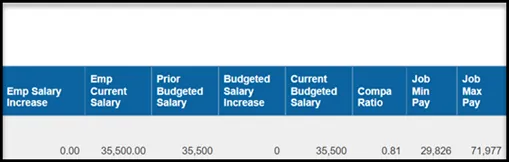
The report is generated with Organizational Unit, LI Effective Year, and LI Version values entered. This is a sample row from the report, which shows the columns available on the base report:

Report detail line continued...
Available Objects
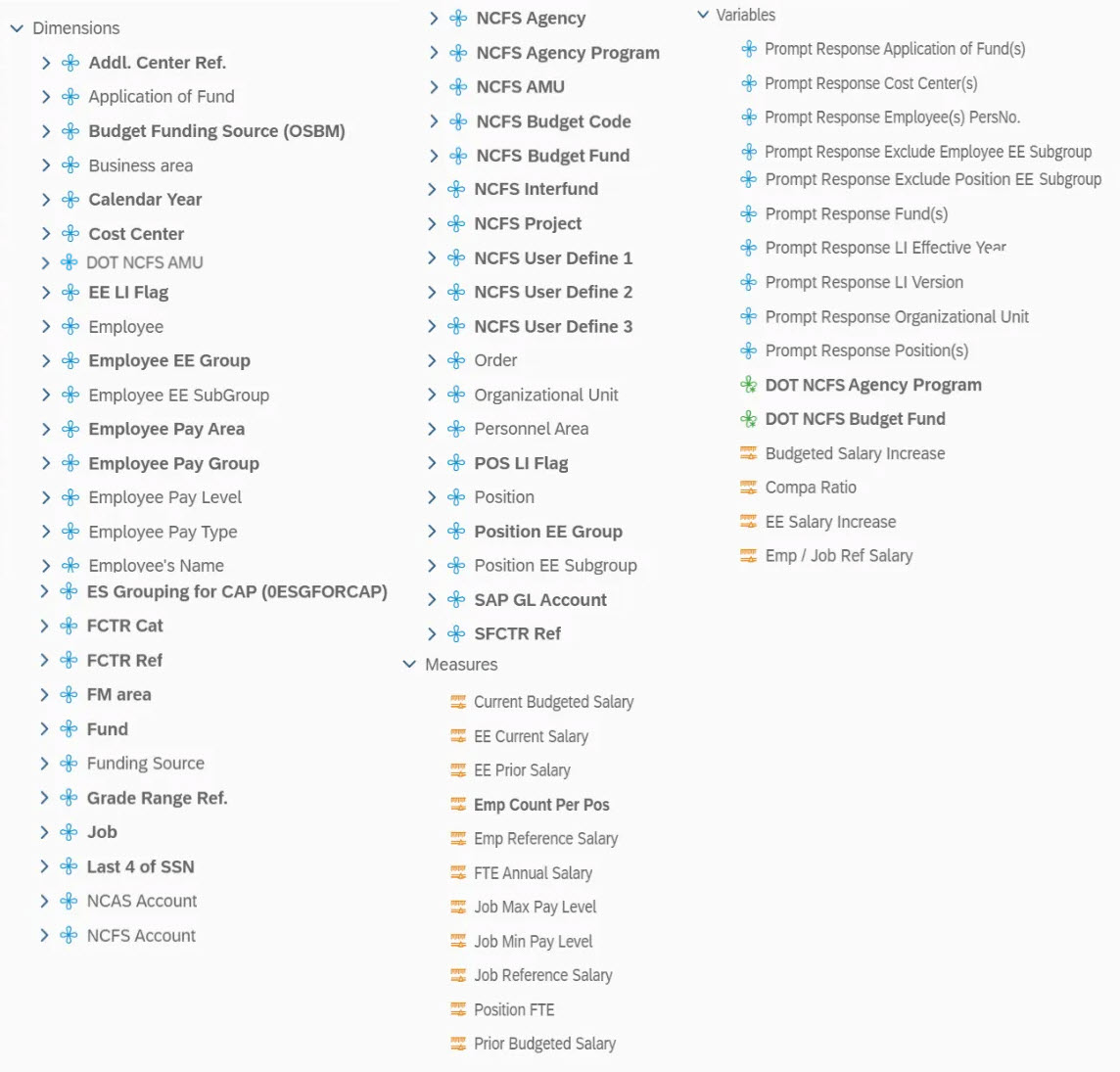
This is a list of the available objects that can be added to the report, from the Document Dictionary once in the Design mode:
Dimensions
- Addl. Center Ref.
- Application of Fund
- Budget Funding Source (OSBM)
- Business Area
- Calendar Year
- Cost Center
- DOT NCFS AMU
- EE LI Flag
- Employee
- Employee EE Group
- Employee EE Subgroup
- Employee Pay Area
- Employee Pay Group
- Employee Pay Level
- Employee Pay Type
- Employee’s Name
- ES Grouping for CAP (0ESGFORCAP)
- FCTR Cat
- FCTR Ref
- FM area
- Fund
- Funding Source
- Grade Range Ref.
- Job
- Last 4 of SSN
- NCAS Account
- NCFS Account
- NCFS Agency
- NCFS Agency Program
- NCFS AMU
- NCFS Budget Code
- NCFS Budget Fund
- NCFS Funding Source
- NCFS Interfund
- NCFS Project
- NCFS User Define 1
- NCFS User Define 2
- NCFS User Define 3
- Order
- Organizational Unit
- Personnel Area
- Pos LI Flag
- Position
- Position EE Group
- Position EE Subgroup
- SAP GL Account
- SFCTR Ref
Measures
- Current Budgeted Salary
- EE Current Salary
- EE Prior Salary
- Emp Count Per Pos
- Emp Reference Salary
- FTE Annual Salary
- Job Max Pay Level
- Job Min Pay Level
- Job Reference Salary
- Position FTE
- Prior Budgeted Salary
Variables
- Prompt Response Application of Fund(s)
- Prompt Response Cost Center(s)
- Prompt Response Employee(s) PersNo.
- Prompt Response Exclude Employee EE Subgroup
- Prompt Response Exclude Position EE Subgroup
- Prompt Response Fund(s)
- Prompt Response LI Effective Year
- Prompt Response LI Version
- Prompt Response Organizational Unit
- Prompt Response Position(s)
- DOT NCFS Agency Program
- DOT NCFS Budget Fund
- Budgeted Salary Increase
- Compa Ratio
- EE Salary Increase
- Emp / Job Ref Salary
Special Report Considerations/Features
- No history is retained for the (U) updated version of the LI report for previous years. The updated version always relates to the most current LI year. Historical (O) original versions are available for all years since the inception of the Integrated HR/Payroll system.
- The Compa Ratio was added to this report as an enhancement, so it is not populated on historical reports prior to 2017. It will show blank values if it is run for anything prior to 2017. It is available in this report as of 2017 going forward.
- The Compa Ratio is derived by dividing the FTE Annual Salary by the Employee or the Job reference salary. The determination regarding whether the job reference salary or the employee reference salary is used is as follows:
- If the employee pay type is "02 Banded," then the employee reference salary is used in the calculation for the Compa Ratio. Otherwise, the job reference salary is used.
- Field/Home Based indicator is available from Position attributes (expanded list) in Available Objects.
- NCFS Accounting Segments - are available for reporting in this report as drag and drop from Available Objects.
- NCFS accounting segments here are specific to an NCFS internal order in SAP HR/Payroll ERP system. Transactions with no NCFS internal orders will not display values for the NCFS segments in the BI BOBJ report.
- NCFS Agency, NCFS Agency Program, NCFS AMU, NCFS Budget Code, NCFS Budget Fund, NCFS Funding Source, NCFS Interfund, NCFS Project, NCFS User Define 1, NCFS User Define 2, NCFS User Define 3
- Agencies (like NCDOT, DES and DWS) that do not use NCFS Internal Orders will not see the values for the above NCFS segments in reports.
- NCFS Account and Budget Funding Source (OSBM) are available for reporting. Values are corresponding crosswalk to SAP GL Account and Funding Source in SAP HR Payroll system.
- Financial Key is representative of internal order from NCFS and old NCAS systems.
- DOT specific NCFS objects viz DOT NCFS Agency Program, DOT NCFS AMU and DOT NCFS Budget Fund are added to the report as needed for NC HB199. Source of these new objects are maintained in crosswalk tables in the ERP HR Payroll system.
- NCFS accounting segments here are specific to an NCFS internal order in SAP HR/Payroll ERP system. Transactions with no NCFS internal orders will not display values for the NCFS segments in the BI BOBJ report.