Purpose
The purpose of this report description is to develop a method of self-populating North Carolina Industrial Commission Form 22 using data contained in the Integrated HR-Payroll System.
Report Description
Form 22 is used in workers’ compensation claims to calculate the injured employee’s average weekly wage and the resulting weekly disability compensation rate based on earnings for the 52 weeks prior to the date of injury. Form 22 automation is a method of self-populating North Carolina Industrial Commission Form 22 using data contained in the Integrated HR-Payroll System.
Report Location
Workers Comp
Report Uses
This report provides data used to calculate the average weekly wage when an injured employee is entitled to disability compensation for a workers’ compensation claim. The report contains the employee’s statement of days worked and earnings covering the 365-day period prior to the injury.
The purpose of this report is to provide information documenting the basis for Form 22.
How to Generate This Report
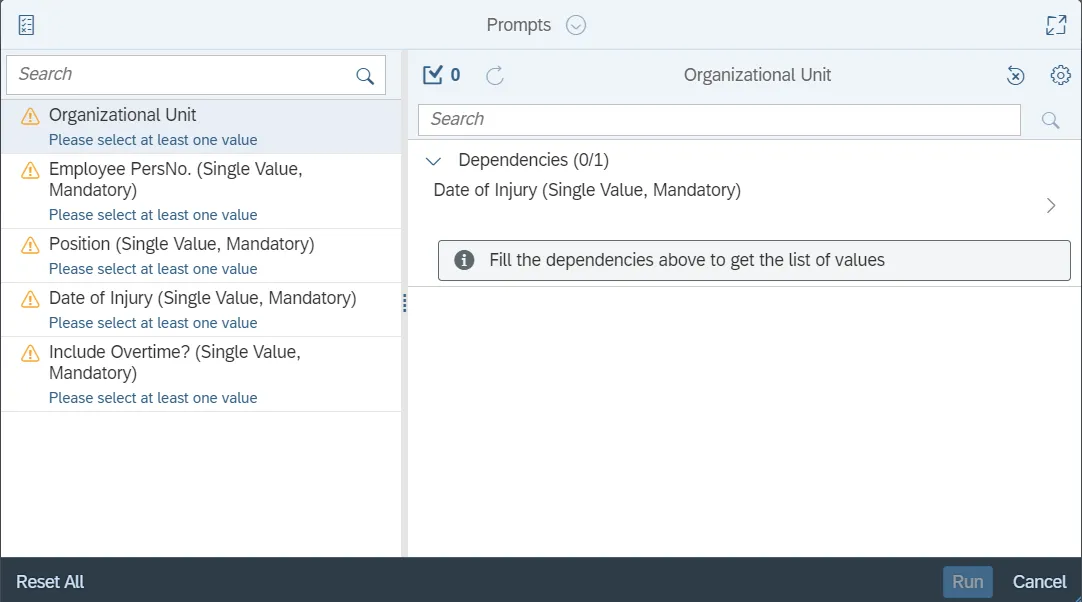
This report is generated after selecting values for the mandatory prompts. All mandatory prompts must have values selected before the Run Icon can be used to generate the report. Mandatory prompts can be identified as mandatory by the exclamation mark inside of the yellow-orange triangle, the square with the checkmark, or the display of (Mandatory). Detailed instructions for interaction with each prompt can be found on the Web Intelligence Prompt List on the OSC website.
The Mandatory prompts for this report are:
- Organizational Unit
- Employee PersNo. (Single Value, Mandatory)
- Position (Single Value, Mandatory)
- Date of Injury (Single Value, Mandatory)
- Include Overtime? (Single Value, Mandatory)
Note: “Date of Injury” needs to be entered before other prompts accept values.
Initial Layout
This report contains two report tabs and a Report Info tab. Below are sample renderings from each tab.
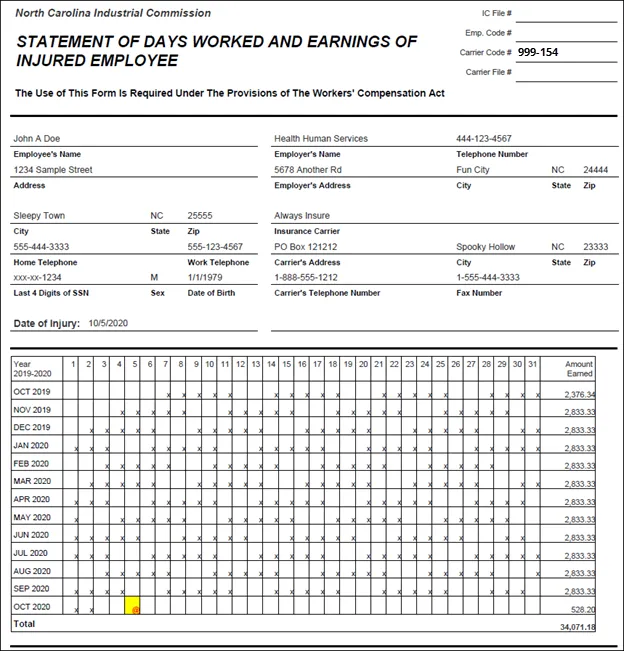
1st Tab of B0048 Average Weekly Wage Calculation - Form 22
This tab contains Time and Payroll data for the 365-day period up to the injury date.
Page 1 of 1st tab
Page 1 of 1st tab continued… (bottom of page)

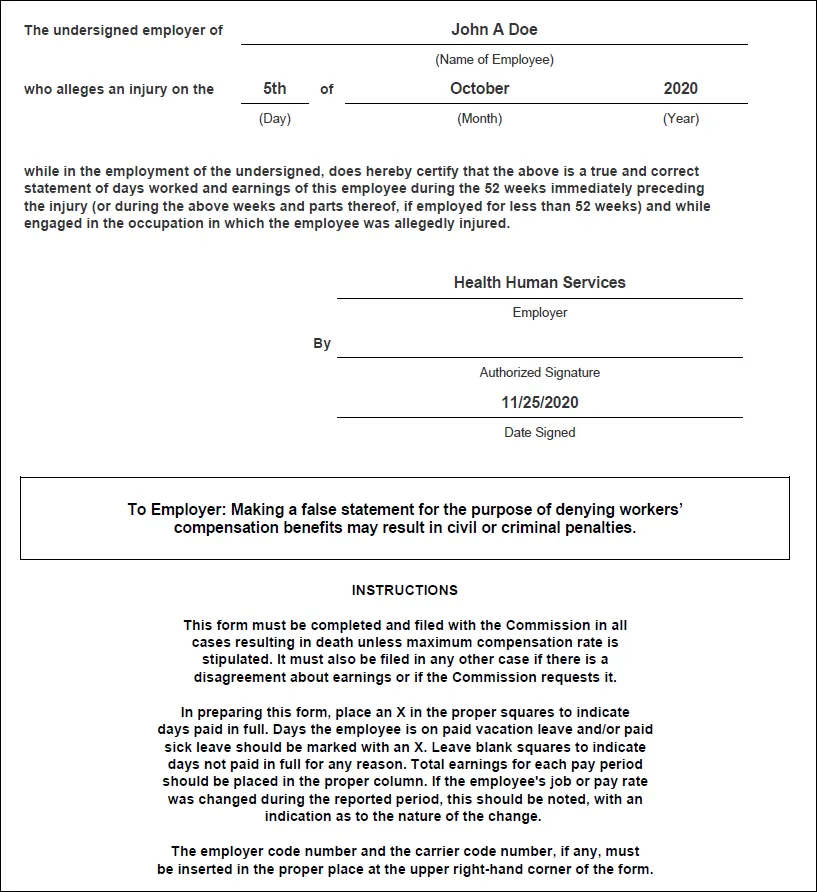
Page 2 of 1st tab
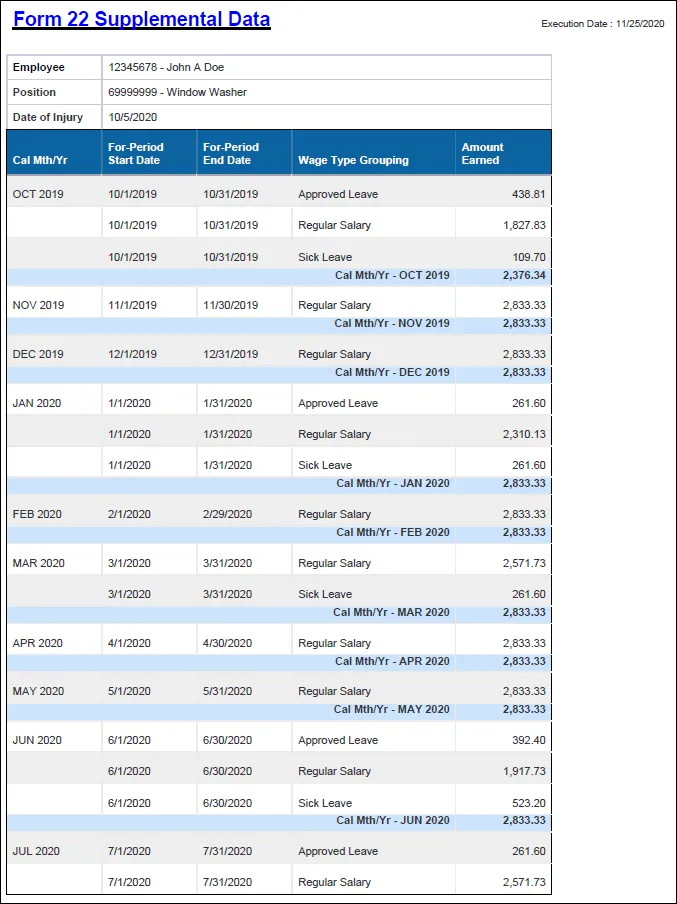
2nd Tab of Form 22 Supplemental Data
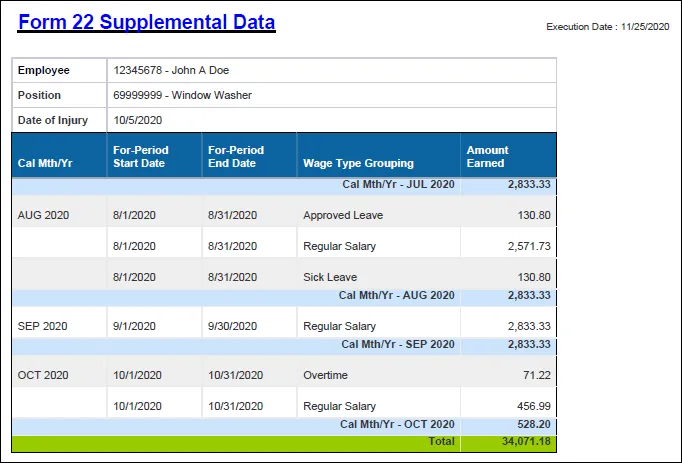
This tab displays the detailed earnings for 365-day period up to the injury date. Earnings are broken out by month and Wage Type Grouping. Additional details can be navigated on to the report layout to further break out the earnings. See Available Objects section.
2nd tab continued…
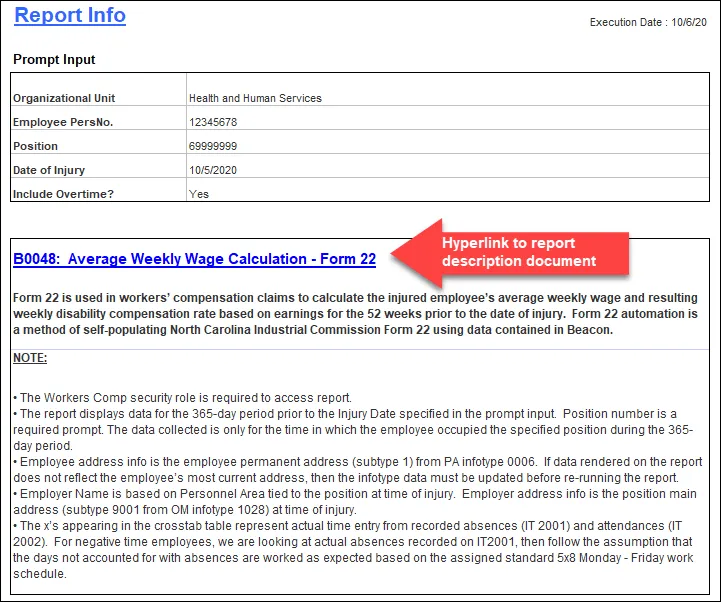
3rd Tab of Report Info
Manual Data Entry
If the employee was given any type of allowance in lieu of wages, manually fill in this section of the report. There are 6 steps to complete this process.
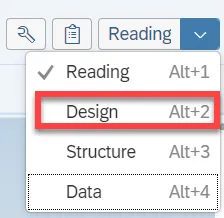
Step 1. Click on Design button to put the layout in edit mode.
Step 2. Click cell to be edited.
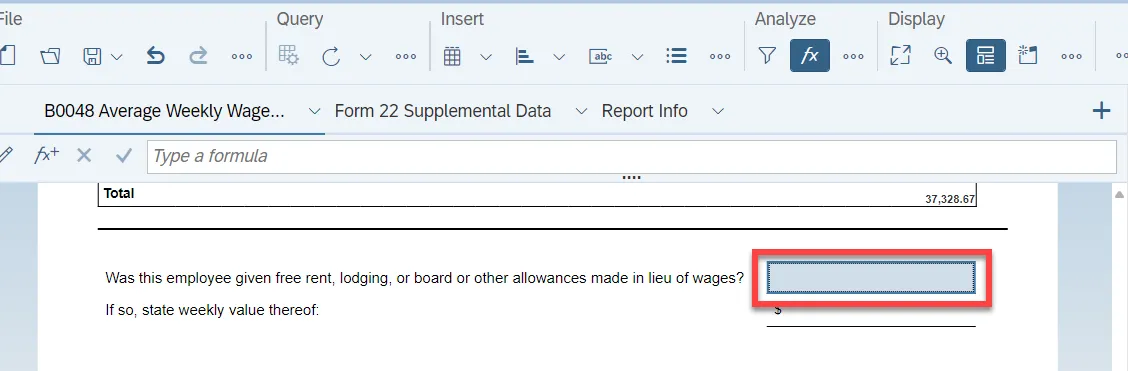
Step 3. A formula bar should appear at the top of the screen. Type the text into the white area.
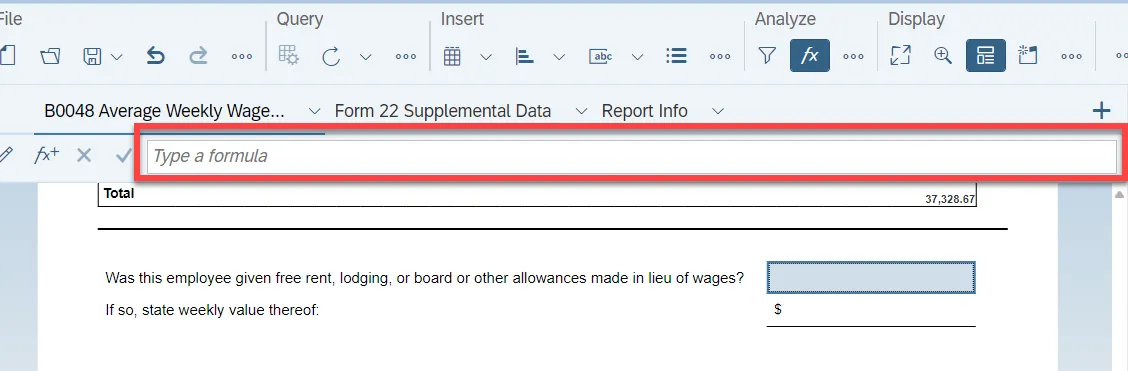
Step 4. Click on the green checkmark to accept your typed value.

Step 5. Repeat steps 2-4 to edit the next cell.
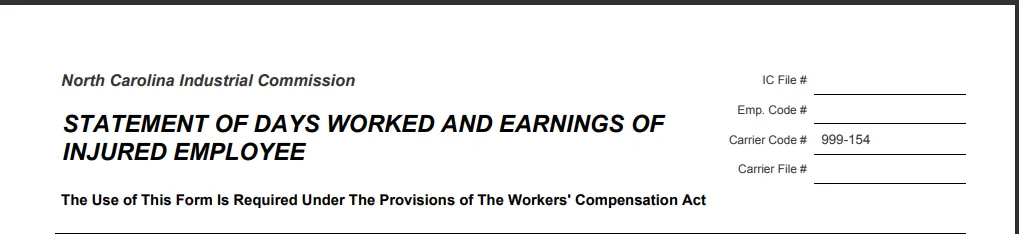
Step 6. Follow the same steps above to enter data for the Carrier section at the top of the report.
Available Objects
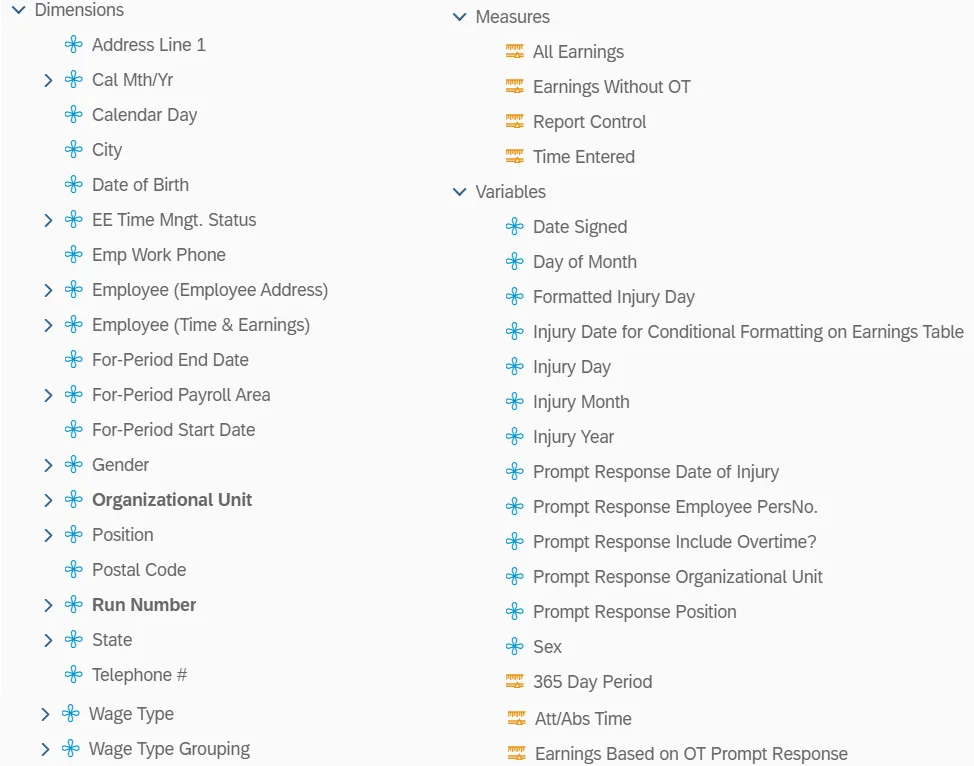
This is a list of the available objects that can be added to the report, from the Document Dictionary once in the Design mode:
Dimensions
- Address Line 1
- Cal Mth/Yr
- Calendar Day
- City
- Date of Birth
- EE Time Mngt. Status
- Emp Work Phone
- Employee (Employee Address)
- Employee (Time & Earnings)
- For-Period End Date
- For-Period Payroll Area
- For-Period Start Date
- Gender
- Organizational Unit
- Position
- Postal Code
- Run Number
- State
- Telephone #
- Wage Type
- Wage Type Grouping
Measures
- All Earnings
- Earnings Without OT
- Report Control
- Time Entered
Variables
- Date Signed
- Day of Month
- Formatted Injury Date
- Injury Date for Conditional Formatting on Earnings Table
- Injury Day
- Injury Month
- Injury Year
- Prompt Response Date of Injury
- Prompt Response Employee PersNo.
- Prompt Response Include Overtime?
- Prompt Response Organizational Unit
- Prompt Response Position
- Sex
- 365 Day Period
- Att/Abs Time
- Earnings Based on OT Prompt Response
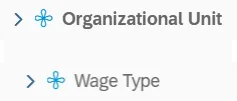
Additional navigation is supported for the 2nd tab only (Form 22 Supplemental Data), in Design mode.
Only the following two data elements are supported for additional detail breakout of the supplemental data.
Special Report Considerations/Features
- The Workers Comp security role is required to access report.
- ZBI / BOBJ - Workers' Comp - FORM 22
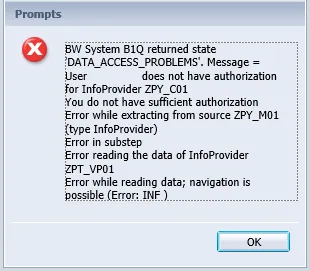
- If you receive the following error, please open a trouble ticket with BEST Shared Services and ask that the ticket be routed to the Security team.
- The report displays data for the 365-day period prior to the Injury Date specified in the prompt input. Position number is a required prompt. The data collected is for the time in which the employee occupied the specified position only during the 365-day period.
- Employee address info is the employee permanent address (subtype 1) from PA Infotype 0006. If data rendered on the report does not reflect the employee’s most current address, then the Infotype data must be updated before re-running the report.
- Employer Name is based on Personnel Area tied to the position at time of injury. Employer address is the position main address (subtype 9001 from OM Infotype 1028) at time of injury.
- The Xs appearing in the crosstab table represent actual time entry from recorded absences (IT 2001) and attendances (IT 2002). For negative time employees, we are looking at actual absences recorded on IT2001, then follow the assumption that the days not accounted for with absences are worked as expected based on the assigned standard 5x8 Monday - Friday work schedule.
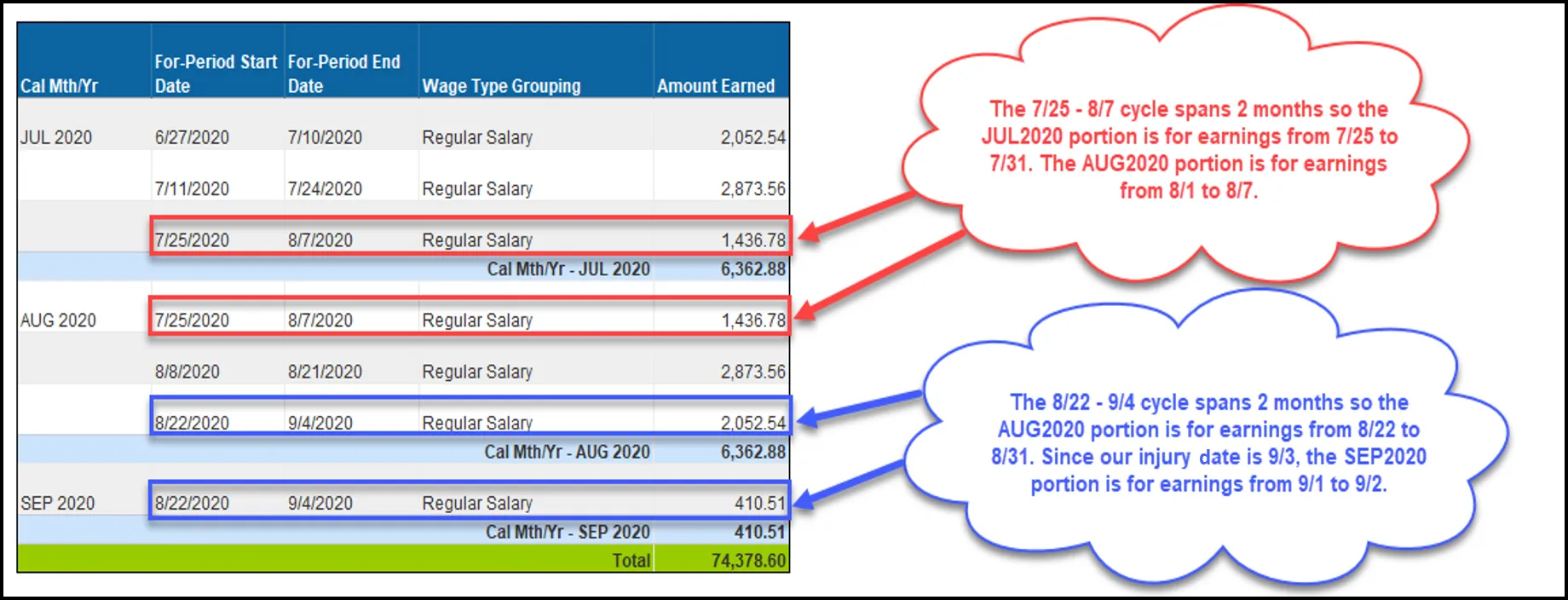
- The earnings data is broken out by calendar month based on the For-Period Date Range. A clear example of this can be seen for Bi-Weekly employees where the For-Period cycle spans 2 different months.
- In the example below, our employee is Bi-Weekly with an injury date of 9/3/2020.
- The following Wage Types are selected for reporting. This table can be displayed in ERP using transaction ZPTFORM22.
| Wage Type Grouping | Wage Type | Wage Type Text |
|---|---|---|
| Regular Salary | 1000 | Regular Salary |
| Regular Salary | 1100 | Salaried/Hourly Pay |
| Regular Salary | 1150 | 10 or 11 pd over 12 |
| Regular Salary | 1155 | 12 over 12 |
| Regular Salary | 1160 | SPA 11 ov 12 no contract |
| Regular Salary | 1175 | 10 over 10 or 11 over 11 |
| Regular Salary | 1200 | Regular Hours |
| Temp Post Disaster DOT | 1201 | Temp Post Disaster DOT |
| Temp Coop Ed Student DOT | 1202 | Temp Coop Ed Student DOT |
| Temp Labor DOT | 1203 | Temp Labor DOT |
| Temp Labor Grant DOT | 1204 | Temp Labor Grant DOT |
| Temporary Hours | 1205 | Temporary Hours |
| Overtime | 1210 | Overtime |
| Overtime | 1211 | Straight Time/OT 1.0 |
| Overtime | 1212 | Overtime Premium |
| Longevity Pay | 1220 | Annual Longevity |
| Longevity Pay | 1230 | Monthly Longevity |
| Paid Holiday | 1240 | Holiday Premium Pay |
| Shift Differential | 1250 | Shift Premium 5% |
| Shift Differential | 1251 | Shift Premium 10% |
| Shift Differential | 1252 | Shift Premium 15% |
| Shift Differential | 1253 | Shift Premium 20% |
| Shift Differential | 1254 | Shift Premium 25% |
| Shift Differential | 1255 | Shift Premium 30% |
| Shift Differential | 1256 | Shift Premium Other |
| Custody Differential | 1261 | Custody Differential 10% |
| Custody Differential | 1263 | Custody Differential 20% |
| Temp Wg-SepPayCont-RIFLEO | 1264 | Temp Wg-SepPayCont-RIFLEO |
| Approved Leave | 1301 | Vacation Leave |
| Sick Leave | 1302 | Sick Leave |
| Bonus Leave | 1304 | Bonus Leave |
| Other Paid Leave | 1305 | Holiday Premium Payout |
| Approved Leave | 1306 | Holiday Comp Leave |
| Overtime | 1307 | Gap Hours Pay |
| Other Paid Leave | 1312 | Other Mgmt Approved Leave |
| Other Paid Leave | 1313 | Adverse Weather |
| Other Paid Leave | 1314 | Administrative Leave-CDE |
| Other Paid Leave | 1315 | Civil Leave |
| Other Paid Leave | 1316 | Community Service Leave |
| Other Paid Leave | 1317 | Community Serv Tutoring |
| Other Paid Leave | 1318 | Educational Leave |
| Injury | 1319 | Injury Leave |
| Approved Leave | 1323 | Emergency Closing Comp Lv |
| Paid Holiday | 1325 | Paid Holiday |
| Approved Leave | 1326 | Voluntary Shared Leave |
| Approved Leave | 1327 | Comp Leave |
| Injury | 1329 | Injury Absence WC |
| Approved Leave | 1330 | Paid Leave |
| Approved Leave | 1331 | On Call Comp Leave |
| Other Paid Leave | 1339 | Bereavement Leave Family |
| Approved Leave | 1340 | Vacation Leave |
| Sick Leave | 1341 | Sick Leave |
| Paid Holiday | 1342 | Paid Holiday |
| Approved Leave | 1343 | Comp Leave |
| Approved Leave | 1344 | Travel Comp Time |
| Gap Leave | 1350 | Gap Hours Leave |
| Bonus Leave | 1356 | FY2012-13 Special Leave |
| Approved Leave | 1358 | Callback Comp Leave |
| Approved Leave | 1360 | Incentive Leave |
| Bonus Leave | 1361 | Special Leave |
| Bonus Leave | 1363 | Special Bonus FY 2018 |
| Bonus Leave | 1364 | Special Bonus FY19-20 |
| Other Paid Leave | 1366 | Literacy Volunteer Leave |
| Parental Leave | 1370 | Parental Leave 4 week |
| Parental Leave | 1371 | Parental Leave 8 week |
| Other Paid Leave | 1373 | Investigatory Leave |
| Other Paid Leave | 1374 | OMAL – Non-Discretionary |
| Other Paid Leave | 1375 | OMAL – Discretionary |
| Other Paid Leave | 1376 | OMAL- Emergency Closing |
| Other Paid Leave | 1377 | OMAL- Relief Efforts |
| Other Paid Leave | 1378 | OMAL – Medical |
| Other Paid Leave | 1379 | State of Emergency Leave |
| Shift Differential | 1380 | CDE Closing Shift |
| Other Paid Leave | 1381 | CDE Care Leave |
| Other Paid Leave | 1382 | Comm Disease Comp Leave |
| Shift Differential | 1385 | SOE Shift Premium |
| Other Paid Leave | 1386 | FFCRA Family Care |
| Other Paid Leave | 1388 | FFCRA Employee Care |
| Other Paid Leave | 1389 | FFCRA EFMLEA |
| Other Paid Leave | 1390 | CDE Eldercare/ No TLW |
| Other Paid Leave | 1392 | CDE Elder/No TLW 1/3 |
| Other Paid Leave | 1394 | CDE Care Leave |
| Other Paid Leave | 1396 | Personal Observance Leave |
| Other Paid Leave | 1397 | Bereavement Leave Other |
| Regular Salary | 1424 | Temporary Higher Duty Pay |
| Regular Salary | 1425 | Special Assignment Pay |
| High Need Supplement | 1430 | High Need Supp Payout |
| High Need Supplement | 1431 | High Need Supplement 1 |
| High Need Supplement | 1432 | High Need Supplement 2 |
| High Need Supplement | 1433 | High Need Supplement 3 |
| Regular Salary | 1637 | Back Pay |
| Supplement | 1703 | Teaching Supplement |
- If you select ‘No’ for the “Include Overtime?” prompt, the following Wage Types are excluded.
| Wage Type Grouping | Wage Type | Wage Type Text | |
| Overtime | 1210 | Overtime | |
| Overtime | 1211 | Straight Time/OT 1.0 | |
| Overtime | 1212 | Overtime Premium | |
| Overtime | 1307 | Gap Hours Pay |
Payroll Reconciliation
- The earnings data generated in the Amount Earned section of the Form 22 – Average Weekly Wage Calculation report can be mapped back to payroll earnings posted in the PC_PAYRESULT table for the employees For-Period. It is important to note that the Renumeration Statement details earnings for an employees’ In-Period earnings; it also includes differences for retro earnings from previous periods. The Form 22 groups the retro earnings together as if they were paid accumulative originally.
- Wage Type Reporter (PC00_M99_CWTR) can be used to validate For-Period earnings by selecting variant Z_FORM22. Fields that will need selection criteria include the Personnel Number and the payroll period.