Purpose
The purpose of this Report Description is to show Separations counts, Turnover rates, and Active employee counts by Personnel Area or Job Family for certain Separation Categories.
Report Description
This report shows Separations counts, Turnover rates, and Active employee counts by Personnel Area or Job Family for each of the following Separation Categories:
- Voluntary
- Involuntary
- Retirement
- Transfers
This report also provides an Extended Analysis of Internal versus External Transfers.
Additional demographics can be added to the report to analyze turnover by Gender, Ethnicity, Age Range, etc.
Report Location
PA: Turnover
Report Uses
Analyze separation metrics to spot potential problem areas and assist in determining a course of action to help with employee retention. Also, analyze the difference between internal and external turnover, this helps to determine exactly where the retention issues are.
- Is there a staffing risk due to a large number of Retirements?
- Is there a retention issue due to Salary Ranges?
- Are there particular types of jobs that are more prone to having a higher turnover rate?
- What was the Receiving Personnel Area the employee transferred from?
- Are there particular personnel areas that employees are transferring from at a higher turnover rate?
How to Generate This Report
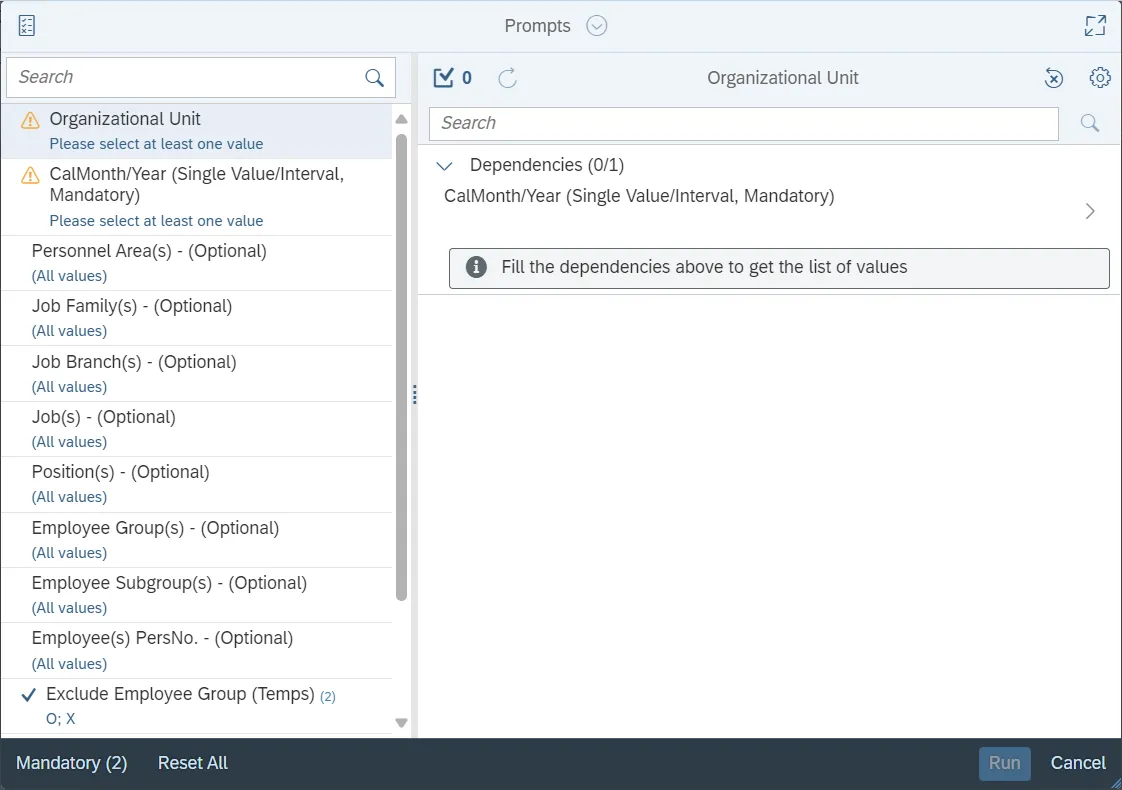
This report is generated after selecting values for the mandatory prompts. All mandatory prompts must have values selected before the Run Icon can be used to generate the report. Mandatory prompts can be identified as mandatory by the exclamation mark inside of the yellow-orange triangle, the square with the checkmark, or the display of (Mandatory). Detailed instructions for interaction with each prompt can be found on the Web Intelligence Prompt List on the OSC website.
The Mandatory prompts for this report are:
- Organizational Unit
- CalMonth/Year (Single Value/Interval, Mandatory)
This report can also be further limited by utilizing the Optional prompts to further limiting the amount of data that retrieved into the body of the report. Optional prompts are indicated as option in parentheses beside the prompt.
The Optional prompts are:
- Personnel Area(s) - (Optional)
- Job Family(s) - (Optional)
- Job Branch(s) - (Optional)
- Job(s) - (Optional)
- Position(s) - (Optional)
- Employee Group(s) - (Optional)
- Employee(s) PersNo. - (Optional)
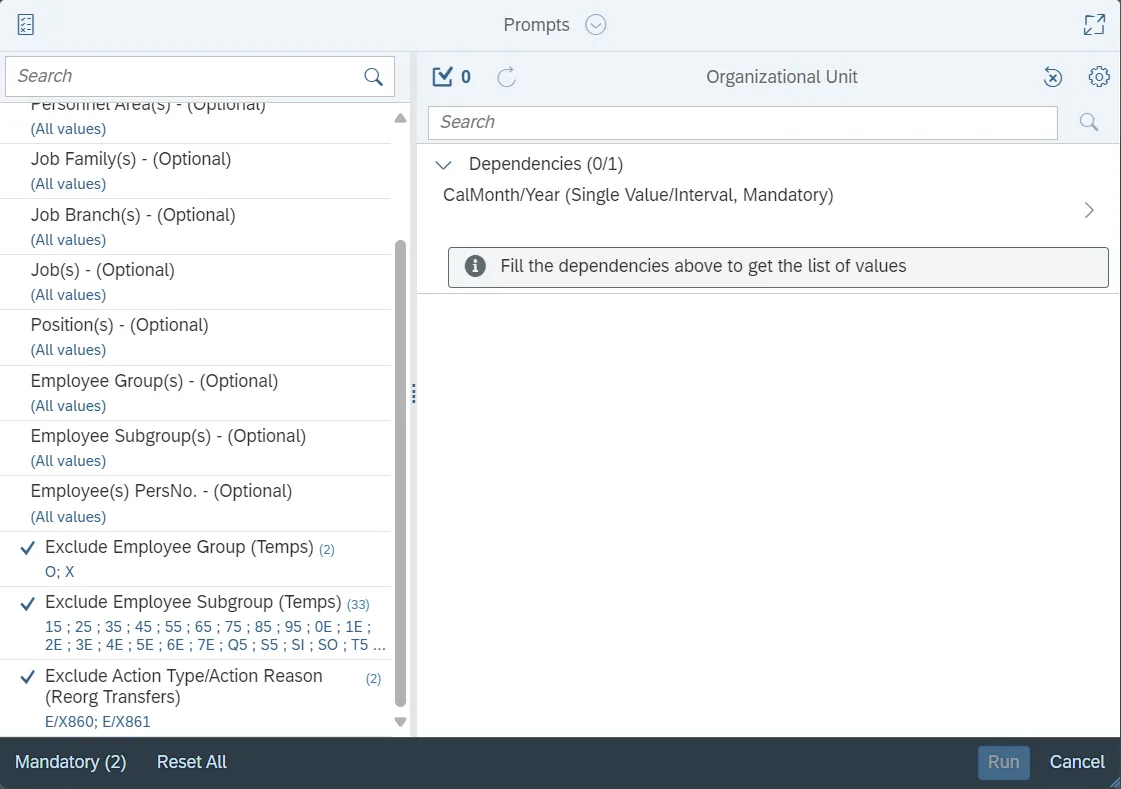
Exclusion prompts exclude specified data by default while allowing customers the flexibility of changing them when necessary. Exclusion prompts are identified by the term Exclude followed by the prompt.
The Exclusion prompts are:
- Exclude Employee Group (Temps)
- Exclude Employee Subgroup (Temps)
- Exclude Action Type/Action Reason (Reorg Transfers)
Prompt Summary Continued…
Initial Layout
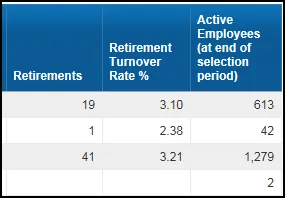
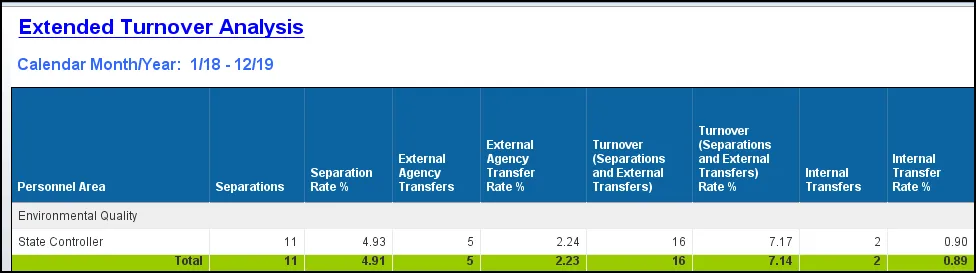
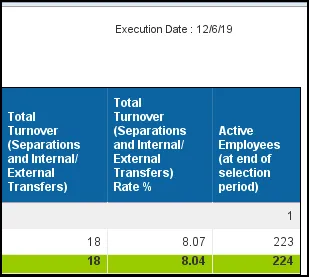
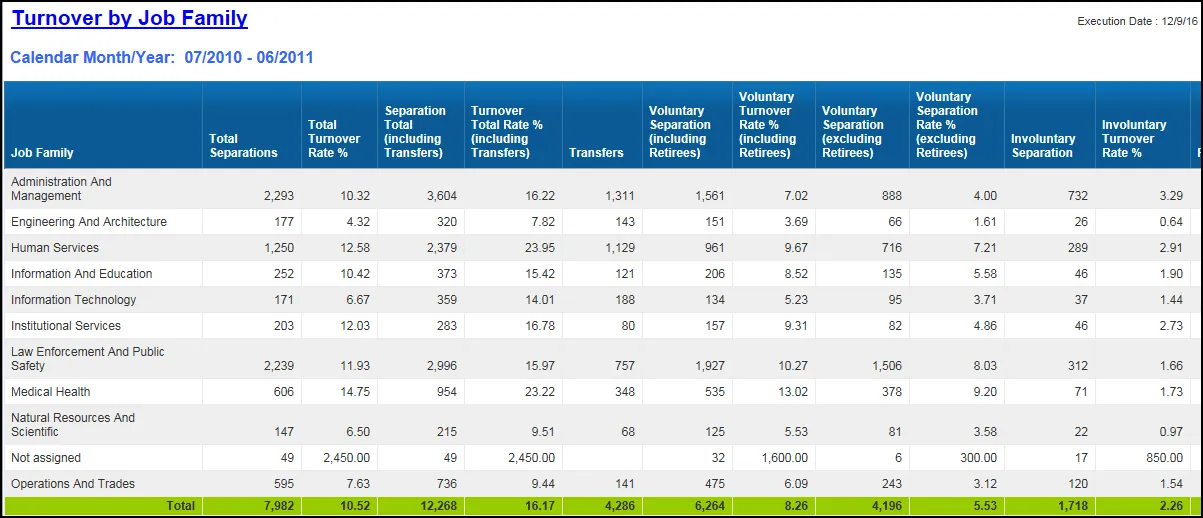
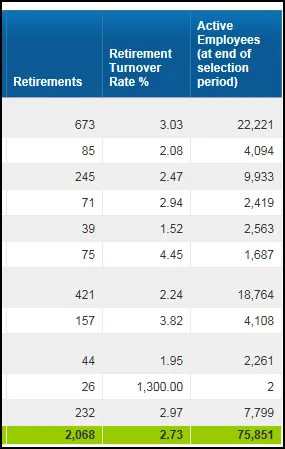
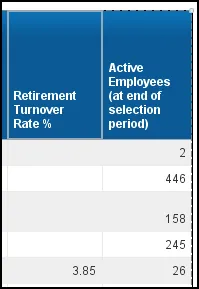
The report renders with various Separation metrics, related Turnover rates, and a count of Active employees. The first tab is a breakout of the metrics by Personnel Area; the second tab is a breakout of transfers moving to a new personnel area. The third tab is a breakout by Job Family with the fourth tab breaking out the metrics by job. Below are sample rows from each tab.
- B0042 Employee Turnover tab
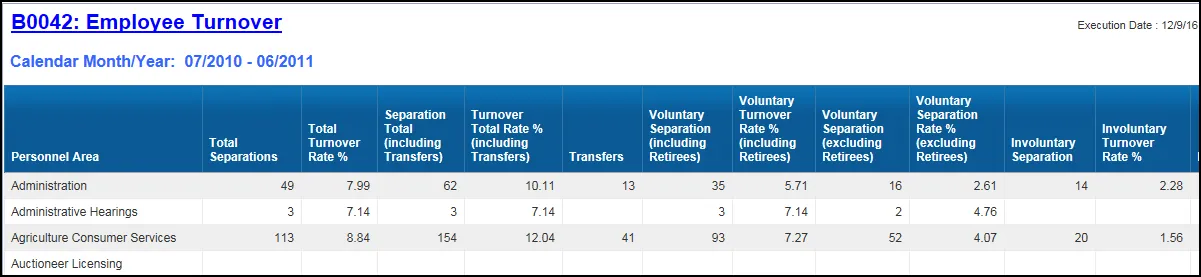
- Continued…
- Extended Turnover Analysis
- Continued…
- Turnover by Job Family tab
- Continued…
- Turnover by Job tab
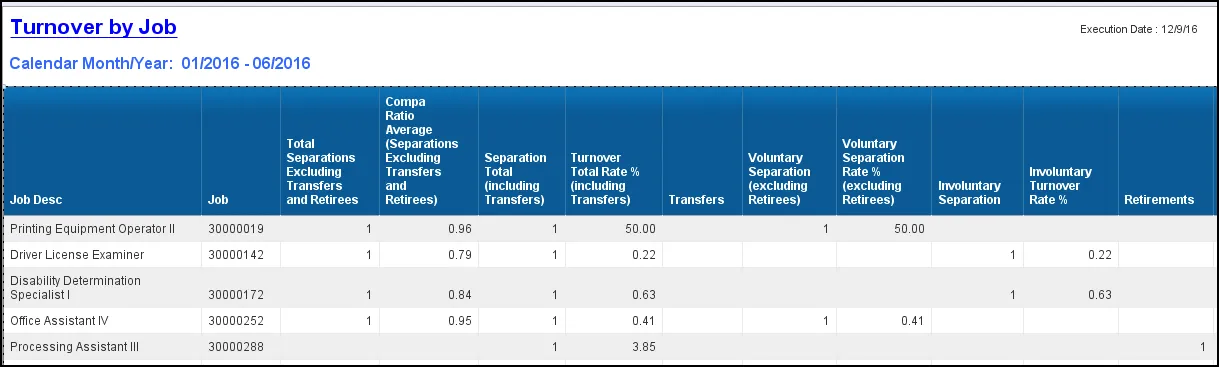
- Continued…
Available Objects
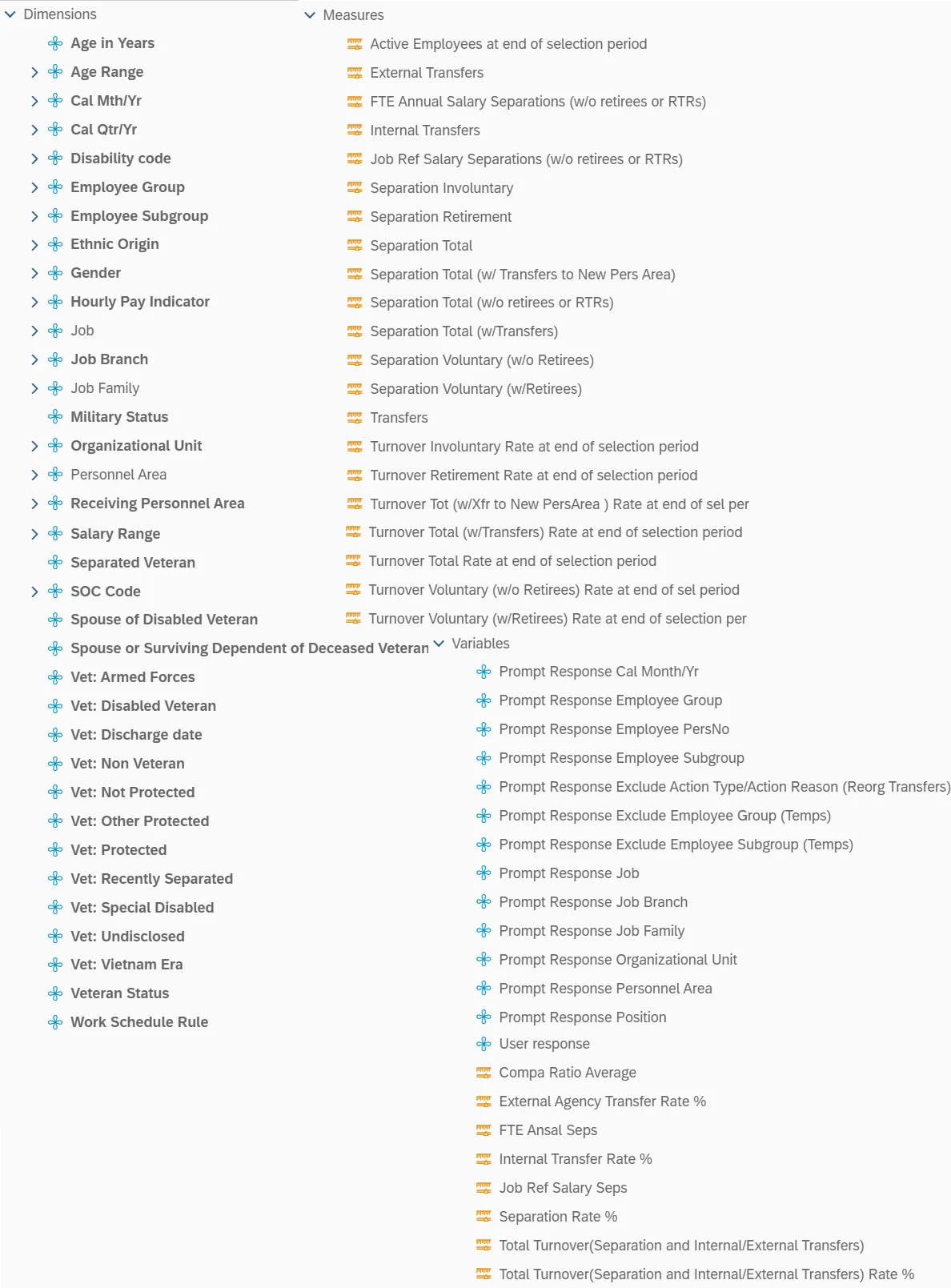
This is a list of the available objects that can be added to the report, from the Document Dictionary once in the Design mode:
Dimensions
- Age in Years
- Age Range
- Cal Mth/Yr
- Cal Qtr/Yr
- Disability code
- Employee Group
- Employee Subgroup
- Ethnic Origin
- Gender
- Hourly Pay Indicator
- Job
- Job Branch
- Job Family
- Military Status
- Organizational Unit
- Personnel Area
- Receiving Personnel Area
- Salary Range
- Separated Veteran
- SOC Code
- Spouse of Disabled Veteran
- Spouse or Surviving Dependent of Deceased Veteran
- Vet: Armed Forces
- Vet: Disabled Veteran
- Vet: Discharge date
- Vet: Non Veteran
- Vet: Not Protected
- Vet: Other Protected
- Vet: Protected
- Vet: Recently Separated
- Vet: Special Disabled
- Vet: Undisclosed
- Vet: Vietnam Era
- Veteran Status
- Work Schedule Rule
Measures
- Active Employees at end of selection period
- External Transfers
- FTE Annual Salary Separations (w/o retirees or RTRs)
- Internal Transfers
- Job Ref Salary Separations (w/o retirees or RTRs)
- Separation Involuntary
- Separation Retirement
- Separation Total
- Separation Total (w/ Transfers to New Pers Area)
- Separation Total (w/o retirees or RTRs)
- Separation Total (w/Transfers)
- Separation Voluntary (w/o Retirees)
- Separation Voluntary (w/Retirees)
- Transfers
- Turnover Involuntary Rate at end of selection period
- Turnover Retirement Rate at end of selection period
- Turnover Tot (w/Xfr to New PersArea ) Rate at end of sel per
- Turnover Total (w/Transfers) Rate at end of selection period
- Turnover Total Rate at end of selection period
- Turnover Voluntary (w/o Retirees) Rate at end of sel period
- Turnover Voluntary (w/Retirees) Rate at end of selection per
Variables
- Prompt Response Cal Month/Yr
- Prompt Response Employee Group
- Prompt Response Employee PersNo
- Prompt Response Employee Subgroup
- Prompt Response Exclude Action Type/Action Reason (Reorg Transfers)
- Prompt Response Exclude Employee Group (Temps)
- Prompt Response Exclude Employee Subgroup (Temps)
- Prompt Response Job
- Prompt Response Job Branch
- Prompt Response Job Family
- Prompt Response Organizational Unit
- Prompt Response Personnel Area
- Prompt Response Position
- User response
- Compa Ratio Average
- External Agency Transfer Rate %
- FTE Ansal Seps
- Internal Transfer Rate %
- Job Ref Salary Seps
- Separation Rate %
- Total Turnover(Separation and Internal/External Transfers)
- Total Turnover(Separation and Internal/External Transfers) Rate %
Special Report Considerations/Features
- ZG/04 (Separation/Did Not Report) and ZG/26 (Separation/Cancel Sep Pay Continuation) actions are excluded.
- Temporary employees are excluded by default, but this can be changed by removing the selected values on the Prompts selection for Exclude Employee Group and Exclude Employee Subgroup.
- Reorg Transfer actions are excluded by default, but this can be changed by removing the selected values on the Prompts selection for Exclude Action Type/Action Reason (Reorg Transfers).
- The Active Employees metric is based on the count of active employees at the end of the selection period (i.e., the high range given for the CalMonth/Year prompt). The various Turnover Rates are calculated as Separations divided by Active Employees.
- The Compa Ratio average in the Turnover by Job report is calculated based on the job of the employee’s organizational assignment as of the effective date of the separation, except for ZF Action type separations. For ZF action types, the job of the employee’s organizational assignment as of one day prior to the separation effective date is used for the Compa Ratio average calculation.
- The Compa ratio average is calculated by dividing the separated employees’ FTE annual salary by the job reference salary. The Compa Ratio average will not be calculated for an employee if the job reference salary does not exist.
- The “Turnover by Job” report lists only jobs which had separated employees within the date range specified.
- The Separation categories are defined based on Action Type and Action Reason:
| Separation Categories | Action Type | Action Type Desc. | Action Reason | Action Reason Desc. |
|---|---|---|---|---|
| Exclude | ZG | Separation (NC) | 4 | Did Not Report |
| Exclude | ZG | Separation (NC) | 26 | Cancel Sep Pay Continuation |
| Involuntary | ZF | SeparationPayContinuation(NC) | 2 | RIFSeverance and/or Health Ins |
| Involuntary | ZF | SeparationPayContinuation(NC) | 4 | Separation ShortTermDisability |
| Involuntary | ZG | Separation (NC) | 3 | Involuntary Separation |
| Involuntary | ZG | Separation (NC) | 6 | RIF w/no Severance/Health Ins |
| Involuntary | ZG | Separation (NC) | 8 | Long Term Disability |
| Involuntary | ZG | Separation (NC) | 11 | Contract Ended |
| Involuntary | ZG | Separation (NC) | 12 | Time-Limited Appt Term |
| Involuntary | ZG | Separation (NC) | 13 | Supplemental Appt Term |
| Involuntary | ZG | Separation (NC) | 14 | Appointment Ended |
| Involuntary | ZG | Separation (NC) | 15 | Not Re-Elected |
| Involuntary | ZG | Separation (NC) | 16 | Dismissed-Gross Inefficiency |
| Involuntary | ZG | Separation (NC) | 17 | Dismissed-Conduct |
| Involuntary | ZG | Separation (NC) | 18 | Dismissed-Unsat Performance |
| Involuntary | ZG | Separation (NC) | 20 | Prior to achieving Perm status |
| Involuntary | ZG | Separation (NC) | 21 | Pay in lieu of notice |
| Involuntary | ZG | Separation (NC) | 27 | Removal from Office - AOC Only |
| Involuntary | ZG | Separation (NC) | 29 | Unavailable to Work |
| Involuntary | ZG | Separation (NC) | 40 | 115C Dismissal |
| Retirement - Voluntary | ZF | SeparationPayContinuation(NC) | 1 | Retirement LEO Supplement |
| Retirement - Voluntary | ZG | Separation (NC) | 9 | Retirement |
| Retirement - Voluntary | ZG | Separation (NC) | 10 | Retirement Disability |
| Retirement - Voluntary | ZG | Separation (NC) | 28 | RIF Discontinue Service Retire |
| Retirement - Voluntary | ZG | Separation (NC) | 52 | RTR-Retire |
| Transfer | X8 | Transfer Out (BI) | 1 | Agency to Agency - Lateral |
| Transfer | X8 | Transfer Out (BI) | 2 | Agency to Agency -Reassignment |
| Transfer | X8 | Transfer Out (BI) | 5 | Agency to Agency - Promotion |
| Transfer | X8 | Transfer Out (BI) | 6 | Within Agency - Lateral |
| Transfer | X8 | Transfer Out (BI) | 7 | Within Agency - Reassignment |
| Transfer | X8 | Transfer Out (BI) | 8 | Grade-Band Transfer |
| Transfer | X8 | Transfer Out (BI) | 9 | Class/Pay Plan Change |
| Transfer | X8 | Transfer Out (BI) | 10 | EPA-SPA |
| Transfer | X8 | Transfer Out (BI) | 12 | Temp to Perm |
| Transfer | X8 | Transfer Out (BI) | 13 | Perm to Temp |
| Transfer | X8 | Transfer Out (BI) | 14 | Temp to Temp |
| Transfer | X8 | Transfer Out (BI) | 60 | Within Agency Reorganization |
| Transfer | X8 | Transfer Out (BI) | 61 | AgencytoAgency Reorganization |
| Voluntary | ZF | SeparationPayContinuation(NC) | 5 | RTR-RIF |
| Voluntary | ZG | Separation (NC) | 1 | Better Employment |
| Voluntary | ZG | Separation (NC) | 2 | Personal Reasons |
| Voluntary | ZG | Separation (NC) | 5 | Voluntary Resigned W/O Notice |
| Voluntary | ZG | Separation (NC) | 7 | No Reason Given |
| Voluntary | ZG | Separation (NC) | 22 | Death |
| Voluntary | ZG | Separation (NC) | 23 | Other |
| Voluntary | ZG | Separation (NC) | 24 | Terminate while on FMLA |
| Voluntary | ZG | Separation (NC) | 25 | Beacon to Non-Beacon Agency |
| Voluntary | ZG | Separation (NC) | 50 | RTR |
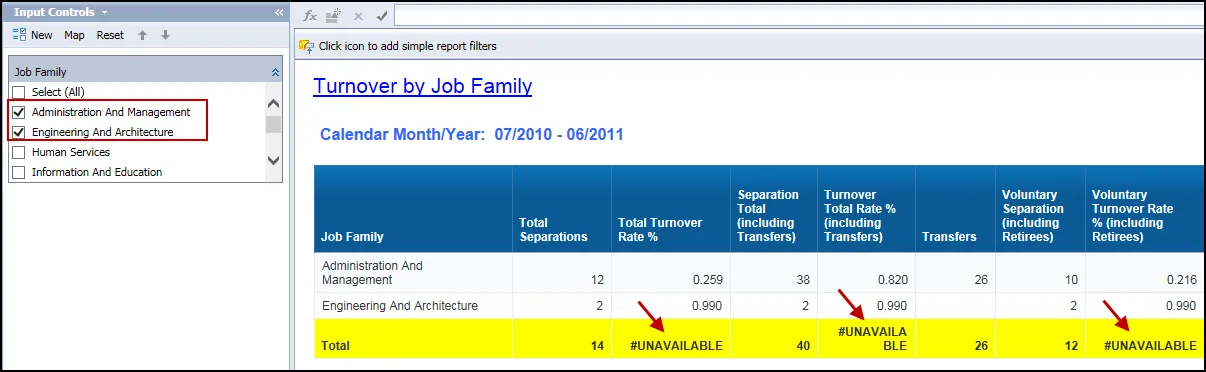
- The calculation for the various Turnover Rates and the Active Employee count related to the yellow Total row are defined using the “Aggregation” feeding panel to render accurate results.
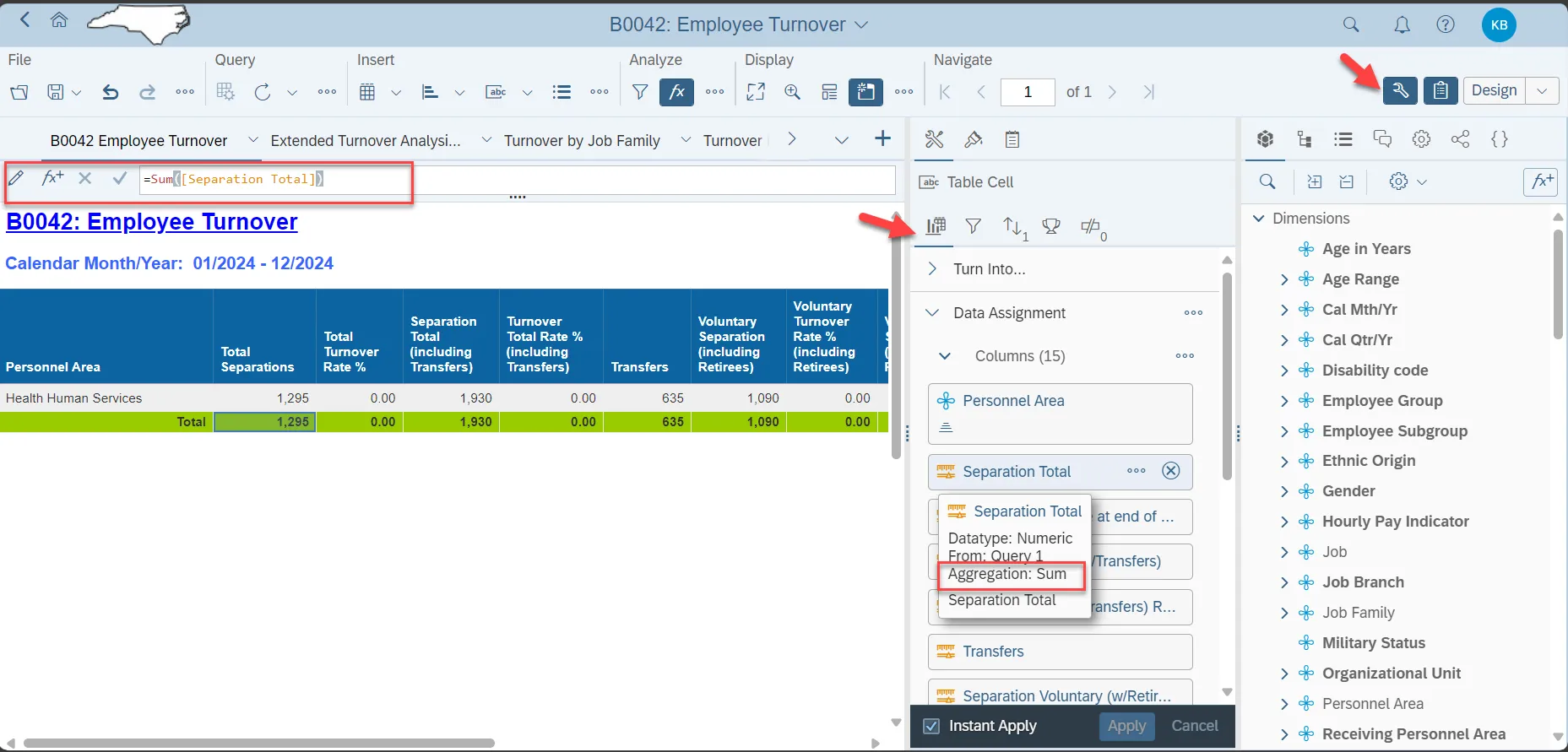
- Because of this setting, these calculations will result in the #UNAVAILABLE error if any type of local filter or Input Control utilizing more than one filter value is applied inside the report. This is a known bug within the tool. If possible, please utilize the Prompt screen to do any additional filtering desired.
- Example…
- Changes to job branch and/or job family that occurred before February 25, 2016 may not be reflected correctly in the monthly snapshot data.
- If you want to match the headcount and turnover totals for this report with the totals on the “B0043-D: Turnover from State Government last 12 Months” Dashboard report, you will need to run this report with the following values in the prompts:
- Select the high-level organizational unit for your agency, along with any unassigned org units that belong to your agency.
- Select the last 12 months for the CalMonth/Year date range and be sure the current month is included in the end value.
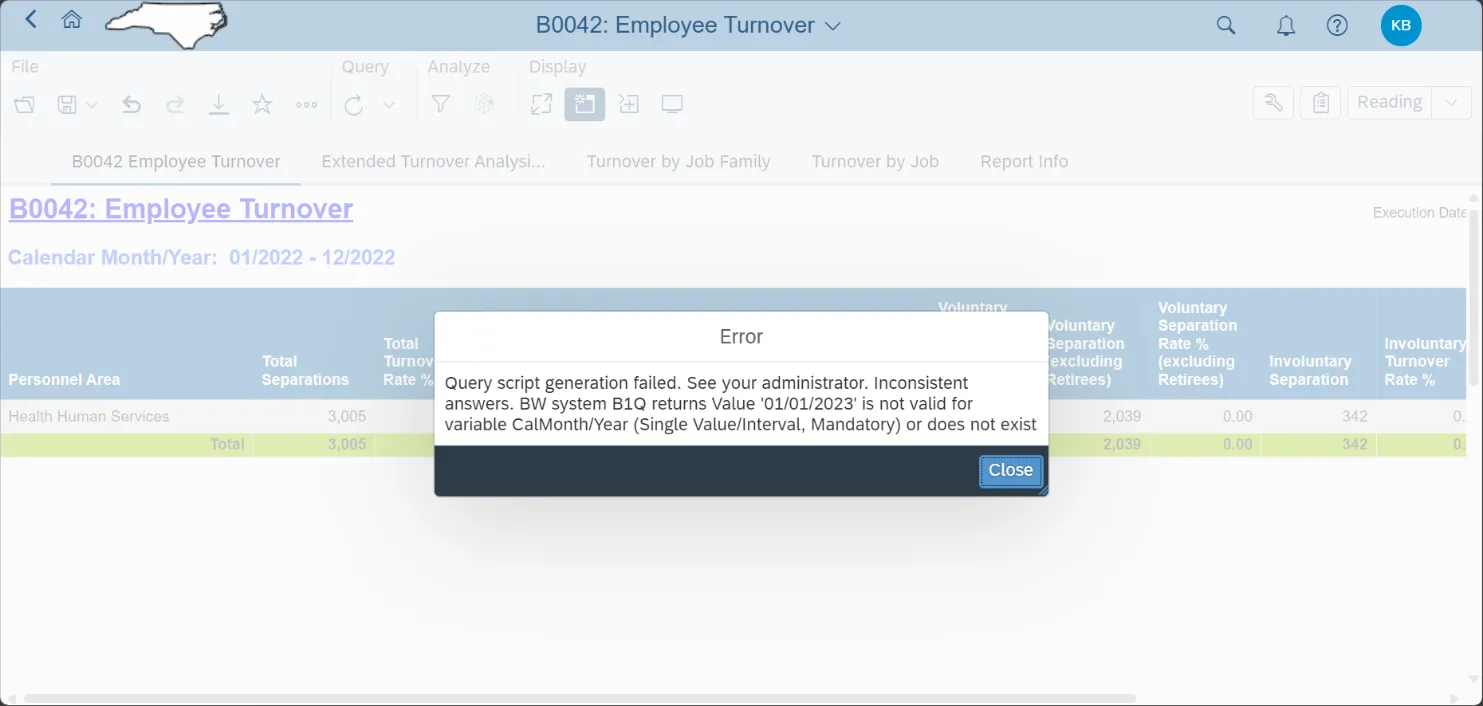
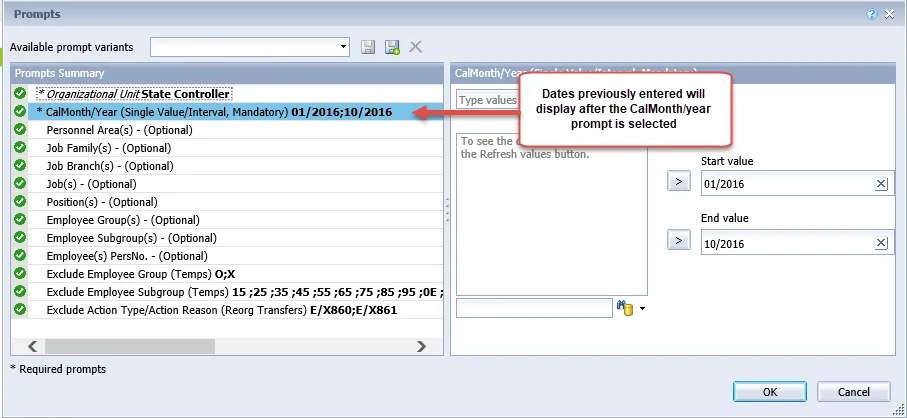
- There is a known issue with the prompt values on this report when the dates are manually entered. If the report is refreshed after it has been run with the dates manually entered, from and to date and run the report, an error message displays. Click on the CalMonth/Year prompt to see the values for the dates entered on the previous report execution:
- After the CalMonth/Year prompt is selected, the dates entered will display from the previous report execution before the report was refreshed:
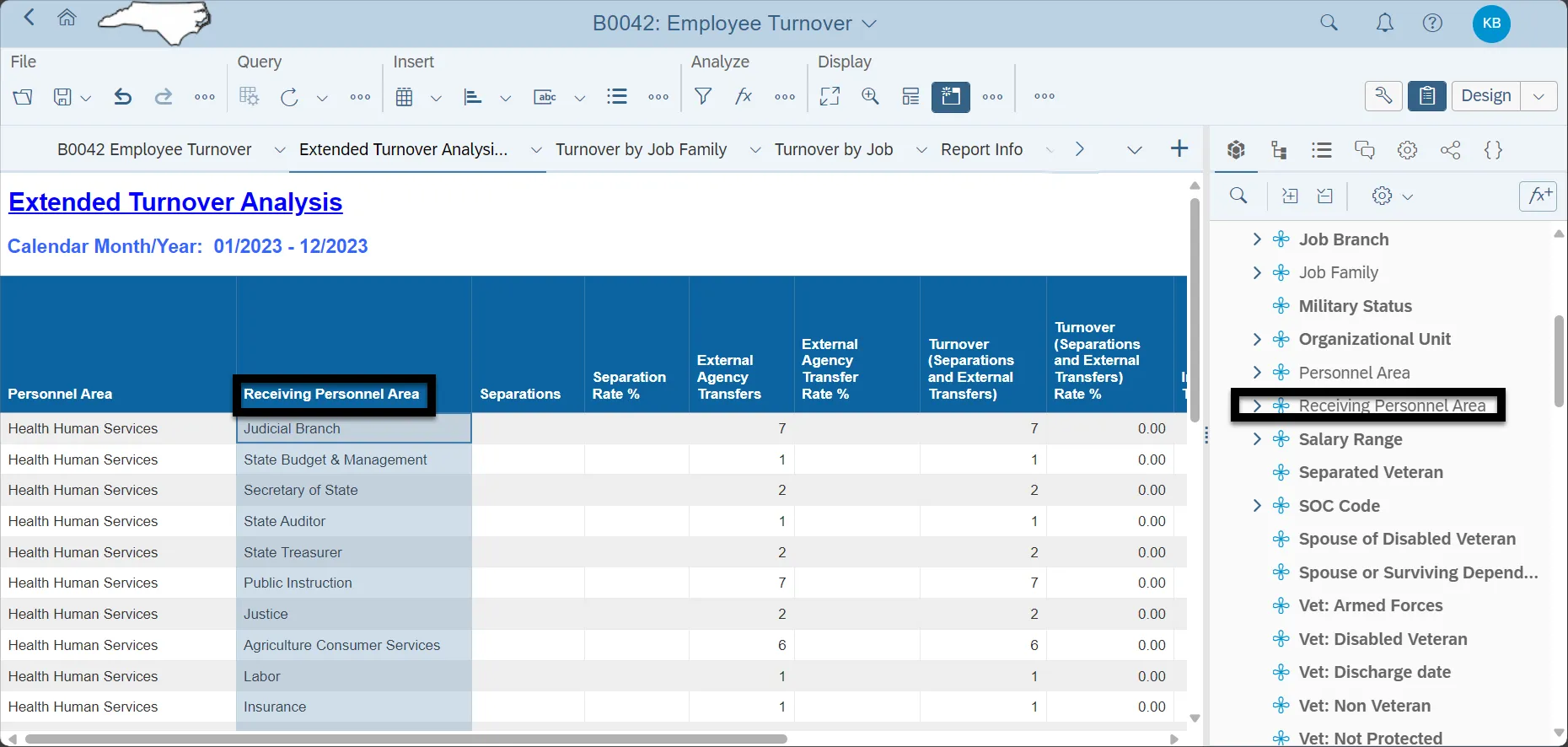
- The Extended Turnover Analysis Tab provides internal and external transfer data. It will provide the Action and rate of that action as it relates to active employees given in the time period by the user. Internal Transfers are defined as anyone who was transferred within the same agency and stayed. An External Transfer is anyone transferred outside of their current agency and Personnel Area. To investigate where the employee transferred to drag on the report Receiving Personnel Area.
- Special Case Study for: DIT and Commerce are special Organizational Units that have multiple Personnel Areas under them. As such when one of the personnel areas transfers into one of the other personnel areas this would be considered an external transfer because the personnel areas have changed. Looking at the below screenshot for Commerce:
- Commerce Example - A Commerce Personnel Area (4301) employee transferred to another Commerce – DES & DWS (4305) but because the Personnel Areas have changed it is considered an external transfer instead of an internal transfer.
- Calculations for the columns – see the table under special report considerations for detailed action type and action reasons counted for each calculation.
| Column Name | Column Definition/Calculation |
|---|---|
| Active Employees (at end of selection period) | IF Key Figure = Number of Employees and Action Type = Blank and Employment Status = Active and Calendar Year/Month = The Values set by the user |
| External Agency Transfers | IF Pers Area Changed Flag = ‘Y’ and Action Reason <> ‘60’ or ‘61’ and Action Type = X8 (Transfer Out (BI)) |
| External Agency Transfer Rate % | ([External Transfers] / [Active Employees at end of selection period]) * 100 |
| Internal Transfers | IF Pers A rea Changed Flag = ‘N’ and Action Reason <> ‘60’ or ‘61’ and Action Type = X8 (Transfer Out (BI)) |
| Internal Transfers Rate % | ([Internal Transfers] / [Active Employees at end of selection period]) * 100 |
| Involuntary Turnover Rate % | ([Separation Involuntary] / [Active Employees at end of selection period]) * 100 |
| Pers Area Changed | A Flag that is checked if there was a change in a Personnel Area to denote a transfer has been made |
| Retirement Turnover Rate % | ([Retirements} / [Active Employees at end of selection period]) * 100 |
| Retirements | ZF Retire Sep + ZG Retire Sep |
| Separation Involuntary | ZF Involuntary Sep + ZG Involuntary Sep |
| Separation Voluntary (w/ Retirees) | ZF Voluntary (w/o Retirees) + ZG Voluntary (w/o Retirees) + ZF Retire Sep + ZG Retire Sep |
| Separation Voluntary (w/o retirees) | ZF Voluntary (w/o Retirees) + ZG Voluntary (w/o Retirees) |
| Separations Rate % | [Separations Total] / [Active Employees (at end of Selection period]) * 100 |
| Separations Total | Separation Involuntary + Separation Voluntary (w/ Retirees) |
| Total Turnover (Separations and Internal/External Transfers) | Separations Total + Internal Transfers + External Agency Transfers |
| Total Turnover (Separations and Internal/External Transfers) Rate % | (Separations Total + Internal Transfers + External Agency Transfers) / [Active Employees at end of selection period]) * 100 |
| Turnover (Separations and External Transfers) | Separations Total + External Agency Transfers |
| Turnover (Separations and External Transfers) Rate % | (([Separations Total] + [External Agency Transfers]) / [Active Employees at end of selection period])) * 100 |
| Voluntary Turnover Rate (w/o retirees) Rate % | ([Separation Voluntary (w/o retirees)] / [Active Employees at end of selection period]) * 100 |
* Special Note <> Stands for Not Equal to
** Reorganizations are excluded, Action Type = X8 Transfer Out (BI) and Action Reasons 60 & 61