Purpose
The purpose of this Report Description is to explain the Employee Headcount by Org Structure report from BOBJ in the Integrated HR-Payroll System.
Report Description
The B0038: Employee Headcount by Org Structure shows employee headcounts over a single month period. Free characteristics include demographics and employee pay information besides Employee veteran status and military status.
Report Location
PA: Employee Headcount
Report Uses
- This report shows employee headcounts over a single month time period.
- This report counts the total number of active employees with a break down by SPA/EPA, Supplemental/Judicial as of the end of the calendar year/month specified.
- This report extracts employees from IT0001 in SAP ERP data. It lists the number of employees for the organizational unit selected as of the end of the calendar month/year specified.
- This report provides information on veteran status, military status, different veteran types, and a veteran summary.
- This report provides information on National Guard status and military spouse status.
- This report provides employee headcount by ethnicity and salary range.
- Review Available Objects if additional fields are required. Available Objects include demographics and employee pay information.
How to Generate This Report
This report is generated after selecting values for the mandatory prompts. All mandatory prompts must have values selected before the Run Icon can be used to generate the report. Mandatory prompts can be identified as mandatory by the exclamation mark inside of the yellow-orange triangle, the square with the checkmark, or the display of (Mandatory). Detailed instructions for interaction with each prompt can be found on the Web Intelligence Prompt List on the OSC website.
The Mandatory prompts for this report are:
- Organizational Unit
- Calendar Month/Year
- This prompt must be completed prior to any other prompt.
This report can also be further limited by utilizing the Optional prompts to further limiting the amount of data that retrieved into the body of the report. Optional prompts are indicated as option in parentheses beside the prompt.
The Optional prompts are:
- Employee Group(s)
- Employee Subgroup(s)
Exclusion prompts exclude specified data by default while allowing customers the flexibility of changing them when necessary. Exclusion prompts are identified by the term Exclude followed by the prompt.
The Exclusion prompts are:
- Exclude Employee Subgroup (Contractors, National Guard)

Initial Layout
The report is generated with a list of Organizational No. of Employees by Employee Subgroup for each month. This is a sample of the report:
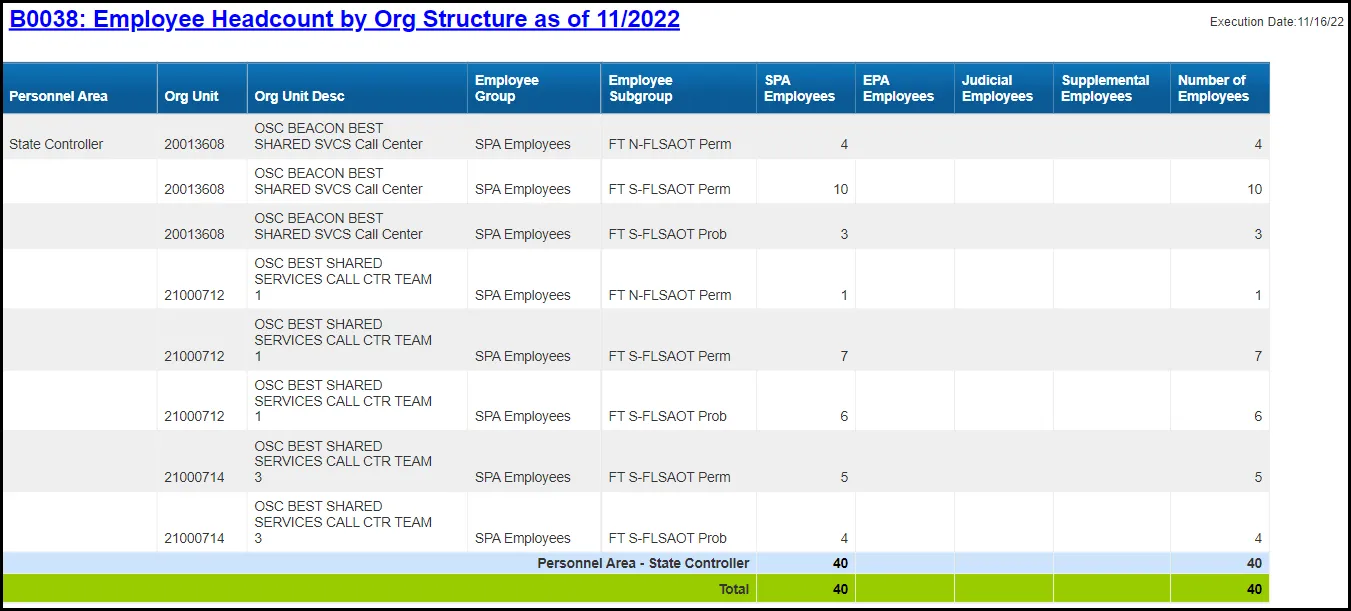
This report has 5 tabs at the bottom of the screen and each one is a report of its own kind and provides a detailed and summary info of EE Head Count, Military and Veteran status, Ethnic Origin, and Salary Range, etc.

The following are the list of tabs available in B0038:
- B0038 Employee Head Count
- EE Headcount Military & Veteran
- Veteran Summary
- Ethnic Origin
- Salary Range by Gender
B0038 Employee Headcount
This report tab counts the total number of active employees with a break down by SPA, EPA, Supplemental, and Judicial as of the end of the calendar year/month specified.
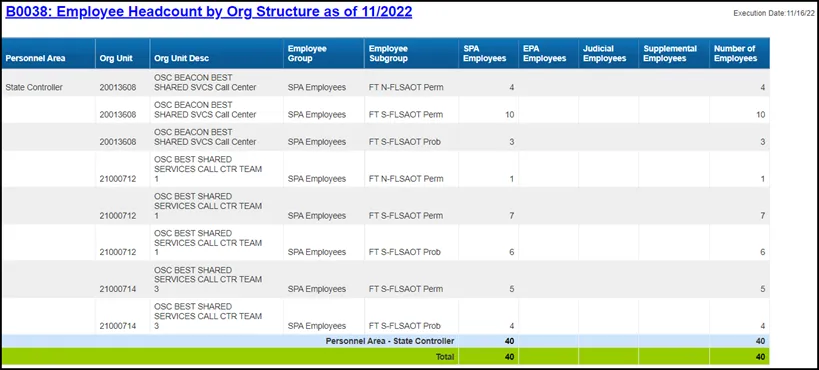
This report has a break total on Personnel Area, and it also has an ascending sort on Personnel Area.
EE Headcount Military & Veteran
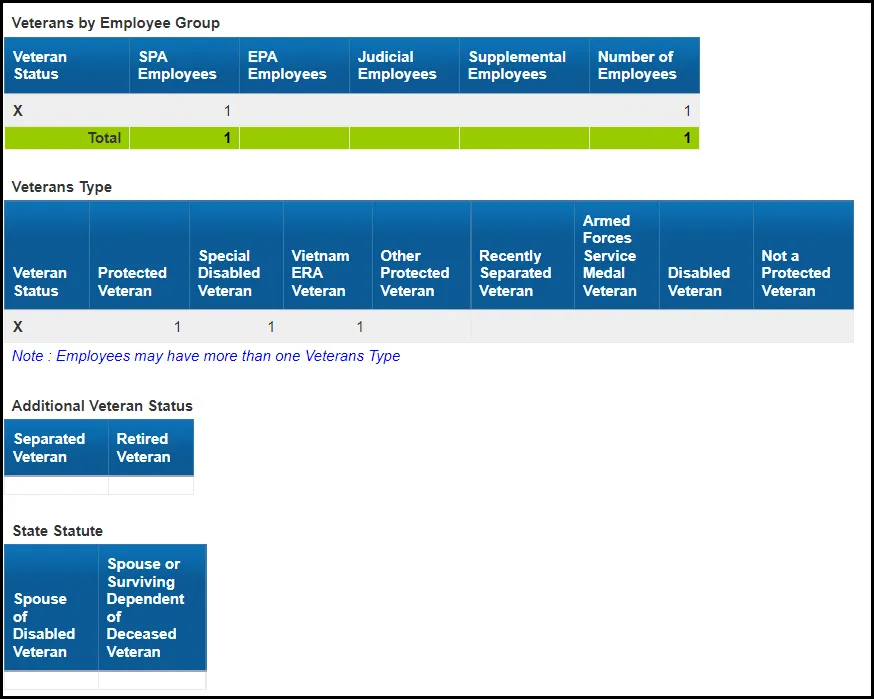
This report provides information on veteran status, military status, and different veteran types.

… report continues
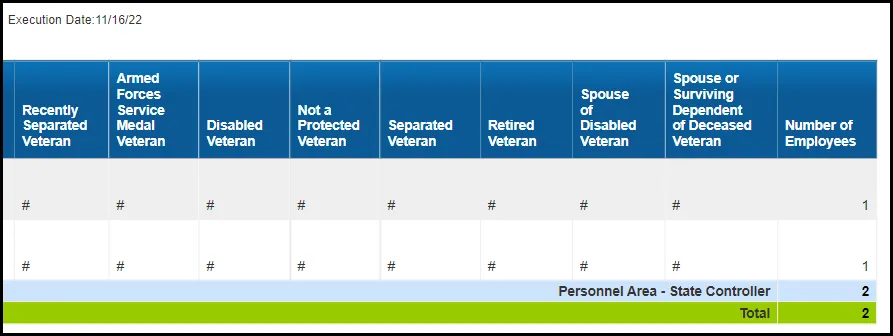
This report has filter to include in the report only the employee records that have one or more of the following flags marked: Veteran Status, Military Status, Retired Veteran, Separated Veteran, Spouse of Disabled Veteran, or Spouse or Surviving Dependent of Deceased Veteran. The flag Veteran Status is used for all other Veteran Types.
Veteran Summary
This report provides summary information on veteran status including a pie chart and summary table count on different veteran types.
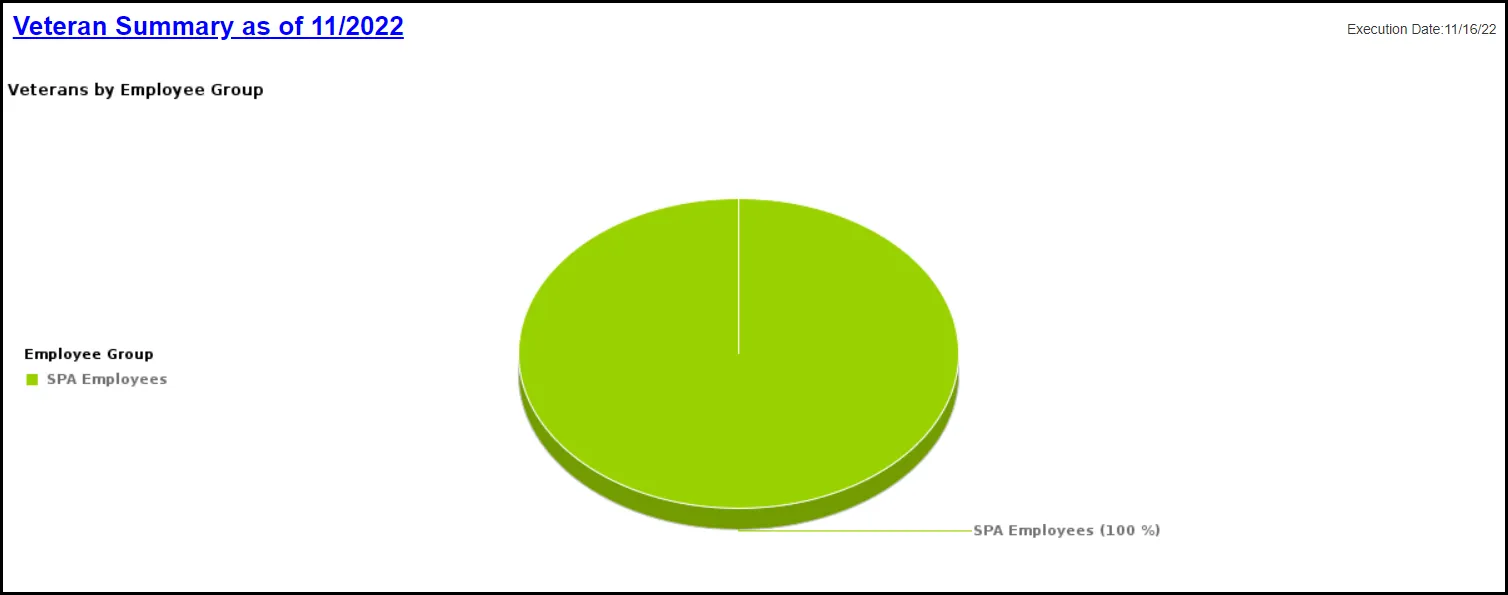
… report continues
Ethnic Origin
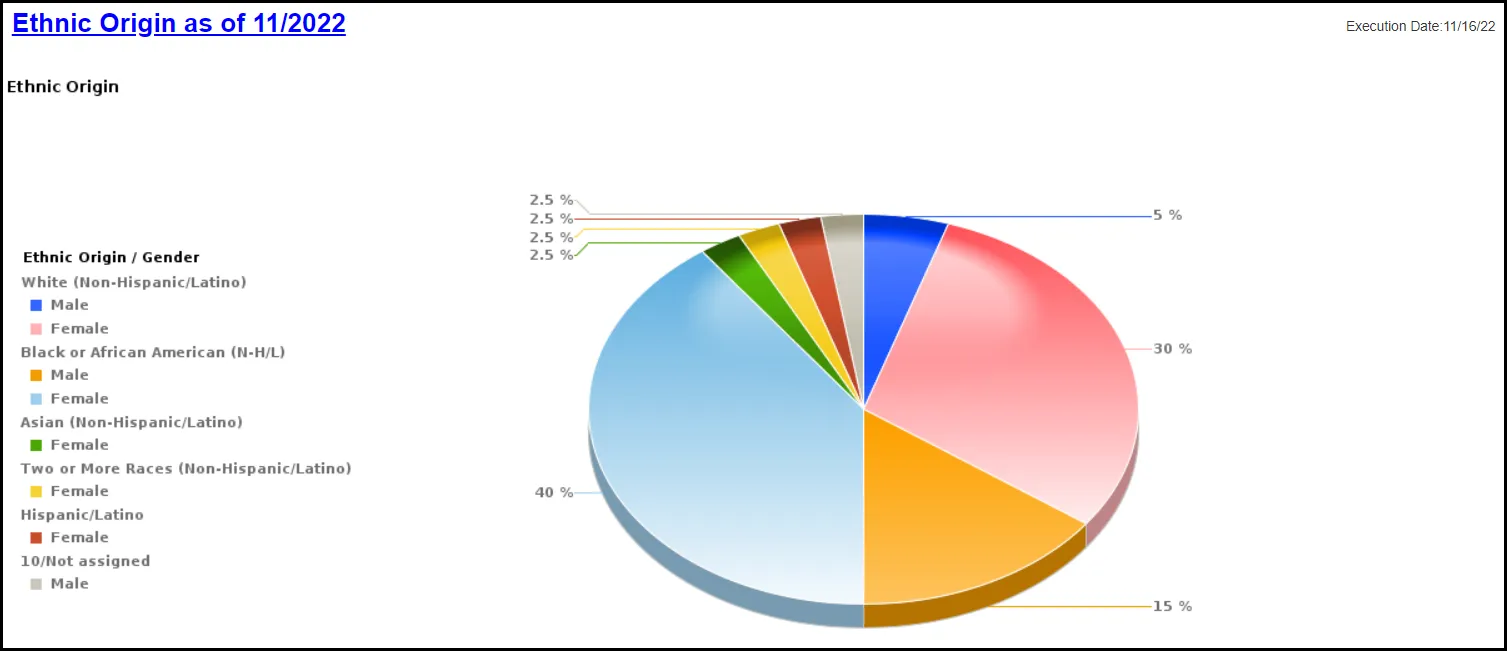
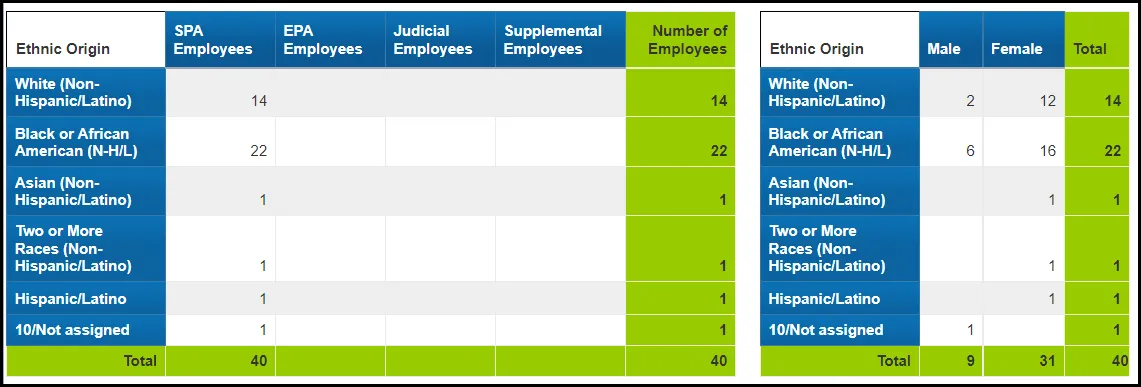
This report provides ethnicity information by Employee Group and Gender. This report includes a pie chart and summary table count on Employee Group and Gender.
… report continues
Salary Range
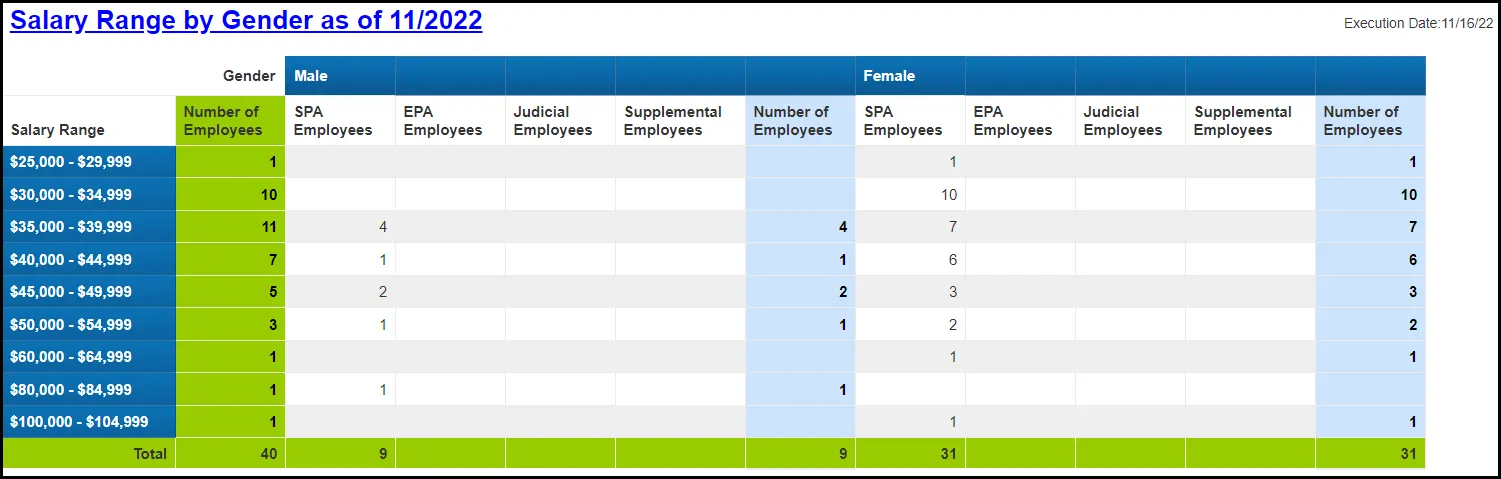
This report provides employee salary range by Employee Group and Gender. This report includes a pie chart and summary table count on Employee Group and Gender.
Available Objects
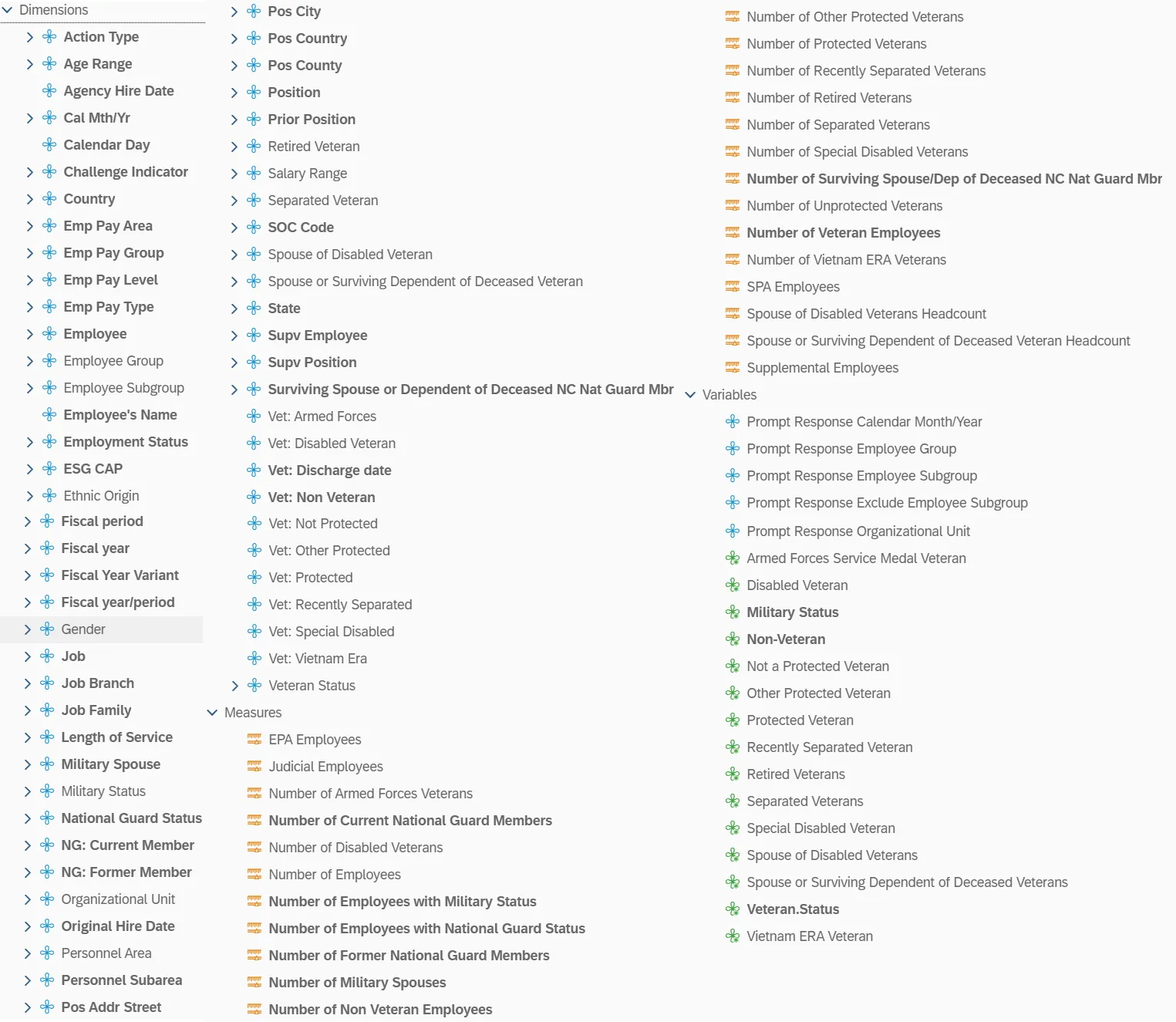
This is a list of the available objects that can be added to the report, from the Document Dictionary once in the Design mode:
Dimensions
- Action Type
- Age Range
- Agency Hire date
- Cal Mth/Yr
- Calendar Day
- Challenge Indicator
- Country
- Emp Pay Area
- Emp Pay Group
- Emp Pay Level
- Emp Pay Type
- Employee
- Employee Group
- Employee Subgroup
- Employee’s Name
- Employment Status
- ESG CAP
- Ethnic Origin
- Fiscal period
- Fiscal year
- Fiscal Year Variant
- Fiscal year/period
- Gender
- Job
- Job Branch
- Job Family
- Length of Service
- Military Spouse
- Military Status
- National Guard Status
- NG: Current Member
- NG: Former Member
- Organizational Unit
- Original Hire Date
- Personnel Area
- Personnel Subarea
- Pos Addr Street
- Pos City
- Pos Country
- Pos County
- Position
- Prior Position
- Retired Veteran
- Salary Range
- Separated Veteran
- SOC Code
- Spouse of Disabled Veteran
- Spouse of Surviving Dependent of Deceased Veteran
- State
- Supv Employee
- Supv Position
- Surviving Spouse or Dependent of Deceased NC Nat Guard Mbr
- Vet: Armed Forces
- Vet: Disabled Veteran
- Vet: Discharge date
- Vet: Non Veteran
- Vet: Not Protected
- Vet: Other Protected
- Vet: Protected
- Vet: Recently Separated
- Vet: Special Disabled
- Vet: Vietnam Era
- Veteran Status
Measures:
- EPA Employees
- Judicial Employees
- Number of Armed Forces Veterans
- Number of Current National Guard Members
- Number of Disabled Veterans
- Number of Employees
- Number of Employees with Military Status
- Number of Employees with National Guard Status
- Number of Former National Guard Members
- Number of Military Spouses
- Number of Non-Veteran Employees
- Number of Other Protected Veterans
- Number of Protected Veterans
- Number of Recently Separated Veterans
- Number of Retired Veterans
- Number of Separated Veterans
- Number of Special Disabled Veterans
- Number of Surviving Spouse/Dep of Deceased NC Nat Guard Mbr
- Number of Unprotected Veterans
- Number of Veteran Employees
- Number of Vietnam ERA Veterans
- SPA Employees
- Spouse of Disabled Veterans Headcount
- Spouse of Surviving Dependent of Deceased Veteran Headcount
- Supplemental Employees
Variables:
- Prompt Response Calendar Month/Year
- Prompt Response Employee Group
- Prompt Response Employee Subgroup
- Prompt Response Exclude Employee Subgroup
- Prompt Response Organizational Unit
- Armed Forces Service Medal Veteran
- Disabled Veteran
- Military Status
- Non-Veteran
- Not A Protected Veteran
- Other Protected Veteran
- Protected Veteran
- Recently Separated Veteran
- Retired Veterans
- Separated Veterans
- Special Disabled Veteran
- Spouse of Disabled Veterans
- Spouse of Surviving Dependent of Deceased Veterans
- Veteran.Status
- Vietnam ERA Veteran
Special Report Considerations/Features
- Employee Subgroup G1 – Contractors and G5 – National Guards are excluded from the report. Refer the Exclusion Prompt “Exclude Employee SubGroup (Contractors, National Guard) G1; G5” for details.
- Employment Status - Active. Report runs for Active Employees only.
- PMIS Headcount data is no longer available in this report as of 12/15/2022.