Purpose
The purpose of this report description is to explain how to generate the Last Salary Action Excluding LI report.
Report Description
The purpose of this report is to display active employees with the last employee action that resulted in an increase or decrease in salary, excluding legislative increases.
The last salary action selected represents the most recent action based on the date range used when executing the report.
Report Location
PA: Employee Actions
Report Uses
Analyze employee actions that resulted in a salary change across organizational units to determine salary trends and statistics.
Establish correlations between turnover and the number of increases between different organizational units.
How to Generate This Report
This report is generated after selecting values for the mandatory prompts. All mandatory prompts must have values selected before the Run Icon can be used to generate the report. Mandatory prompts can be identified as mandatory by the exclamation mark inside of the yellow-orange triangle, the square with the checkmark, or the display of (Mandatory). Detailed instructions for interaction with each prompt can be found on the Web Intelligence Prompt List on the OSC website.
The Mandatory prompts for this report are:
- Organizational Unit
- CalMonth/Year (Single Value/Interval, Mandatory)
This report can also be further limited by utilizing the Optional prompts to further limiting the amount of data that retrieved into the body of the report. Optional prompts are indicated as option in parentheses beside the prompt.
The Optional prompts are:
- Action Type(s) - (Optional)
- Action Reason(s) - (Optional)
- Personnel Area(s) - (Optional)
- Employee(s) PersNo. - (Optional)
- Job(s) - (Optional)
- Employee Pay Type(s) - (Optional)
- Employee Pay Area(s) - (Optional)
Initial Layout
Below is a sample rendering of the initial report.
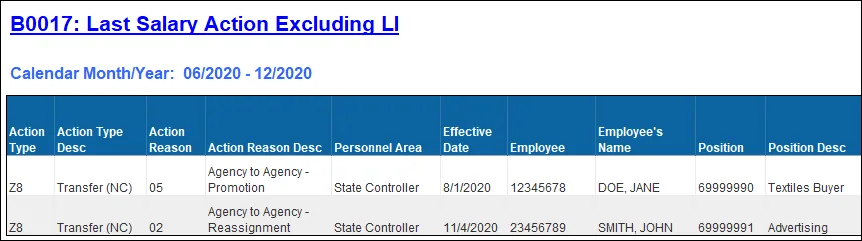
Continued….
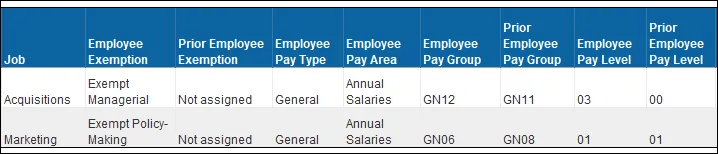
Continued…
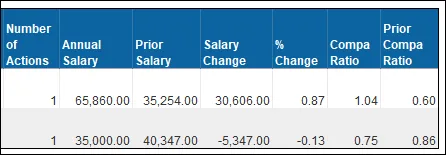
Available Objects
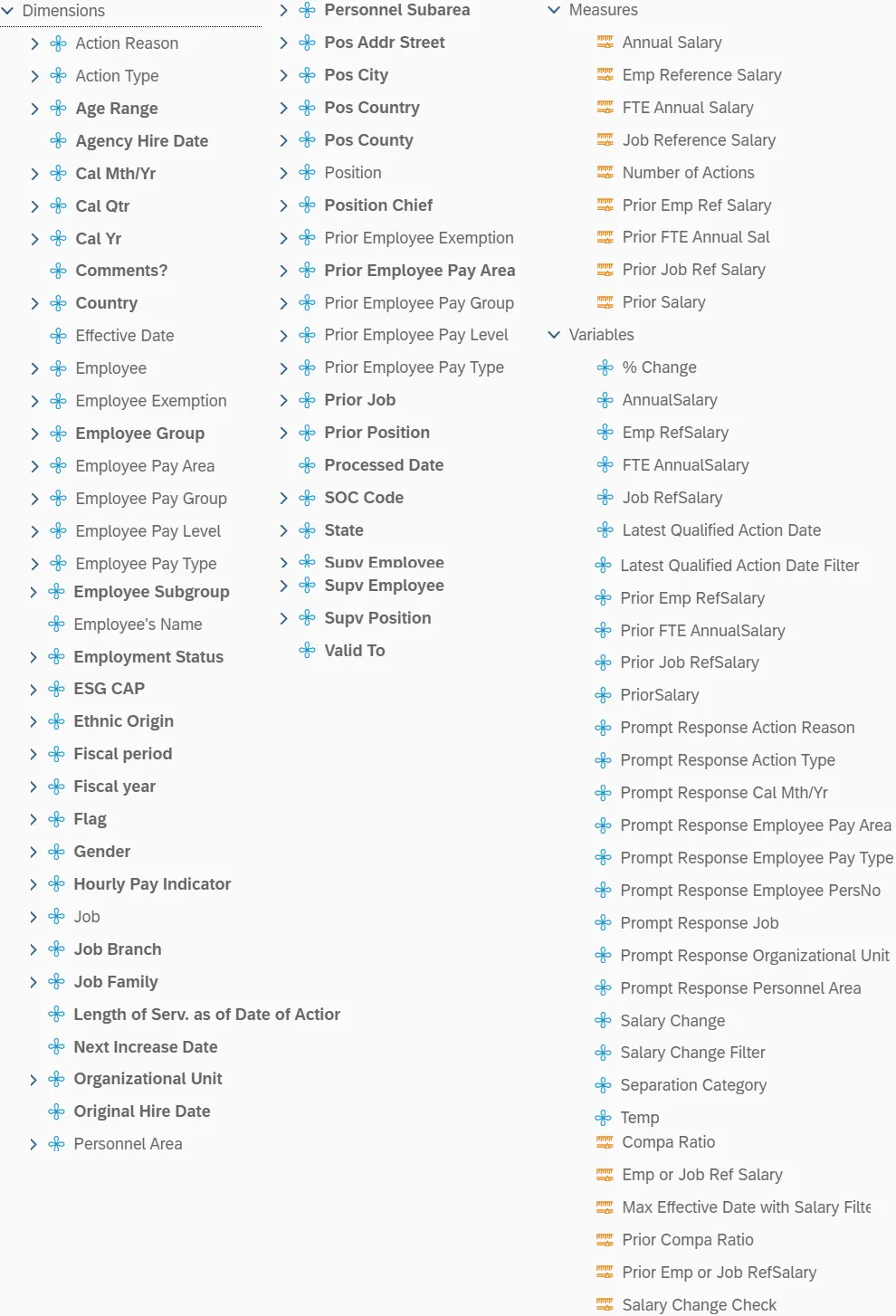
This is a list of the available objects that can be added to the report, from the Document Dictionary once in the Design mode:
Dimensions
- Action Reason
- Action Type
- Age Range
- Agency Hire Date
- Cal Mth/Yr
- Cal Qtr
- Cal Yr
- Comments?
- Country
- Effective Date
- Employee
- Employee Exemption
- Employee Group
- Employee Pay Area
- Employee Pay Group
- Employee Pay Level
- Employee Pay Type
- Employee Subgroup
- Employee's Name
- Employment Status
- ESG CAP
- Ethnic Origin
- Fiscal period
- Fiscal year
- Flag
- Gender
- Hourly Pay Indicator
- Job
- Job Branch
- Job Family
- Length of Serv. as of Date of Action
- Next Increase Date
- Organizational Unit
- Original Hire Date
- Personnel Area
- Personnel Subarea
- Pos Addr Street
- Pos City
- Pos Country
- Pos County
- Position
- Position Chief
- Prior Employee Exemption
- Prior Employee Pay Area
- Prior Employee Pay Group
- Prior Employee Pay Level
- Prior Employee Pay Type
- Prior Job
- Prior Position
- Processed Date
- SOC Code
- State
- Supv Employee
- Supv Position
- Valid To
Measures
- Annual Salary
- Emp Reference Salary
- FTE Annual Salary
- Job Reference Salary
- Number of Actions
- Prior Emp Ref Salary
- Prior FTE Annual Sal
- Prior Job Ref Salary
- Prior Salary
Variables
- % Change
- AnnualSalary
- Emp RefSalary
- FTE AnnualSalary
- Job RefSalary
- Latest Qualified Action Date
- Latest Qualified Action Date Filter
- Prior Emp RefSalary
- Prior FTE AnnualSalary
- Prior Job RefSalary
- PriorSalary
- Prompt Response Action Reason
- Prompt Response Action Type
- Prompt Response Cal Mth/Yr
- Prompt Response Employee Pay Area
- Prompt Response Employee Pay Type
- Prompt Response Employee PersNo
- Prompt Response Job
- Prompt Response Organizational Unit
- Prompt Response Personnel Area
- Salary Change
- Salary Change Filter
- Separation Category
- Temp
- Compa Ratio
- Emp or Job Ref Salary
- Max Effective Date with Salary Filters
- Prior Compa Ratio
- Prior Emp or Job RefSalary
- Salary Change Check
Special Report Considerations/Features
Report contains the following Action restrictions.
- Only the following Action Types are selected.
| Action Type Code | Action Type Description |
|---|---|
| Z0 | New Hire (NC) |
| Z1 | Promotion (NC) |
| Z2 | Reinstatement/Reemployment (NC) |
| Z7 | Transfer (NC) |
| Z8 | Appointment Change (NC) |
| Z9 | Reallocation (NC) |
| ZA | Salary Adjustment (NC) |
| ZC | Range Revision (NC) |
| ZE | Career Progression (NC) |
| ZH | Career Progression (NC) |
| ZM | Band Revision (NC) |
- The following Action Type/Action Reasons are excluded.
| Action Type | Action Reason |
|---|---|
| Z2 |
06 - Rtn from Short Term Dis Tr-Reh |
| Z2 | 07 - Rtn from Short Term Dis Comple |
| Z2 | 08 - Rtn from Long Term Disability |
| Z2 |
09 - Rtn from Disciplinary Suspensi |
| Z2 | 10 - Rtn from Investig Placement Lv |
| Z2 |
11 - Return from Military |
| Z2 |
12 - Rtn from WC Phys Restrictions |
| Z2 | 13 - Rtn from WC with MMI Complete |
| Z2 | 14 - Return from Educational Leave |
| Z2 | 15 - Return from FMLA |
| Z2 | 16 - Return from Family Illness |
| Z2 |
17 - Return from Parental |
| Z2 | 18 - Return from LOA Other |
| Z2 | 19 - Return to Supplemental |
| Z2 | 20 - Rtn from STD with Restrictions |
| Z2 | 21 - Rtn fr Military Care Giver Lv |
| Z2 | 22 - Rtn from WC with MMIDisability |
| Z2 | 23 - Rtn from WC Restrictions<20hrs |
- Only the most recent salary action resulting in an increase or decrease is selected.
- Note: If there are multiple actions on the same date and this date qualifies as the most recent action date, then all actions pertaining to this one date will be reported.
- Only active employees are selected.
- Temporary employees are excluded.
- If one or more completed PCRs exist for an action, the “Processed Date” available object is populated with the date from the most recent processed PCR action. If no completed PCR exists for the action, the Processed Date is populated with the “Changed on” date from the action infotype.
- Compa Ratio is calculated Based on Employee Reference Salary, Job Reference Salary, and FTE Annual Salary.
- The Formula for Compa Ratio is (FTE Annual Salary) divided by (Employee or Job Ref Salary). Employee or Job Reference Salary represents the Employee Reference Rate for Banded pay types; for all other pay types, it represents the Job Reference Rate.
- Position and Job descriptions represent the titles in effect based on the high end of the date range selected when executing the report. For example, if the date range selected is Jan2021-Jun2021, the Position and Job titles shown on the report will be the titles in effect as of 6/30/2021.
- When there are multiple salary changing actions with the same Effective Date, the Infotype 0008 change history table is reviewed to determine which salary change went with which action. However, if for some reason the number of actions does not equal the number of IT0008 change records for that same date, then we are unable to determine which action caused what salary change so the most recent IT0008 salary is shown for all actions on that day. When this scenario happens, the action records will be flagged, and the “Flag” data element (from Available Objects) will show an ‘X’ value to signify this.