Purpose
The purpose of this job aid is to explain how to indicate on the PA PCR (ZPAA076) and IT9898 (11-Month Limit Required) whether a temporary is required to take a mandatory “break-in-service” within 11 consecutive months of employment as a temporary within North Carolina state government. The indicator is called the 11-Month Limit Required Indicator and applies only to temporaries in one of the following Employee Subgroups within Employee Group O: Supplemental Staff:
EEGrp O: Supplemental Staff
| ESgrp | Name of EE Subgrp | EE Subgrp Definition |
|---|---|---|
| G7 | Temp FT N-FLSAOT | Temporary, Full-Time, Not Subject to FLSA Overtime |
| G8 | Temp FT S-FLSAOT | Temporary, Full-Time, Subject to FLSA Overtime |
| GA | Temp PT N-FLSAOT | Temporary, Part-Time, Not Subject to FLSA Overtime |
| GB | Temp PT S-FLSAOT | Temporary, Part-Time, Subject to FLSA Overtime |
| GC | Temp Sol FT N-FLSAOT | Temporary Solutions, Full-Time, Not Subject to FLSA Overtime |
| GD | Temp Sol FT S-FLSAOT | Temporary Solutions, Full-Time, Subject to FLSA Overtime |
| GE | Temp Sol PT N-FLSAOT | Temporary Solutions, Part-Time, Not Subject to FLSA Overtime |
| GF | Temp Sol PT S-FLSAOT | Temporary Solutions, Part-Time, Subject to FLSA Overtime |
As a reminder, Temporary assignments are limited to 11 consecutive months unless the temporary is retired, a full-time student, intern, extern, or trustee (inmate). Appointed members of state Boards and Commissions are not considered temporary employees and therefore are not required to take a “break-in-service.” Exceptions to the 11-month separation requirement may also be granted by law or Executive Order.
The “break-in-service,” which is a condition but not a guarantee of re-employment in a temporary position, is a period of at least 31 consecutive calendar days within a period of 11 consecutive months in which the individual does not work in a temporary position with the State of North Carolina.
Each Supplemental Staff employee in active status must be identified by one of the following limits on all PA PCR (ZPAA076) hiring actions and the IT9898 (11-Month Limit Required).
| LmtRqd | Description | Definition |
|---|---|---|
| 0 | Yes | Employee is not retired, a full-time student, intern, extern, trustee (inmate), appointed member of a state Board or Commission, exempt from the “break-in-service” requirement by law, Executive Order, or other reason identified by the NC Office of State Human Resources. |
| 1 | No – Retired | Employee is drawing a retirement income or Social Security benefit and has signed a statement stating that they are not available for or seeking permanent state employment. |
| 2 | No – Student | Employee is an undergraduate student taking at least 12 credit hours or a graduate student taking at least 9 credit hours. Enrollment and credit hours have been verified by an official course schedule. Temporaries employed in both the spring and fall semesters/quarters are considered full-time students during the summer even if they are not enrolled in classes for the summer. |
| 3 | No – Intern | Employee is a student who, regardless of the number of credit hours enrolled, is employed to gain occupational experience for a period of time not to exceed three months. |
| 4 | No – Extern | Employee is a student who, regardless of the number of credit hours enrolled, is employed as part of a written agreement between the state and an academic institution through which the student is paid and earns course credit. |
| 5 | No – Inmate | Employee is a trustee (inmate) who is on a work-release program. |
| 6 | No – Board or Commission | Individual is an appointed member of a state Board or Commission. |
| 7 | No – State of Emergency | Employee is working in a temporary position identified through law, Executive Order, or state policy as essential to the response of a declared State of Emergency. |
| 8 | No – Other | Employee has a temporary assignment identified through law, Executive Order, or state policy as not limited to the 11-month mandatory separation requirement. |
Note: This infotype (IT9898) indicator is only to be used for Supplemental employees and should not be used for active Permanent/Probationary/Time-Limited employees.
The 11-Month Limit Required Indicator is different than the Work Contract Type, which exists to ensure appropriate ACA status and benefit eligibility, on Transaction ZPAA076 and IT0001. However, temporaries identified as No – Retired (Subtype 1) on the 11-Month Limit Required Indicator must also be appropriately designated as retired in the PCR ACA Status and Work Contract Type field in ZPAA076 and IT0001.
Note: Please reference Job Aid BEN-18 IT1/Contract Field & IT171 Eligibility Guide for all ACA Status options.
Completing the 11-Month Limit Required Indicator on Transaction ZPAA076 (Employee Action Request)
Trigger: PA PCRs for Employee Group O: Supplemental Staff, Employee Subgroups G7, G8, GA, GB, GC, GD, GE, and GF will prompt the PA initiator to create or delimit the 11-Month Limit Required Indicator when the Action Type and Action Reason is:
Create for:
- Z0 – New Hire
- 01 – New Hire Initial entry into the Integrated HR/Payroll System as a temporary employee.
- Z2 – Reinstatement/Reemployment
- 19 - Return to Supplemental Return to work.
- Z7 – Non-Beacon to Beacon
- 07 – Return to State within 5 years Or employee separated from Non-Integrated HR/Payroll agency or State University and is rehired as a temporary employee in the Integrated HR/Payroll within five years.
- 08 – Return to State after 5 years Employee separated from Non-Integrated HR/Payroll System agency or State University and is rehired as a temporary employee in the Integrated HR/Payroll System after five years.
- Z8 – Transfer
- 13 - Perm to Temp Employee movement from a permanent position to a temporary
position (Change in position number) ▪ Permanent employees should be separated unless transferring to a Temporary assignment the very next day. If the transition to a Temporary assignment is the next day, the correct Integrated HR/Payroll System action is a Transfer/Perm to Temp.
- 13 - Perm to Temp Employee movement from a permanent position to a temporary
- Z9 - Appointment Change
- 13 - Permanent to Supplemental Employee status that is Temporary.
Delimit for:
- Z8 – Transfer
- 12 – Temp to Perm Employee movement from a temporary position to a permanent position (Change in position number) o Temporary employees should be separated at the end of a Temporary assignment EXCEPT for the following scenario: ▪ A Temporary employee separates from their Temporary assignment and begins a Permanent assignment within the next 14 calendar days. The correct Integrated HR/Payroll System action would be Transfer/Temp to Perm.
- Z9 - Appointment Change
- 08 - Supplemental to Probation Employee is changing from Temporary status to a Probationary status, within the same position, but the employee must serve a probationary period.
- 09 - Supplemental to Permanent Employee is changing from a Temporary status to a Permanent status, within the same position, in which the employment in the Temporary position satisfies the probation period and credentials have been verified.
- 20 - Supplemental to Time-Limited Employee is changing from Temporary status to a Time-Limited status.
- 21 - Supplemental to Probation TL Employee is changing from Temporary status to Probation Time-Limited status.
- ZG – Separation
- 13 – Supplemental Appt. Term End of temporary appointment.
For all other PA PCRs in which the employee remains active (i.e., Salary Adjustment, Appointment Change, etc.), the 11-Month Limit Required Indicator status currently in effect will remain in effect unless another IT9898 record is created or the employee is separated.
Access Transaction
Via Menu Path
Your menu path may contain this custom transaction code depending on your security roles.
Via Transaction Code
ZPAA076
Step 1. Using the Employee Action Request screen, enter the information required for the type of action being created/initiated and click the Create (F5) button.
Step 2. On the following screen of the Employee Action Request, enter the information required for the type of hiring action being created/initiated. Identify whether the Supplemental Staff employee is required take a mandatory “break-in-service” within 11 consecutive months of employment as a temporary within North Carolina state government by using the field provided.
If the employee is not retired, a full-time student, intern, extern, trustee (inmate), appointed member of a state Board or Commission, exempt from the “break-in-service” requirement by law, Executive Order, or other reason identified by the NC Office of State Human Resources, use Subtype 0: Yes.
If the employee is not required to take a mandatory “break-in-service,” choose the appropriate Subtype (1-8) to identify their status.
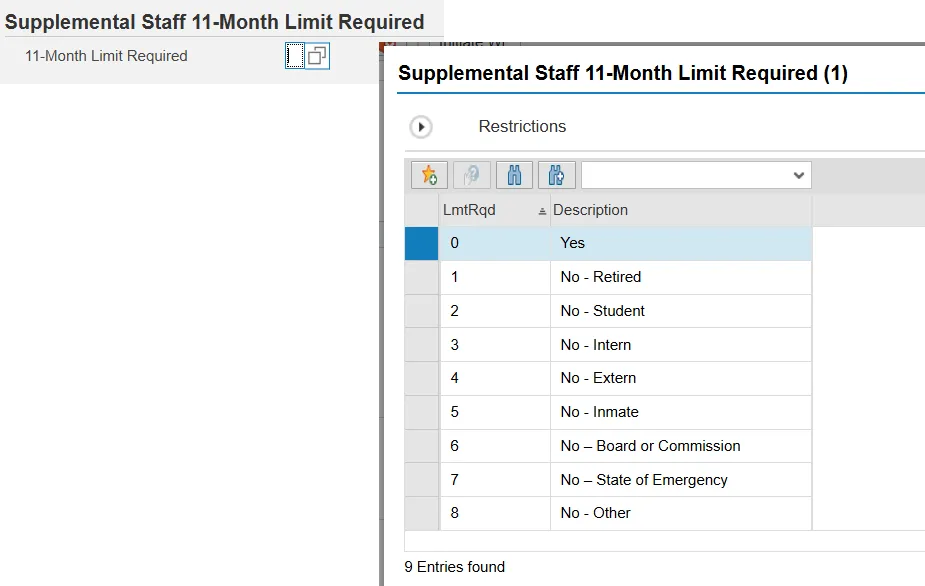
Step 3. After entering all required information for the Employee Action Request, including completing the Supplemental Staff 11-Month Limit Required Indicator, click the Enter button.
Step 4. Click the Save (Ctrl + S) button.
Step 5. Follow your agency approver’s requirements for notes, attachments, and finalizing the Employee Action Request.
Step 6. Click the Initiate WF button.
Step 7. Click the Enter button.
Step 8. Click the Back (F3) button.
Step 9. The Initiate Employee Action is complete.
Step 10. After workflow approvals have been received, proceed with the Complete Action process.
Completing and Maintaining IT9898: 11-Month Limit Required
Access Transaction
Via Menu Path
SAP menu >> Office >> SBWP – Workplace
Via Transaction Code
SBWP, PA40
Step 1. Proceed through completing the Employee Action as normal. IT9898 will appear as a required record.
Step 2. Click in the box beside 11-Month Limit Required? to access the list of Supplemental Staff 11-Month Limit Required 9 Entries.
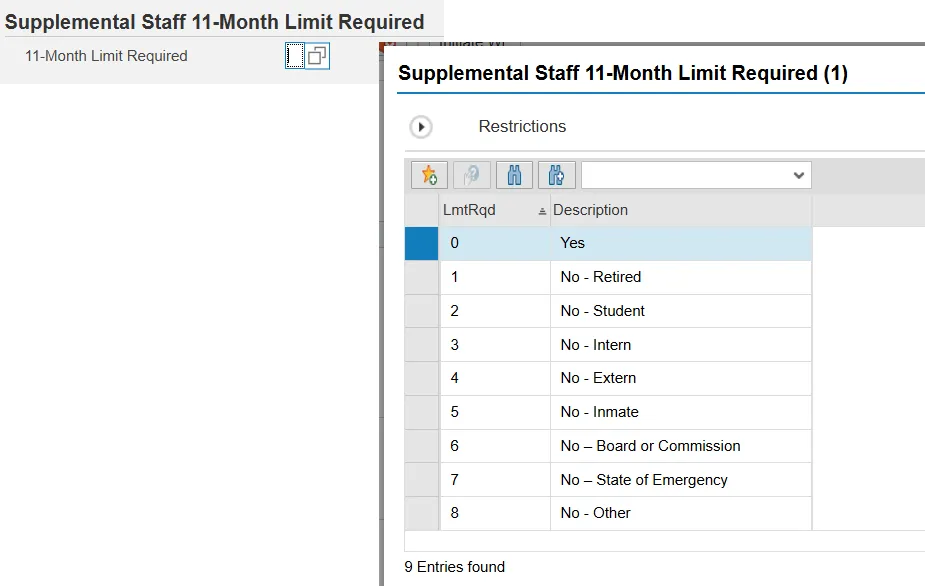
Step 3. Select the appropriate Supplemental Staff 11-Month Limit Required subtype for the employee. The selected subtype must match what was entered in Transaction ZPAA076: Employee Action Request.
Step 4. Click the Enter button.
Step 5. Click the Save (Ctrl + S) button.
Step 6. Complete the remaining Employee Action as normal.
Delimiting IT9898: 11-Month Limit Required
Access Transaction
Via Transaction Code
SBWP, PA40
Proceed through completing the Employee Action as normal. IT9898 will appear as Delimit Supplemental Staff Additional Info (9898).
Step 1. Click the box beside the record to highlight the row.
Step 2. Click the Delimit button to delimit the record.
Step 3. Complete the remaining Employee Action as normal.