Purpose
The purpose of this job aid is to explain how to enter longevity when an employee has been reinstated and part of the employee’s longevity was paid out previously. This process also applies to an employee entered into the Integrated HR/Payroll System via a Non-BEACON to BEACON or a New Hire action, when an employee was paid partial longevity by the previous state entity.
Overview
When a Reinstatement (or New Hire/Non-BEACON to BEACON) action is processed for an individual who is eligible for Longevity, and who was paid out for some of the months upon previous separation, use PA30 to create an Infotype 2012, subtype Z033 (% Longevity Paid) valid for a year from the date of reinstatement. Include in the “Hours” field the percentage of longevity for which the employee has already received payment. For example, if an employee had received a prorated longevity payment for four months, then this would be represented by the value 33.33 in the “HOURS” field (4 months divided by a total of 12 = .3333 or 33.33%). When the employee's next longevity payment is generated, the Integrated HR/Payroll System will subtract the percentage in IT2012, subtype Z033 from 100 percent to give the percentage for the employee's first payment automatically.
Longevity Rates and Processing
| Month # | Proration Factor |
|---|---|
| 1 | 8.33 |
| 2 | 16.67 |
| 3 | 25.00 |
| 4 | 33.33 |
| 5 | 41.67 |
| 6 | 50.00 |
| 7 | 58.33 |
| 8 | 66.67 |
| 9 | 75.00 |
| 10 | 83.33 |
| 11 | 91.67 |
| 12 | 100.00 |
Annual Longevity Proration: Used for partial year longevity payouts upon separation and for recording the amount of longevity paid out by a previous state entity upon transfer into the Integrated HR/Payroll System.
Process
There are 9 steps to complete this process.
Step 1: From the Easy Access screen, enter PA30 in the Command field and press/click Enter.
Step 2: On the Maintain HR Master Data screen, enter:
- Personnel no. field (either search for the employee or enter the personnel number)
- Infotype field: 2012
- Sty field: Z033
Step 3: Click Enter and review data for accuracy. Time Transfer Specifications and Z033 % Longevity paid should display in their respective fields.
Step 4: Click. The “Create Time Transfer Specifications” screen is displayed.
Step 5: In the Start date field, enter the same effective date as the effective date on the employee’s Reinstatement (or Non-BEACON to BEACON) action.
Step 6: In the “To date” field, enter a date one year after the Start date. For example, if the employee is reinstated 5/1/2009; the “To date” is 4/30/2010.
Step 7: In the “Number of hours” field, enter the percentage the employee was paid for longevity when he or she was separated.
Note: Be sure to enter the percentage in the field, even though the field is labeled “hours.”
Step 8: Press/click Enter to verify accuracy.
Step 9: Click Save.
Example
Sandy had 127 months of service when she separated on 1/31/09. She was paid a partial longevity payment for seven months of longevity when she separated. This payment represented 58.33% of her normal longevity payment due to completing only seven months of her 11th year (7 divided by 12 = 58.33%). Sandy was reinstated on 6/1/09. An IT2012, subtype Z033 should be created beginning effective date 6/1/09 and to date 5/31/2010 (one-year timeframe) with 58.33 entered in the “Hours” field. The system recognizes Sandy's achievement of 132 months in October and generates a longevity payment (she worked 50% of each month from June – October, triggering her longevity achievement in October). Due to the existence of 2012, the percentage amount on the 2012 (58.33) will be subtracted from 100 %, and Sandy will be paid 41.67% of her longevity in October. In the end, Sandy received the equivalent of a full payment between the prorated separation payment and the first payment triggered in the system.
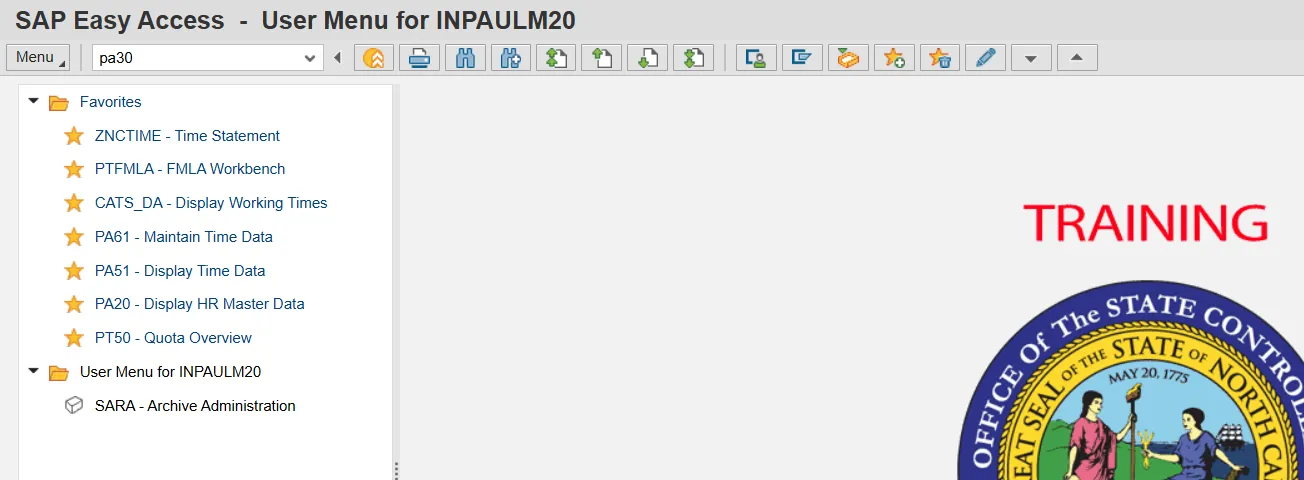
There are 9 steps to complete this process.
Step 1: From the Easy Access screen, enter PA30 in the Command field and press/click Enter.
Step 2: On the Maintain HR Master Data screen, enter:
- Personnel no. field (either search for the employee or enter the personnel number)
- Infotype field: 2012
- Sty field: Z033
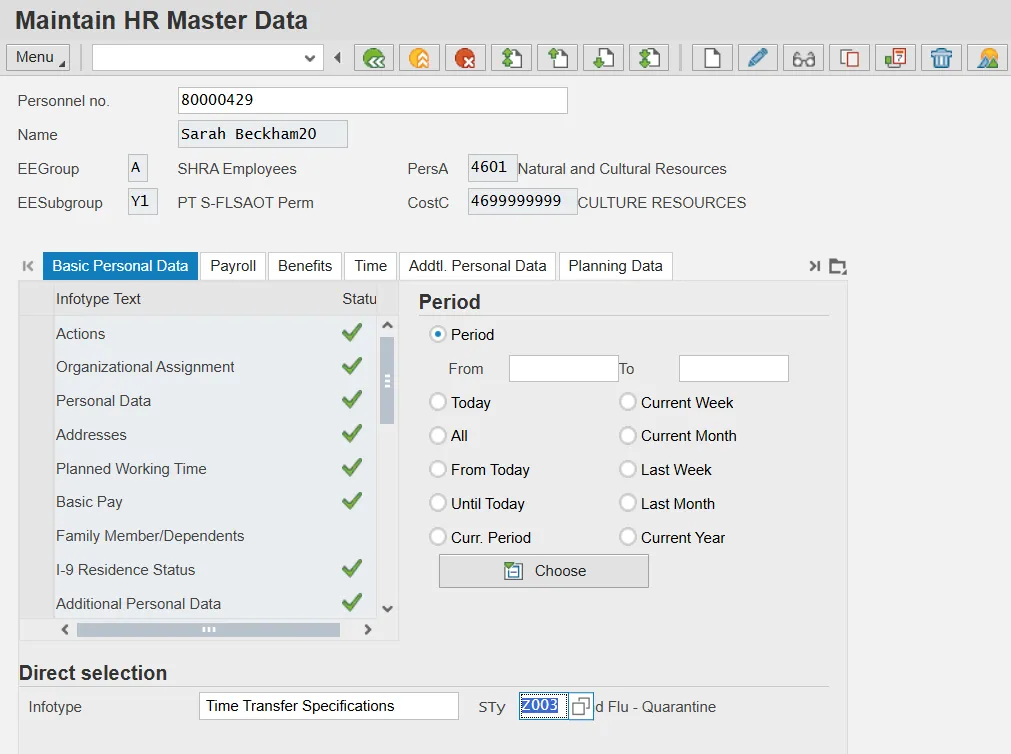
Step 3: Click Enter and review data for accuracy. Time Transfer Specifications, Z033 % Longevity paid should display in their respective fields.
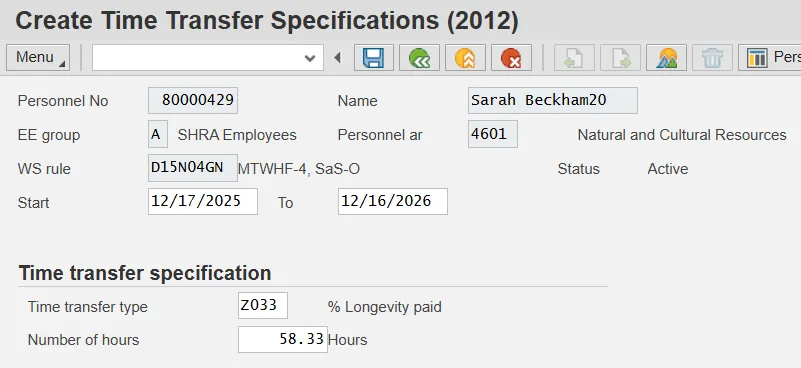
Step 4: Click Create. The “Create Time Transfer Specifications” screen is displayed.
Step 5: In the “Start date” field, enter the same effective date as the effective date on the employee’s Reinstatement (or Non-BEACON to BEACON) Action.
Step 6: In the “To date” field, enter a date one year after the Start date. For example, if the employee is reinstated 12/17/2025; the “To date” is 12/16/2026.
Step 7: In the Number of hours field, enter the percentage the employee was paid for longevity when he or she was separated.
Note: Be sure to enter the percentage in the field, even though the field is labeled “hours.”
Step 8: Click Enter to verify accuracy.
Step 9: Click Save.
Note: If an employee separates during the validity dates of the IT2012 (Z033), the record should be examined to see if it is still relevant for the employee’s prorated longevity payment generated on the employee’s last day.
If the employee has already received their initial prorated payment in the Integrated HR/Payroll System, then the IT2012 (Z033) is not relevant for the prorated separation payment and the infotype should be delimited to the day before the employee’s last day worked.
If the employee has not received their initial prorated payment in the Integrated HR/Payroll System, then the IT2012 (Z033) is still relevant and does not need to be maintained. When the prorated payment is triggered on the employee’s last day worked, the percentage represented on the IT2012 will then be subtracted from the prorated separation payment.
If the employee separates after the validity period of the IT2012 (Z033), the IT2012 does not need to be maintained.