Purpose
The purpose of this Report Description is to show the Received Shared Leave hours, hours donated to Shared Leave, and the associated hours estimated cost by agency.
Report Description
This report shows the Received Shared Leave hours, hours donated to Shared Leave, and the associated hours estimated cost by agency.
Report Location
OSHR Executive Oversight
Report Uses
- This report complies with Section 3 of Session Law 2010-139. The State Personnel Commission is required to report annually on the Voluntary Shared Leave program for the prior fiscal year on or before October 15th each year.
- OSHR will be able to track and monitor the VSL Hours Donated, Received, and Used with the Estimated Cost of the VSL Hours by Agency.
How to Generate This Report
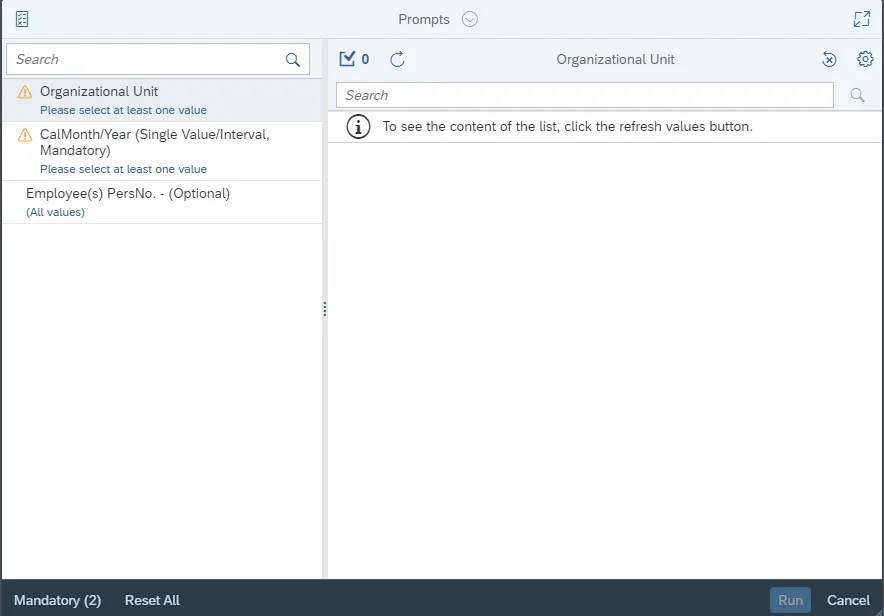
This report is generated after selecting values for the mandatory prompts. All mandatory prompts must have values selected before the Run Icon can be used to generate the report. Mandatory prompts can be identified as mandatory by the exclamation mark inside of the yellow-orange triangle, the square with the checkmark, or the display of (Mandatory). Detailed instructions for interaction with each prompt can be found on the Web Intelligence Prompt List on the OSC website.
The Mandatory prompts for this report are:
- Organizational Unit
- CalMonth/Year (Single Value/Interval, Mandatory)
This report can also be further limited by utilizing the Optional prompts to further limiting the amount of data that retrieved into the body of the report. Optional prompts are indicated as optional in parentheses beside the prompt.
The Optional prompts are:
- Employee(s) PersNo. – (Optional)
Initial Layout
The initial layout of the report displays the VSL Flag Absence Quota type by Personnel area, along with the amount used and total.
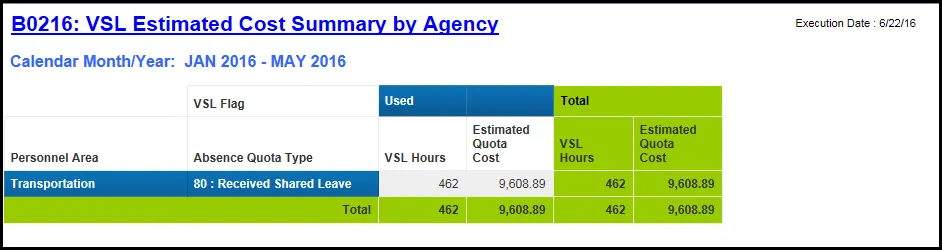
The Report Info tab displays information about the prompts entered.

Available Objects
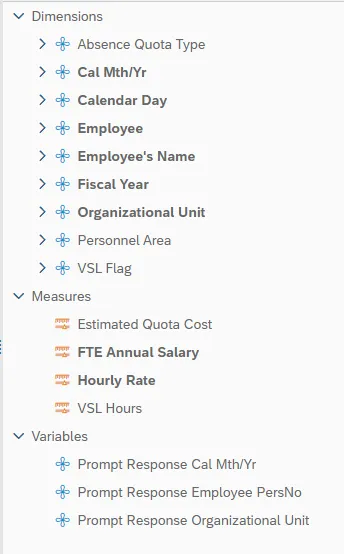
This is a list of the available objects that can be added to the report, from the Document Dictionary once in the Design mode:
Dimensions
- Absence Quota Type
- Cal Mth/Yr
- Calendar Day
- Employee
- Employee’s Name
- VSL Flag
- Fiscal Year
- Organizational Unit
- Personnel Area
Measures
- Estimated Quota Cost
- FTE Annual Salary
- Hourly Rate
- VSL Hours
Variables
- Prompt Response Cal Mth/Yr
- Prompt Response Employee PersNo
- Prompt Response Organizational Unit
Special Report Considerations/Features
- The report provides information on Leave Donations and VSL Quota Deductions.
- If the Leave is used or returned, no more hours will be available. Employees shouldn't use received shared Leave Hours outside of dedicated LOA's.
- Time entry in ESS should be entered as Sick Leave (9200) and system will allocate the entries as Received Shared Leave Hours.