Purpose
The purpose of this Report Description is to provide a list of supplemental staff and their estimated assignment date as of the current month.
Report Description
This report shows a list of Supplemental Staff within the Org Unit and their Estimated Assignment Date as of current month.
Report Location
PA: TEMPORARY EMPLOYEES
Report Uses
- This report is used to provide a list of Supplemental Staff within the Org Unit and their Estimated Assignment Date as of current month.
- This report is used to monitor Supplemental Staff assignment maximum end date.
- This report provides a list of Supplemental Staff with estimated assignment end date not to exceed 11 months.
How to Generate This Report
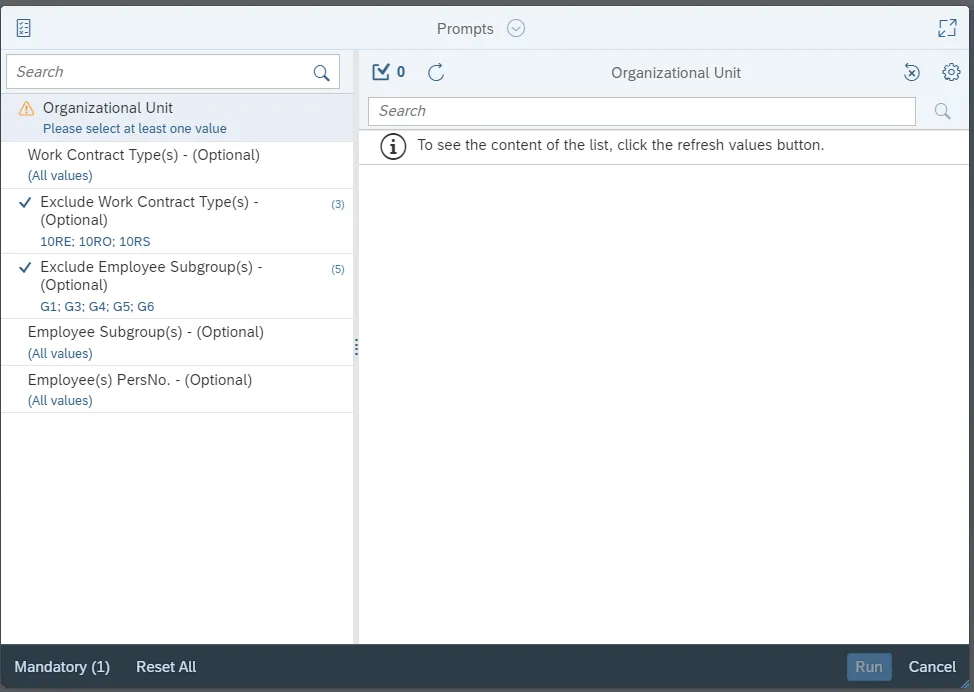
This report is generated after selecting values for the mandatory prompts. All mandatory prompts must have values selected before the Run Icon can be used to generate the report. Mandatory prompts can be identified as mandatory by the exclamation mark inside of the yellow-orange triangle, the square with the checkmark, or the display of (Mandatory). Detailed instructions for interaction with each prompt can be found on the Web Intelligence Prompt List on the OSC website.
The Mandatory prompts for this report are:
- Organizational Unit
This report can also be further limited by utilizing the Optional prompts to further limiting the amount of data that retrieved into the body of the report. Optional prompts are indicated as optional in parentheses beside the prompt.
The Optional prompts are:
- Work Contract Types(s)
- Exclude Work Contract Type(s)
- Exclude Employee Subgroup(s)
- Employee Subgroup(s)
- Employee(s) PersNo.
Initial Layout
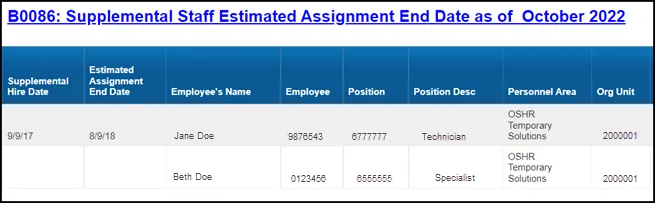
Below is a sample of the initial layout rendered.
Continued…

Note: Report layout has a hidden variable column called ‘Supplement Staff’ with a default filter value = ‘Y’ to differentiate the Employee Subgroups relevant to Judicial (J) and Supplement Staff (O, X) Employee Groups. Removing this hidden column or value of the filter will result in incorrect values in the report.
Available Objects
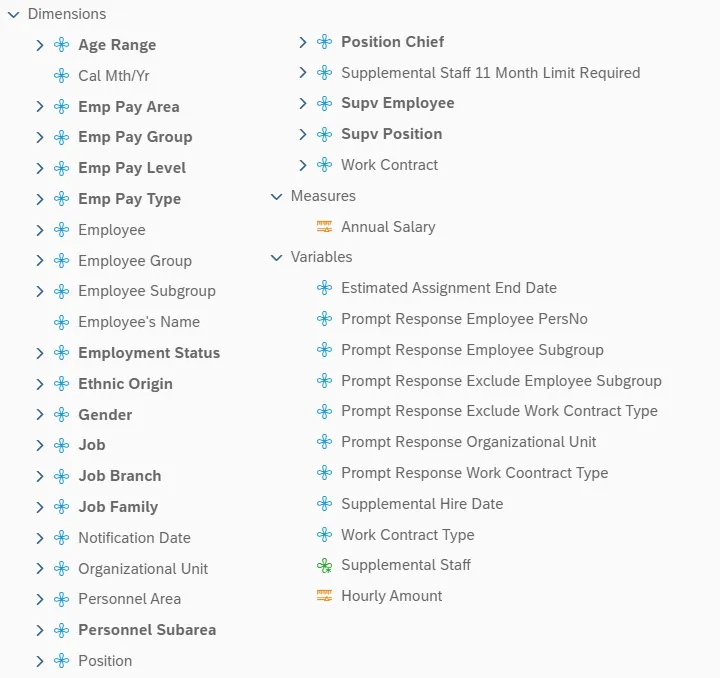
This is a list of the available objects that can be added to the report, from the Document Dictionary once in the Design mode:
Dimensions
- Age Range
- Cal Mth/Yr
- Emp Pay Area
- Emp Pay Group
- Emp Pay Level
- Emp Pay Type
- Employee
- Employee Group
- Employee Subgroup
- Employee’s Name
- Employment Status
- Ethnic Origin
- Gender
- Job
- Job Branch
- Job Family
- Notification Date
- Organizational Unit
- Personnel Area
- Personnel Subarea
- Position
- Position Chief
- Supplemental Staff 11 Month Limit Required
- Supv Employee
- Supv Position
- Work Contract
Measures
- Annual Salary
Variables
- Estimated Assignment End Date
- Prompt Response Employee PersNo
- Prompt Response Employee Subgroup
- Prompt Response Exclude Employee Subgroup
- Prompt Response Exclude Work Contract Type
- Prompt Response Organizational Unit
- Prompt Response Work Contract Type
- Supplemental Hire Date
- Work Contract Type
- Supplemental Staff
- Hourly Amount
Special Report Considerations/Features
- Sort on Estimated Assignment End Date is the only sorting done in the default layout of the report.
- Report runs only for active employees of current month.
- Estimated Assignment End date is calculated as 11 months for Work Contract Types A1 and A2; six months for Seasonal A3 and no calculation for retirees.
- Report includes only the Supplemental Staff (temps) from the following list:
- Employee Groups:
O – Supplemental Staff; X – Supplemental Staff Grant - Employee Subgroups:
G1; G3; G4; G5; G6; G7; G8; GA; GB; GC; GD; GE; GF; A6; B6; WF; Y6; A7; B7; WG; Y7; Y8; Y9
J – Judicial Branch - Employee Subgroups:
0E; 15; 1E; 25; 2E; 35; 3E; 45; 4E; 55; 5E; 65; 6E; 75; 7E; 85; 8E; 95; 9E; Q5; QE; S5; SE; SI; SL; SO; SR; T5; TE; U5; UE; V5; VE
- Employee Groups:
Employee Subgroups:
0E PT S-FLSAOT Temp MAG
15 FT N-FLSAOT Temp Dir
1E PT N-FLSAOT Temp Dir
25 FT N-FLSAOT Temp JB1
2E PT N-FLSAOT Temp JB1
35 FT N-FLSAOT Temp JB2
3E PT N-FLSAOT Temp JB2
45 FT N-FLSAOT Temp JB3
4E PT N-FLSAOT Temp JB3
55 FT N-FLSAOT Temp DA
5E PT N-FLSAOT Temp DA
65 FT N-FLSAOT Temp ADA
6E PT N-FLSAOT Temp ADA
75 FT N-FLSAOT Temp MAG
7E PT N-FLSAOT Temp MAG
85 FT S-FLSAOT Temp CR
8E PT S-FLSAOT Temp CR
95 FT N-FLSAOT Temp CSC
9E PT N-FLSAOT Temp CSC
Q5 FT N-FLSAOT Temp SC
QE PT N-FLSAOT Temp SC
S5 FT N-FLSAOT Temp CJP
SE PT N-FLSAOT Temp CJP
SI FT N-FLSAOT Temp ACJP
SL PT N-FLSAOT Temp ACJP
SO FT S-FLSAOT Temp ACJP
SR PT S-FLSAOT Temp ACJP
T5 FT N-FLSAOT Temp AD
TE PT N-FLSAOT Temp AD
U5 FT N-FLSAOT Temp JBS
UE PT N-FLSAOT Temp JBS
V5 FT S-FLSAOT Temp JBS
VE PT S-FLSAOT Temp JBS
A6 FT N-FLSAOT Student
A7 FT N-FLSAOT Intermit
B6 FT S-FLSAOT Student
B7 FT S-FLSAOT Intermit
G7 Temp FT N-FLSAOT
G8 Temp FT S-FLSAOT
GA Temp PT N-FLSAOT
GB Temp PT S-FLSAOT
GC Temp Sol FT N-FLSAOT
GC Temp Sol FT N-FLSAOT
GD Temp Sol FT S-FLSAOT
GE Temp Sol PT N-FLSAOT
GF Temp Sol PT S-FLSAOT
WF PT N-FLSAOT Student
WG PT N-FLSAOT Intermit
Y6 PT S-FLSAOT Student
Y7 PT S-FLSAOT Intermit
G1 Contractor Soft Exclude
G3 Volunteer Soft Exclude
G4 Board Member Soft Exclude
G5 National Guard Soft Exclude
G6 Federal Soft Exclude
Soft Exclude – Through exclusion prompt with default values in the prompt ‘Employee Subgroup(s) Optional’.