Purpose
The purpose of this Report Description is to explain how to generate information on Grievances within the Integrated HR-Payroll System.
Report Description
This report shows (by Agency, Gender, and Ethnicity) the number of grievances (based on Reason Count) and corresponding percent calculations for each type of Grievance Issue (Policy Violation, Discrimination, Harassment, and Retaliation). Data will display for all 4 types of Grievance issues if there exists at least one grievance for each type of issue.
Report Location
PA: Grievances
Report Uses
The data summarized in this report will reflect the state’s activity for employee grievances. It is used to determine agency and OSHR action for manager and employee training and/or education with the goal of reducing the need for employees to file grievances.
Date Load Frequency
The data for this report is loaded every weekday morning, excluding holidays. This report will include any changes that were made to the data on the previous day, including retroactive changes.
How to Generate This Report
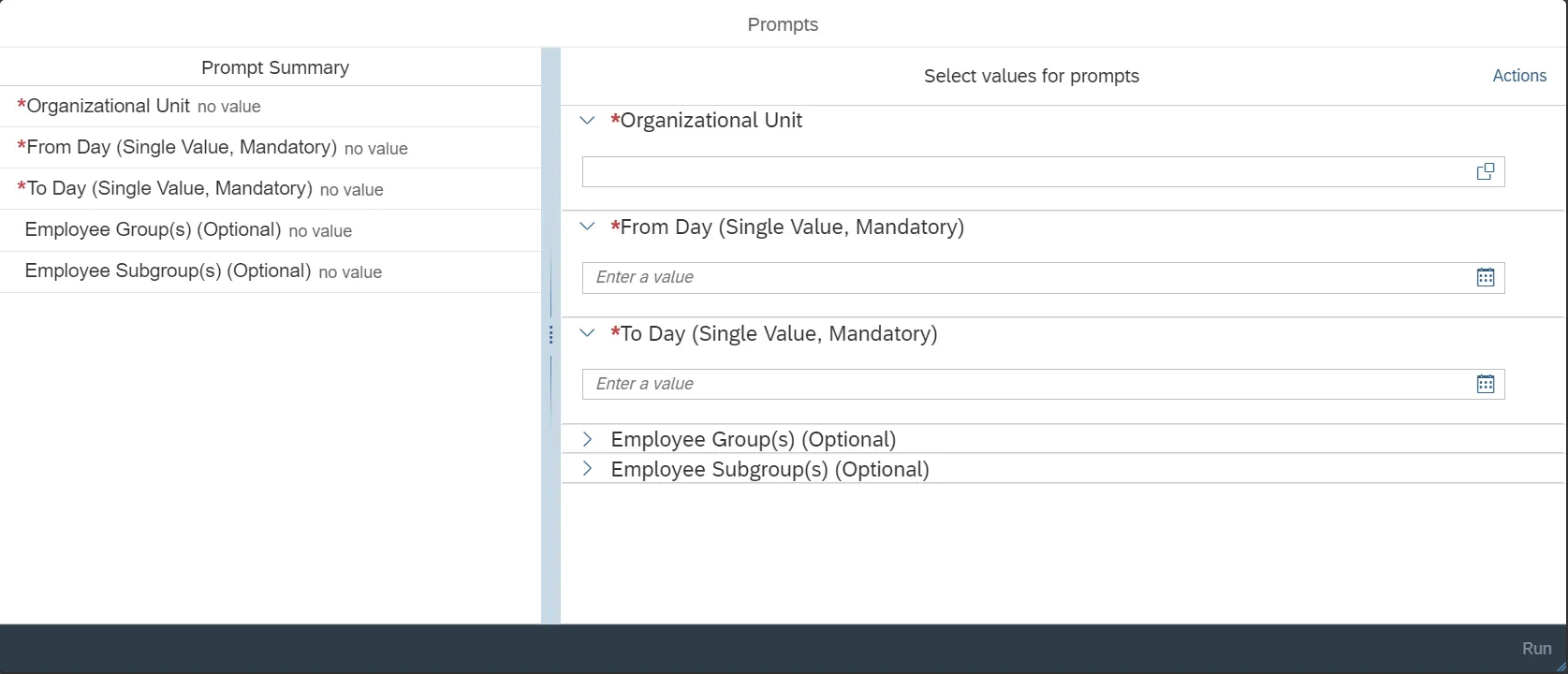
This report is generated after selecting values for the mandatory prompts. All mandatory prompts must have values selected before the Run Icon can be used to generate the report. Mandatory prompts can be identified as mandatory by the exclamation mark inside of the yellow-orange triangle, the square with the checkmark, or the display of (Mandatory). Detailed instructions for interaction with each prompt can be found on the Web Intelligence Prompt List on the OSC website.
The Mandatory prompts for this report are:
- Organizational Unit
- From Day (Single Value, Mandatory)
- To Day (Single Value, Mandatory)
This report can also be further limited by utilizing the Optional prompts to further limiting the amount of data that retrieved into the body of the report. Optional prompts are indicated as option in parentheses beside the prompt.
The Optional prompts are:
- Employee Group(s) (Optional)
- Employee Subgroup(s) (Optional)
Initial Layout
The report lists all grievances based on the prompt selections.
- Policy Violation Summary
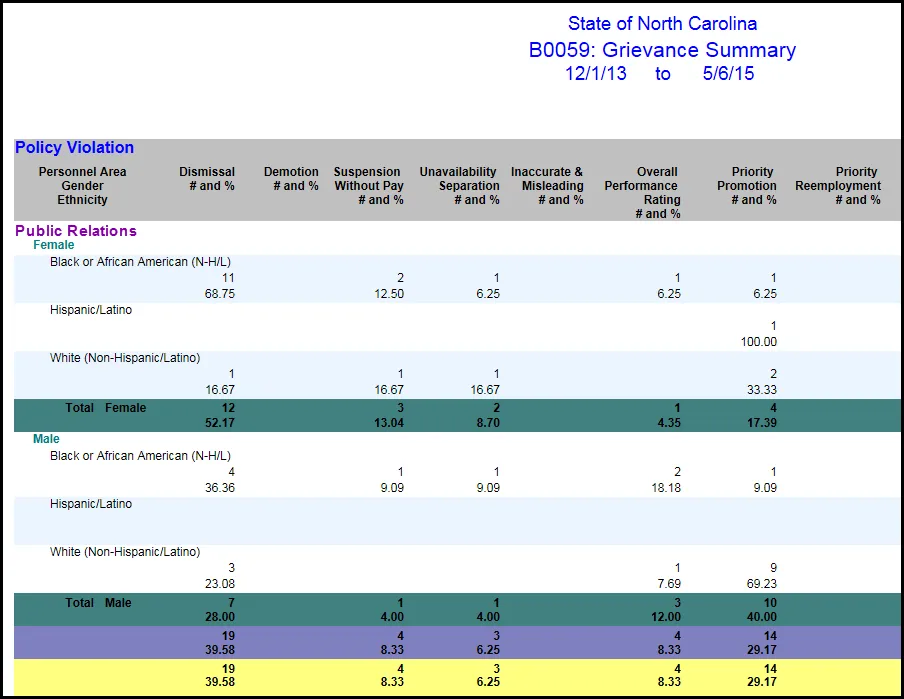
- Policy Violation Summary (Continued)...
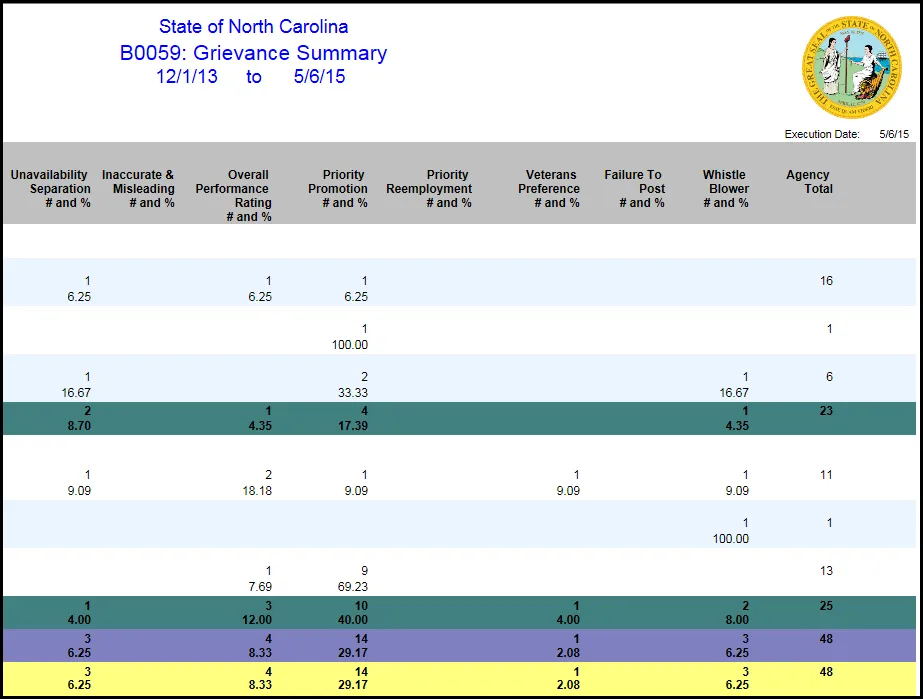
- Discrimination Summary
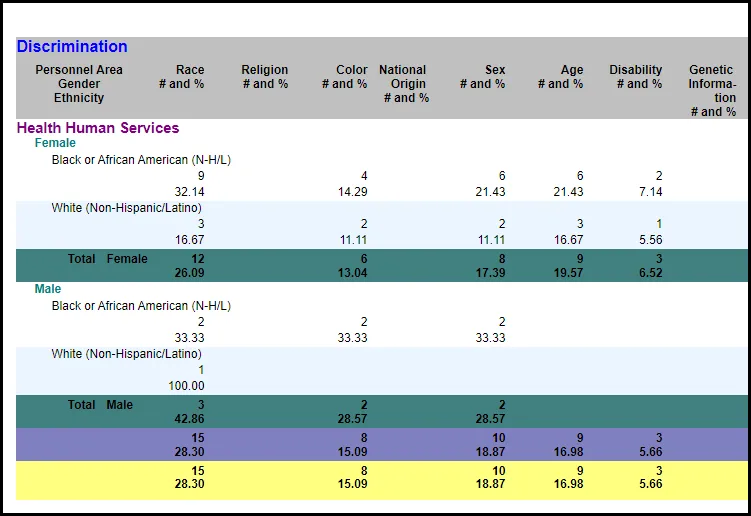
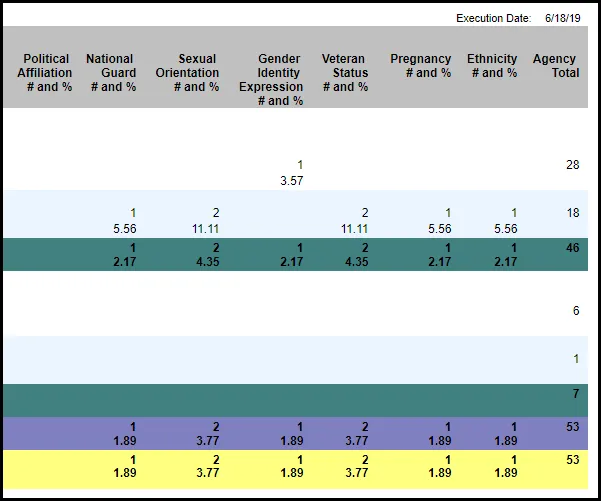
- Discrimination Summary (Continued)…….
- Harassment Summary
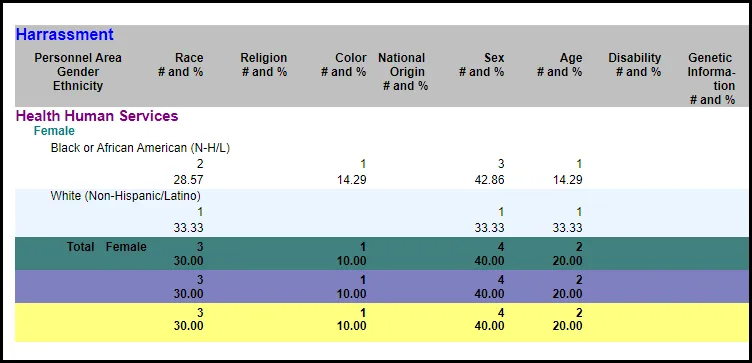
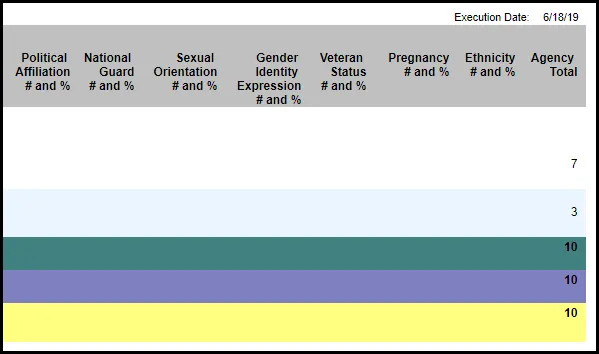
- Harassment Summary……
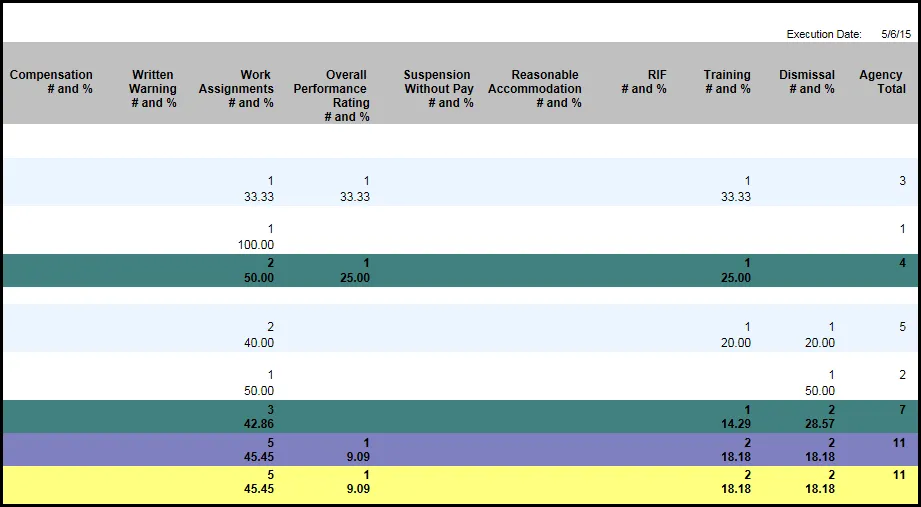
- Retaliation Summary
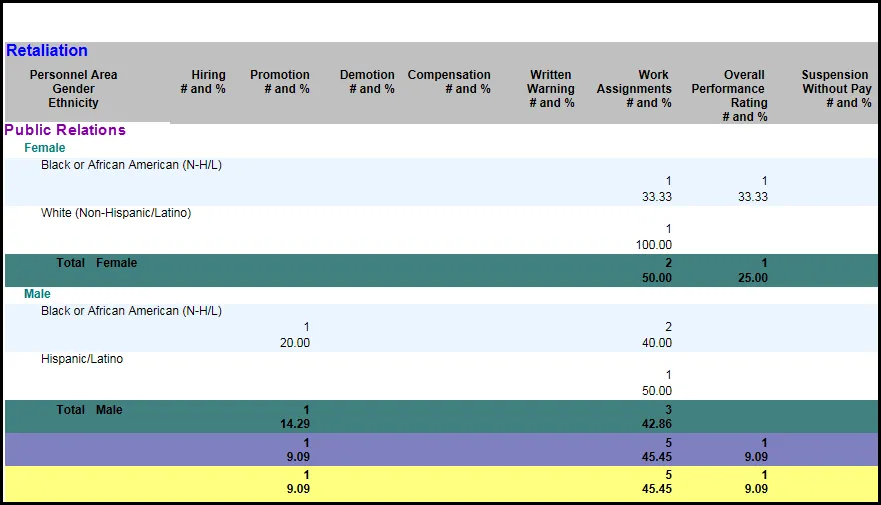
- Retaliation Summary (Continued)…….
Special Report Considerations/Features
- This report excludes records where the ‘Grievance Filed Timely?’ field is blank.
- As a greater number of discrimination basis criteria are added to the report as per Executive Order 24, the report becomes wider now. Scroll to the right to see the Agency Total columns in Discrimination and Harassment screens.
- Report lists the grievances that are valid as of (report run date) for the date ranges entered in ’From Day – To Day’ prompts. This report brings in all the grievances that are within the ‘From Day’ ‘To Day’ date range given in the prompt screen. These records may have begun before the ‘From Day’ or beyond the “To Day” however, if they are valid at any point between the ranges given, they will be selected.
- For example, with a date range of ‘From Day’ 6/11/2019 and ‘To Day’ 12/14/2019 the following records would be selected with the following date ranges:
| Valid From | Valid To | Example Type |
|---|---|---|
| 6/11/2019 | 12/14/2019 | Validity dates match record |
| 5/1/2019 | 12/31/9999 | Validity dates starts before and ends after selected range |
| 6/13/2019 | 8/20/2019 | Validity dates start before and ends before selected range |
| 5/18/2019 | 5/18/2020 | Validity dates start before and ends after selected range |
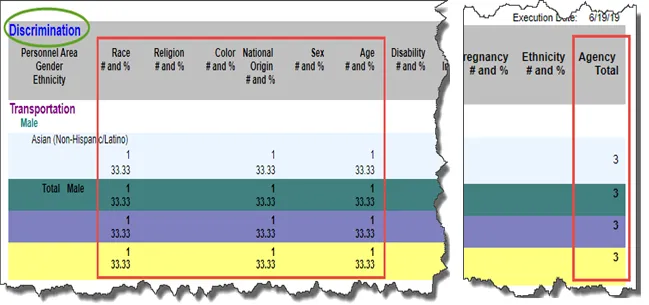
- When multiple discrimination factors are filed under one grievance for EEs in Integrated HR-Payroll System, this report shows them in individual columns on a separate count under a policy violation or discrimination or retaliation category. Agency Total column displayed at the end of each row reflects the number of policy violations or discrimination factors based on Personal Area, Gender and Ethnicity, not the total agency grievances.
- For example, here an employee filed a grievance on multiple factors Race, Age and National Origin.
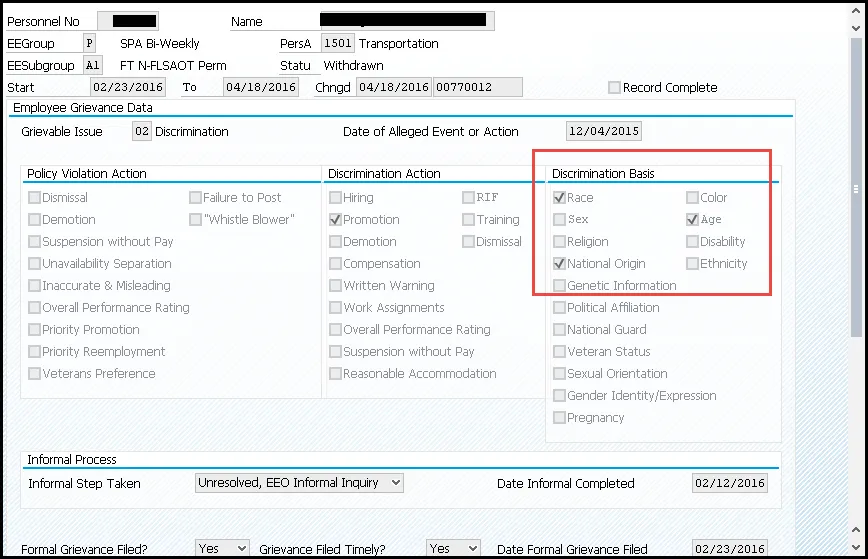
- This report will reflect them under different discrimination factors. Here the Agency Total columns shows the number of such factors for each row. The count (1) and percentage (33.33) reflects the grievance discrimination factor count and percentage by Agency Total categorized by Personal Area/Gender/Ethnicity. Agency Total does not reflect the total Agency grievances.