Purpose
The purpose of this report description is to explain how to generate the B0049 IT Expenditure Report.
Report Description
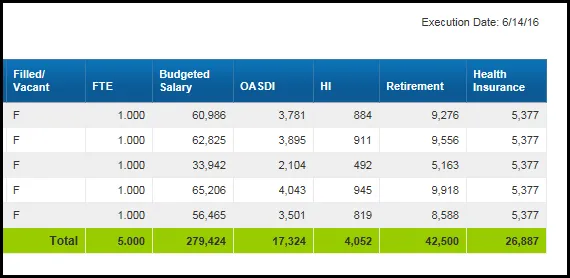
The B0049 IT Expenditure Report lists the positions for Information Technology (IT) job classes for each agency. The report lists each position's agency, FTE, budgeted salary and employer costs for OASDI, HI (Medicare), Retirement, and Health Insurance.
Report Location
OM: Position Budget Data
Report Uses
- This report is used annually to provide budgeted employee and employer costs for IT positions statewide. It can also be used to determine costs for IT positions for budget funding and/or human resource planning purposes.
- This report can be used to identify positions in the IT job family (90000004 and 91000011) within the org unit specified.
- The report can be used to compare the employees’ annual salaries with the budgeted salaries for the IT positions within the org unit specified.
How to Generate This Report
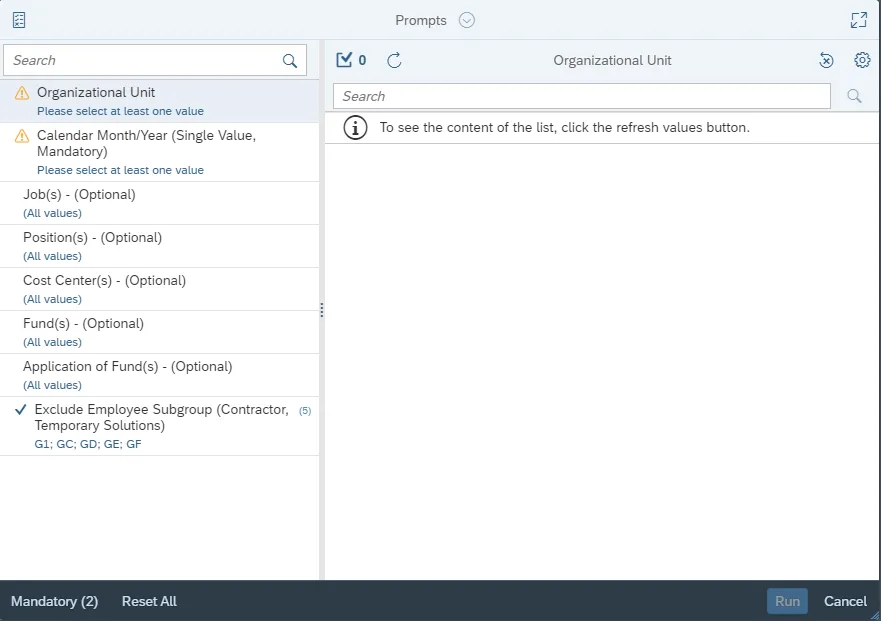
This report is generated after selecting values for the mandatory prompts. All mandatory prompts must have values selected before the Run Icon can be used to generate the report. Mandatory prompts can be identified as mandatory by the exclamation mark inside of the yellow-orange triangle, the square with the checkmark, or the display of (Mandatory). Detailed instructions for interaction with each prompt can be found on the Web Intelligence Prompt List on the OSC website.
The Mandatory prompts for this report are:
- Organization Unit
- Calendar Month/Year (Single Value, Mandatory)
This report can also be further limited by utilizing the Optional prompts to further limiting the amount of data that retrieved into the body of the report. Optional prompts are indicated as optional in parentheses beside the prompt.
The Optional prompts are:
- Job(s) – (Optional)
- Position(s) – (Optional)
- Cost Center(s) – (Optional)
- Fund(s) – (Optional)
- Application of Fund(s) – (Optional)
Exclusion prompts exclude specified data by default while allowing customers the flexibility of changing them when necessary. Exclusion prompts are identified by the term Exclude followed by the prompt.
The Exclusion prompts are:
- Exclude Employee Subgroup (Contractor, Temporary Solutions) G1; GC; GD; GE; GF
Initial Layout
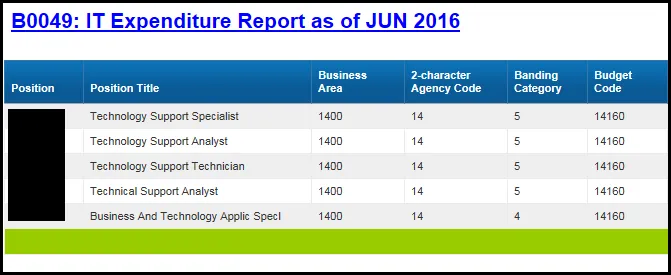
The report is generated with a list of positions for the org unit entered as of the selected calendar month/year.
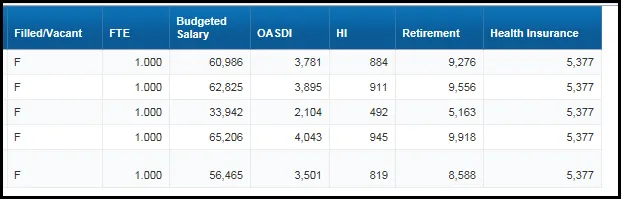
- B0049 IT Expenditure Report tab - The report tab shows the columns available on the base report.
- Continued……
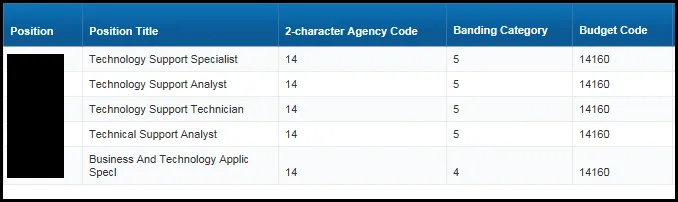
- B0049 IT Expenditure Data tab - This report tab provides a report with no headers and includes many of the same columns as the base report. It was created for internal purposes, but it can be used to view the report in columnar format.
- Continued:
Available Objects
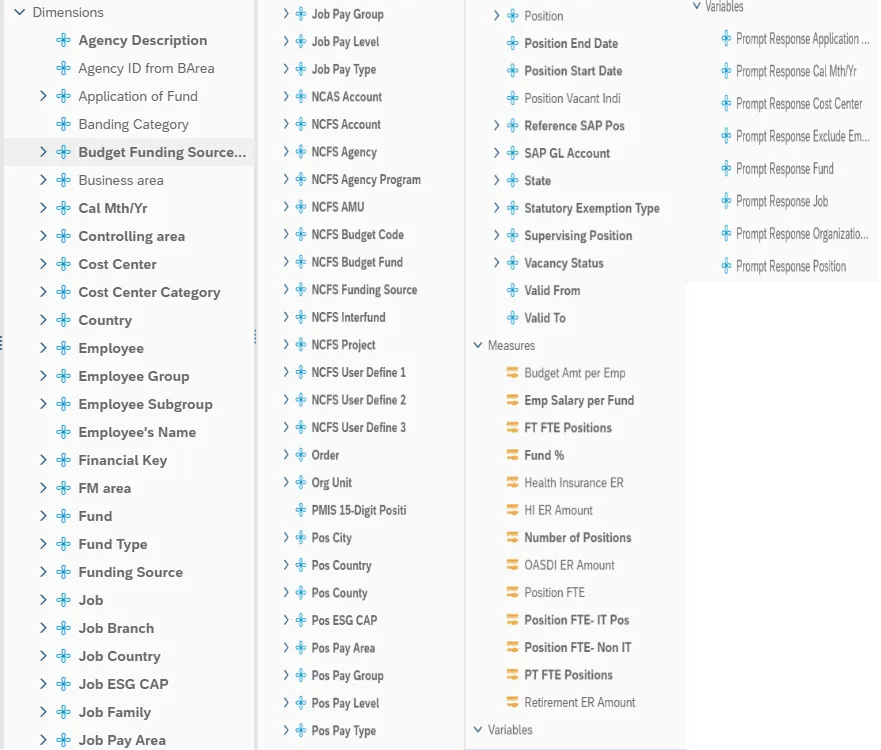
This is a list of the available objects that can be added to the report, from the Document Dictionary once in the Design mode:
Dimensions
- Agency Description
- Agency ID from BArea
- Application of Fund
- Banding Category
- Budget Funding Source (OSBM)
- Business area
- Cal Mth/Yr
- Controlling area
- Cost Center
- Cost Center Category
- Country
- Employee
- Employee Group
- Employee Subgroup
- Employee’s Name
- Financial Key
- FM area
- Fund
- Fund Type
- Funding Source
- Job
- Job Branch
- PMIS 15-Digit Position
- Pos City
- Pos Country
- Pos County
- Pos ESG CAP
- Pos Pay Area
- Pos Pay Group
- Pos Pay Level
- Pos Pay Type
- Position
- Position End Date
- Position Start Date
- Position Vacant Indi
- Reference SAP Pos
- SAP GL Account
- State
- Statutory Exemption Type
- Supervising Position
- Vacancy Status
- Valid From
- Valid To
Measures
- Budget Amt per Emp
- Emp Salary per Fund
- FT FTE Positions
- Fund %
- Health Insurance ER
- HI ER Amount
- Number of Positions
- OASDI ER Amount
- Position FTE
- Position FTE – IT Pos
- Position FTE – Non-IT
- PT FTE Positions
- Retirement ER Amount
Variables
- Prompt Response Application of Fund
- Prompt Response Cal Mth/Yr
- Prompt Response Cost Center
- Prompt Response Exclude Employee Subgroup
- Prompt Response Fund
- Prompt Response Job
- Prompt Response Organizational Unit
- Prompt Response Position
Special Report Considerations/Features
This report includes only positions that are in the Information Technology job families (90000004 and 91000011). The hard filter inside the report is based on Job Family TEXT value ‘Information Technology’.
- FTE calculations for positions are based on the employee subgroups. The position is considered a full-time position if it belongs to one of the following employee subgroups:
- FT N-FLSAOT Perm Dir
- FT N-FLSAOTTL Dir
- FT N-FLSAOT Temp Dir
- FT N-FLSAOT Perm JB1
- FT N-FLSAOT TL JG1
- FT N-FLSAOT Temp JB1
- FT N-FLSAOT Perm JB2
- FT N-FLSAOT TL JB2
- FT N-FLSAOT Temp JB2
- FT N-FLSAOT Perm JB3
- FT N-FLSAOT TM JB3
- FT N-FLSAOT Perm DA
- FT N-FLSAOT Tl DA
- FT N-FLSAOT Temp DA
- FT N-FLSAOT Perm ADA
- FT N-FLSAOT TL ADA
- FT N-FLSAOT Temp ADA
- FT N-FLSAOT Perm MAG
- FT N-FLSAOT TL MAG
- FT N-FLSAOT Temp MAG
- FT S-FLSAOT Perm CR
- FT S-FLSAOT TL CR
- FT S-FLSAOT Temp CR
- FT S-FLSAOT Perm CSC
- FT S-FLSAOT TL CSC
- FT S-FLSAOT Temp CSC
- FT S-FLSAOT Perm
- FT S-FLSAOT Prob TL
- FT S-FLSAOT TL Prob
- FT S-FLSAOT Student
- FT S-FLSAOT Intermit
- FT S-FLSAOT Perm
- FT N-FLSAOT Prob
- FT N-FLSAOT TL
- FT N-FLSAOT TL Prob
- FT N-FLSAOT Student
- FT N-FLSAOT Intermit
- FT N-FLSAOT Perm
- FT N-FLSAOT Prob
- FT N-FLSAOT TL
- FT N-FLSAOT TL Prob
- FT N-FLSAOT Student
- FT N-FLSAOT Intermit
- FT N-FLSAOT Time
- FT N-FLSAOT Fld Tme
- FT N-FLSAOT Perm 12C
- FT N-FLSAOT Prob 2C
- FT N-FLSAOT TL 12C
- FT N-FLSAOT TL Prob 12C
- FT N-FLSAOT Perm 12C
- FT N-FLSAOT Prob 12C
- FT N-FLSAOT TL 12C
- FT N-FLSAOT TL Prob 12C
- FT S-FLSAOT Perm 12C
- FT S-FLSAOT Prob 12C
- FT S-FLSAOT TL 12C
- FT S-FLSAOT TL Prob 12C
- FT S-FLSAOT Perm 11C
- FT S-FLSAOT Prob 11C
- FT S-FLSAOT TL 11C
- FT S-FLSAOT TL Prob 11C
- N/A EPA ConstitutOff
- N/A EPA Sal BD&Com
- N/A EPA Sal GA
- N/A EPA SalGA RecGov
- N/A EPA Lt Gov Staff
- N/A EPA Gov’s Staff
- N/A EPA SalGov&ABC
- N/A EPA Pol-MkingGov
- N/A EPA StatutoryPos
- N/A EPA Pos Gov
- N/A EPA PM Conf Asst
- N/A EPA PM Conf Sec
- N/A EPA Chief Deputy
- N/A EPA StatGAAprAct
- N/A EPA MiscStat Pos
- N/A EPA ExManagerial Contractor
- Pick-up Firefighter
- National Guard
- Federal
- Temp FT N-FLSAOT
- Temp FT S-FLSAOT
- Temp Sol FT N-FLSAOT
- Temp Sol FT S-FLSAOT
- FT N-FLOSA Perm 10C
- FT N-FLOSA Prob 10C
- FT N-FLOSA TL 10C
- FT N-FLOSA TL Prob 10C
- FT S-FLOSA Perm 10C
- FT S-FLOSA Prob 10C
- FT S-FLOSA TL 10C
- FT S-FLOSA TL Prob 10C
- FT EPA
- FT N-FLSA Perm 115C
- FT N-FLSA Prob 115C
- FT N-FLSA TL 115C
- FT N-FLSA TL Prob 115C
- FT S-FLSA Perm 115C
- FT S-FLSA Prob 115C
- FT S-FLSA TL115C
- FT S-FLSALT Prob 115C
- FT N-FLSAOT Perm SC
- FT N-FLSAOT TL SC
- FT N-FLSAOT Temp SC
- FT N-FLSAOT Perm CJP
- FT N-FLSAOT TL CJP
- FT N-FLSAOT Temp CJP
- FT N-FLSAOT Perm ACJP
- FT N-FLSAOT TL ACJP
- FT N-FLSAOT Temp ACJP
- FT S-FLSAOT Perm ACJP
- FT S-FLSAOT TL ACJP
- FT N-FLSAOT Perm AD
- FT N-FLSAOT TL AD
- FT N-FLSAOT Temp AD
- FT N-FLSAOT Perm JBS
- FT N-FLSAOT TL JBS
- FT N-FLSAOT Temp JBS
- FT S-FLSAOT Perm JBS
- FT S-FLSAOT TL JBS
- FT S-FLSAOT Temp JBS
- N/A EPA ConsitutOff
- N/A EPA Sal Bd & Com
- N/A EPA Sal GA
- N/A EPA Sal GARecGov
- N/A EPA Lt Gov Staff
- N/A EPA Gov’s Staff
- N/A EPA Sal Gov&ABC
- N/A EPA Pol-MkingGov
- N/A EPA StatutoryPos
- N/A EPA Pos Gov
- N/A EPA PM Conf Asst
- N/A EPA PM Conf Sec
- N/A EPA Chief Deputy
- N/A EPA StatGAAprAct
- N/A EPA MiscStat Pos
- N/A EPA ExManagerial
The position is considered part-time if it belongs to one of the following employee subgroups:
- PT S-FLSAOT Perm MAG
- PT S-FLSAOT TL MAG
- PT S-FLSAOT Temp MAG
- PT N-FLSAOT Perm Dir
- PT N-FLSAOT TL Dir
- PT N-FLSAOT Temp Dir
- PT N-FLSAOT Perm JB1
- PT N-FLSAOT TL JB1
- PT N-FLSAOT Temp JB1
- PT N-FLSAOT Perm JB2
- PT N-FLSAOT TL JB2
- PT N-FLSAOT Temp JB2
- PT N-FLSAOT Perm JB3
- PT N-FLSAOT TL JB3
- PT N-FLSAOT Temp JB3
- PT N-FLSAOT Perm DA
- PT N-FLSAOT TL DA
- PT N-FLSAOT Temp DA
- PT N-FLSAOT Perm ADA
- PT N-FLSAOT TL ADA
- PT N-FLSAOT Temp ADA
- PT N-FLSAOT Perm MAG
- PT N-FLSAOT TL MAG
- PT N-FLSAOT Temp MAG
- PT S-FLSAOT Perm CR
- PT S-FLSAOT TL CR
- PT S-FLSAOT Temp CR
- PT N-FLSAOT Perm CSC
- PT N-FLSAOT TL CSC
- PT N-FLSAOT Temp CSC
- PT N-FLSAOT Perm 11C
- PT N-FLSAOT Prob 11C
- PT N-FLSAOT TL 11C
- PT N-FLSAOT TLProb 11C
- PT S-FLSAOT Perm 11C
- PT S-FLSAOT Prob 11C
- PT S-FLSAOT TL 11C
- PT S-FLSAOT TLProb 11C
- Volunteer
- Board Member
- Temp PT N-FLSAOT
- Temp PT S-FLSAOT
- Temp Sol PT N-FLSAOT
- Temp Sol PT S-FLSAOT
- PT N-FLSA Perm 10C
- PT N-FLSA Prob 10C
- PT N-FLSA TL 10C
- PT N-FLSA TLProb 10C
- PT S-FLSA Perm 10C
- PT S-FLSA Prob 10 TL 10C
- PT S-FLSA TLProb 10C
- PT EPA
- PT N-FLSAOT Perm SC
- PT N-FLSAOT TL SC
- PT N-FLSAOT Temp SC
- PT N-FLSA Perm 12C
- PT N-FLSA Prob 12C
- PT N-FLSA TL 12C
- PT N-FLSA TLProb 12C
- PT S-FLSA Perm 12C
- PT S-FLSA Prob 12C
- PT S-FLSA TL 12C
- PT S-FLSA TLProb 12
- PT N-FLSAOT Perm CJP
- PT N-FLSAOT TL CJP
- PT N-FLSAOT Temp CJP
- PT N-FLSAOT Perm ACJP
- PT N-FLSAOT TL ACJP
- PT N-FLSAOT Temp ACJP
- PT S-FLSAOT Perm ACJP
- PT S-FLSAOTTL ACJP
- PT S-FLSAOTTL ACJP
- PT S-FLSAOT Temp ACJP
- PT N-FLSAOT Perm AD
- PT N-FLSAOT Temp AD
- PT N-FLSAOT TL AD
- PT N-FLSAOTTemp AD
- PT N-FLSAOT Perm JBS
- PT N-FLSAOT TL JBS
- PT S-FLSAOT Temp JBS
- PT N-FLSAOT Perm
- PT N-FLSAOTProb
- PT N-FLSAOT TL
- PT N-FLSAOT TL Prob
- PT N-FLSAOT Student
- PT N-FLSAOT Intermit
- PT N-FLSAOT Perm 115C
- PT N-FLSAOT Prob 115C
- PT N-FLSAOT TL 115C
- PT S-FLSAOT Perm 115C
- PT S-FLSAOT Prob 115C
- PT S-FLSAOT TL 115C
- PT S-FLSAOT Prob 115C
- PT S-FLSAOT Perm
- PT S-FLSAOT Prob
- PT S-FLSAOT TL
- PT S-FLSAOT TL Prob
- PT S-FLSAOT Student
- PT S-FLSAOT Intermit
- PT S-FLSAOT Time
- PT S-FLSAOT RD Tim
- Vacant positions are identified by having no employee assigned to the position as of Calendar Month/Year. Calendar Month/Year for previous months is represented as the last day of the month (i.e., Jun 2015 equals Jun 30, 2015). If the current month/year was selected, then the actual date is current date minus one day.
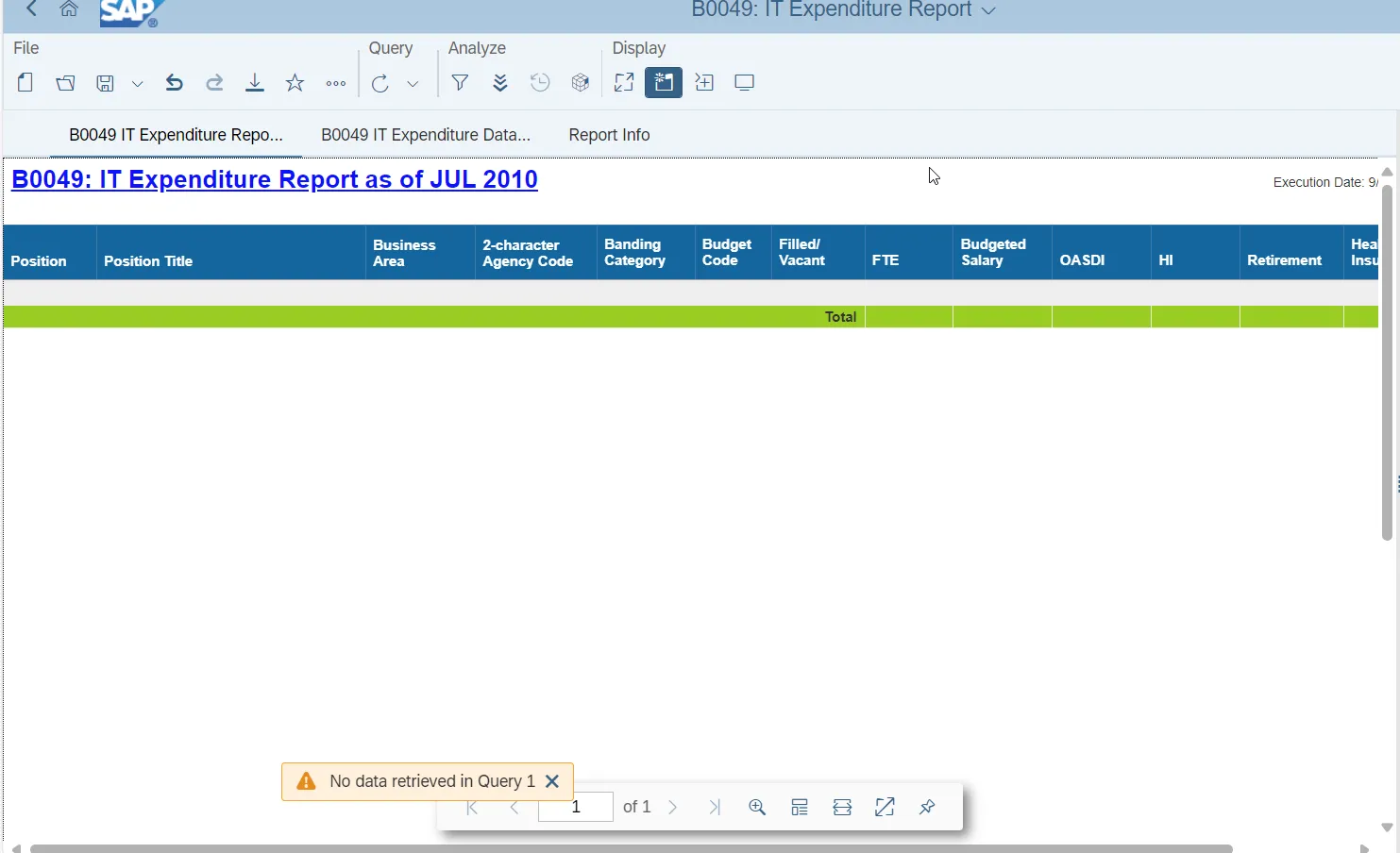
- Historical data prior to June 2015 is not available in this report. If you attempt to run the report using a date prior to June 2015, the following message will appear.
NCFS Accounting Segments - are available for reporting in this report as drag and drop from Available Objects.
- NCFS accounting segments here are specific to an NCFS internal order in SAP HR/Payroll ERP system. Transactions with no NCFS internal orders will not display values for the NCFS segments in the BI BOBJ report.
- NCFS Agency, NCFS Agency Program, NCFS AMU, NCFS Budget Code, NCFS Budget Fund, NCFS Funding Source, NCFS Interfund, NCFS Project, NCFS User Define 1, NCFS User Define 2, NCFS User Define 3
- Agencies (like NCDOT, DES or DWS) that do not use NCFS Internal Orders will not see the values for the above NCFS segments in reports.
- NCFS Account and Budget Funding Source (OSBM) are available for reporting. Values are corresponding crosswalk to SAP GL Account and Funding Source in SAP HR Payroll system.
- Financial Key is representative of internal order from NCFS and old NCAS systems.