Purpose
The purpose of this Report Description is to describe the Payroll Financial Postings Analysis report and how to generate it in the system.
Report Description
This report provides the components of processed payroll postings. It allows the user to incorporate components (for SAP and NCFS) from personnel administration, organizational management, and financial funding information for analysis.
Report Location
FI: Payroll Financial Postings Analysis
Report Uses
Answer payroll related inquires:
- Agency total payroll cost
- Total Employer's cost of benefits
- Comp time payouts
- Overtime costs
- Actual longevity payments
- Total payroll expenses by position or job
How to Generate This Report
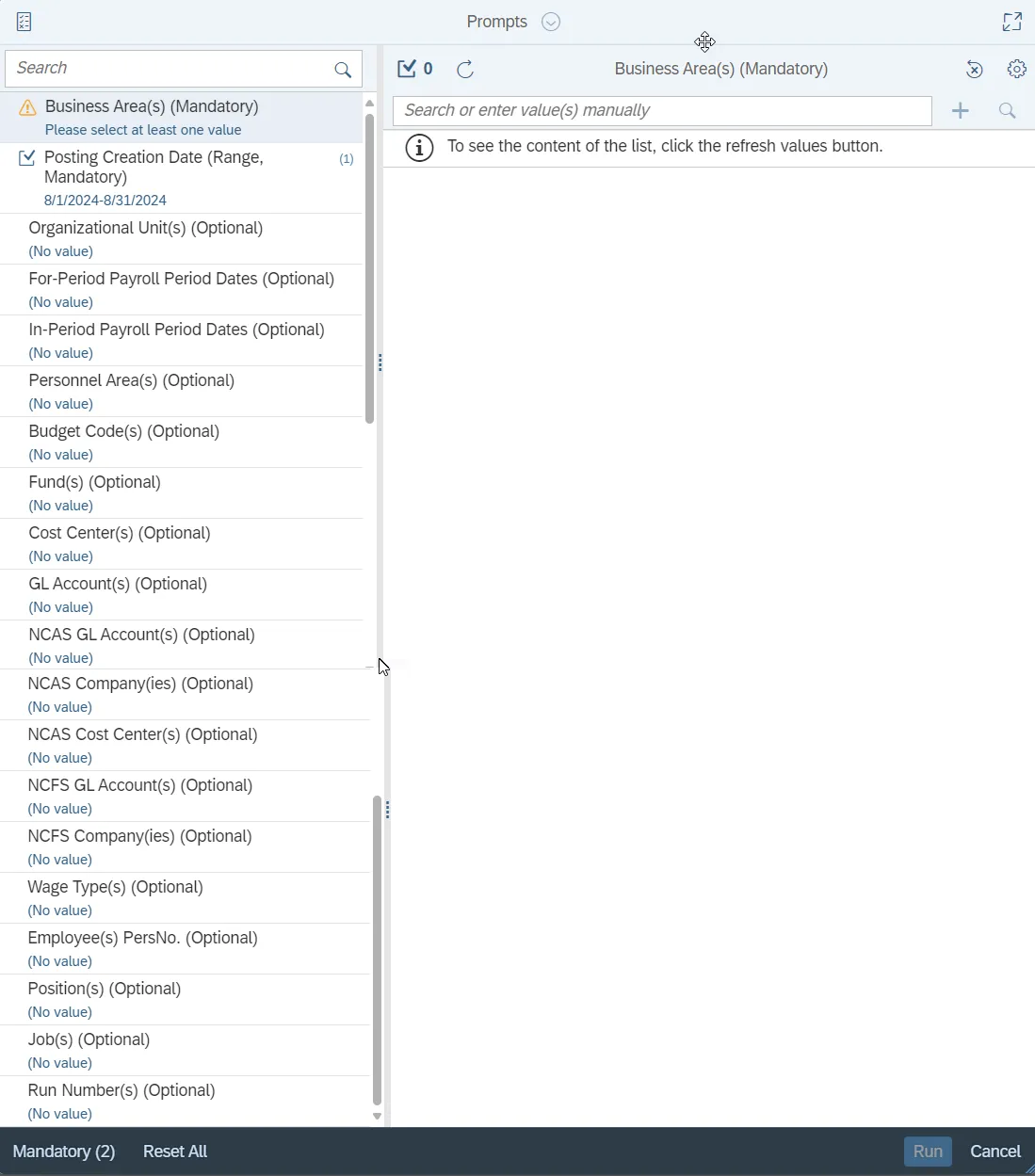
This report is generated after selecting values for the mandatory prompts. All mandatory prompts must have values selected before the Run Icon can be used to generate the report. Mandatory prompts can be identified as mandatory by the exclamation mark inside of the yellow-orange triangle, the square with the checkmark, or the display of (Mandatory). Detailed instructions for interaction with each prompt can be found on the Web Intelligence Prompt List on the OSC website.
The Mandatory prompts for this report are:
- Business Area(s) (Mandatory)
- Posting Creation Date (Range, Mandatory)
This report can also be further limited by utilizing the Optional prompts to further limiting the amount of data that retrieved into the body of the report. Optional prompts are indicated as optional in parentheses beside the prompt.
The Optional prompts are:
- Organizational Unit(s) (Optional)
- For-Period Payroll Period Dates (Optional)
- In-Period Payroll Period Dates (Optional)
- Personnel Area(s) (Optional)
- Budget Code(s) (Optional)
- Fund(s) (Optional)
- Cost Center(s) (Optional)
- GL Account(s) (Optional)
- NCAS GL Account(s) (Optional)
- NCAS Company(ies) (Optional)
- NCAS Cost Center(s) (Optional)
- NCFS GL Account(s) (Optional)
- NCFS Company(ies) (Optional)
- Wage Type(s) (Optional)
- Employee(s) PersNo. (Optional)
- Position(s) (Optional)
- Job(s) (Optional)
- Run Number(s) (Optional)
Initial Layout
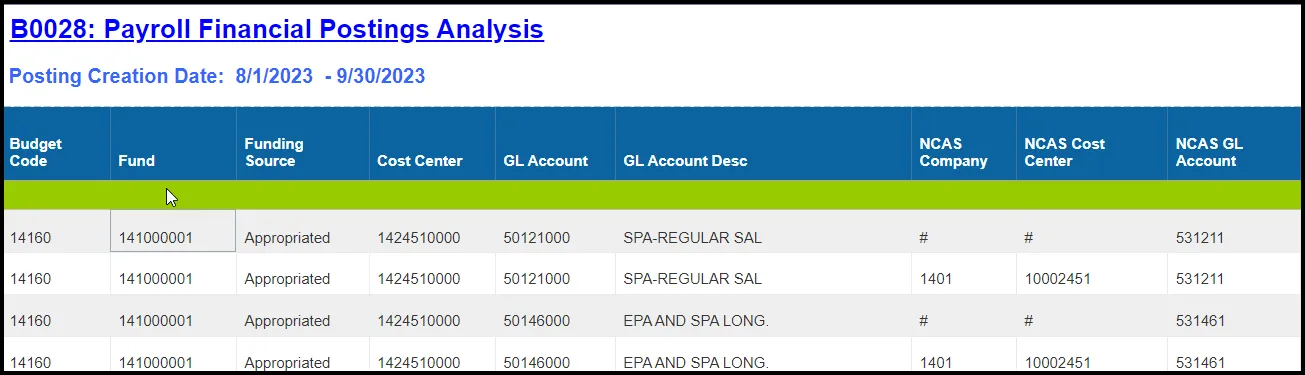
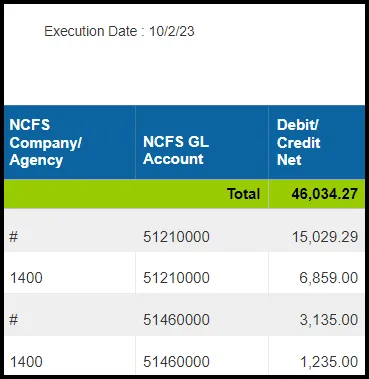
The report lists all postings for the prompt values selected. Below is a sample of the initial layout rendered.
Initial Layout to be continued …
Available Objects
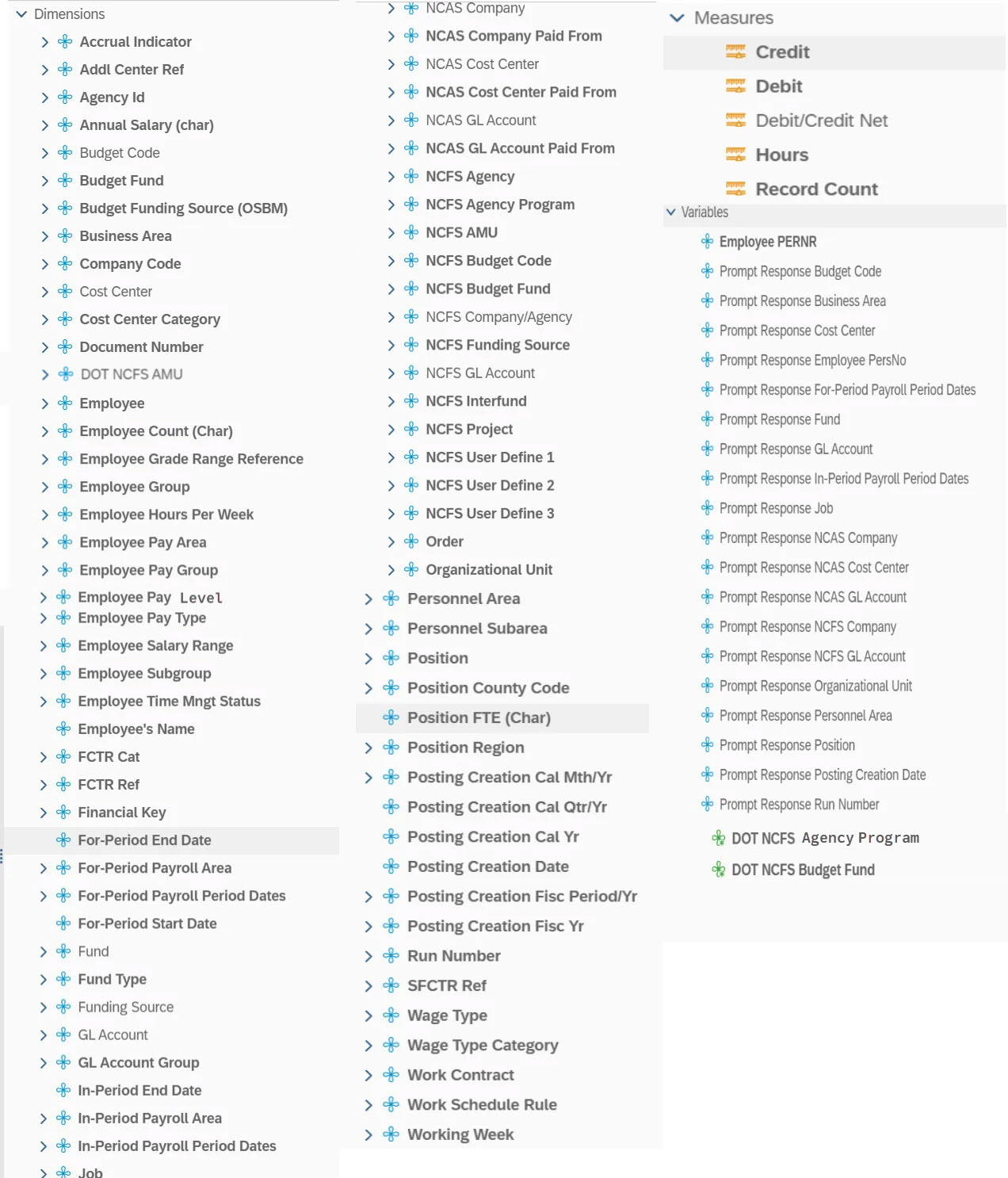
This is a list of the available objects that can be added to the report, from the Document Dictionary once in the Design mode:
Dimensions:
- Accrual Indicator
- Addl Center Ref
- Agency Id
- Annual Salary (char)
- Budget Code
- Budget Fund
- Budget Funding Source (OSBM)
- Business Area
- Company Code
- Cost Center
- Cost Center Category
- Document Number
- DOT NCFS AMU
- Employee
- Employee’s Name
- Employee Count (Char)
- Employee Grade Range Reference
- Employee Group
- Employee Hours Per Week
- Employee Pay Area
- Employee Pay Group
- Employee Pay Level
- Employee Pay Type
- Employee Salary Range
- Employee Subgroup
- Employee Time Mngt Status
- FCTR Cat
- FCTR Ref
- Financial Key
- For-Period End Date
- For-Period Payroll Area
- For-Period Payroll Period Dates
- For-Period Start Date
- GL Account Group
- In-Period End Date
- In-Period Payroll Area
- In-Period Payroll Period Dates
- Job
- NCAS Company
- NCAS Company Paid From
- NCAS Cost Center
- NCAS Cost Center Paid From
- NCAS GL Account
- NCAS GL Account Paid From
- NCFS Agency
- NCFS Agency Program
- NCFS AMU
- NCFS Budget Code
- NCFS Budget Fund
- NCFS Company/Agency
- NCFS Funding Source
- NCFS GL Account
- NCFS Interfund
- NCFS Project
- NCFS User Define 1
- NCFS User Define 2
- NCFS User Define 3
- Order
- Organizational Unit
- Personnel Area
- Personnel Subarea
- Position
- Position County Code
- Position FTE (Char)
- Position Region
- Posting Creation Cal Mth/Yr
- Posting Creation Cal Qtr/Yr
- Posting Creation Cal Yr
- Posting Creation Date
- Posting Creation Fisc Period/Yr
- Posting Creation Fisc Yr
- Run Number
- SFCTR Ref
- Wage Type
- Wage Type Category
- Work Contract
- Working Week
- Work Schedule Rule
Measures:
- Credit
- Debit
- Debit/Credit Net
- Hours
- Record Count
Variables:
- Employees PERNR
- Prompt Response Budget
- Prompt Response Business Area
- Prompt Response Cost Center
- Prompt Response NCAS GL Account
- Prompt Response Employee PersNo
- Prompt Response For-Period Payroll Period Dates
- Prompt Response Fund
- Prompt Response GL Account
- Prompt Response In-Period Payroll Period Dates
- Prompt Response Position
- Prompt Response Job
- Prompt Response NCAS Company
- Prompt Response NCAS Cost Center
- Prompt Response NCAS GL Account
- Prompt Response NCFS Company
- Prompt Response NCFS GL Account
- Prompt Response Organizational Unit
- Prompt Response Personnel Area
- Prompt Response Posting Creation Date
- Prompt Response Run Number
- Prompt Response Wage Type
- DOT NCFS Agency Program
- DOT NCFS Budget Fund
Special Report Considerations/Features
- Data for this report uses the same source as the ERP ZFIR report. In BOBJ, the data set has been extended by providing additional employee, position, and NCAS data elements.
- Report is secured by Business Area rather than Organizational Unit.
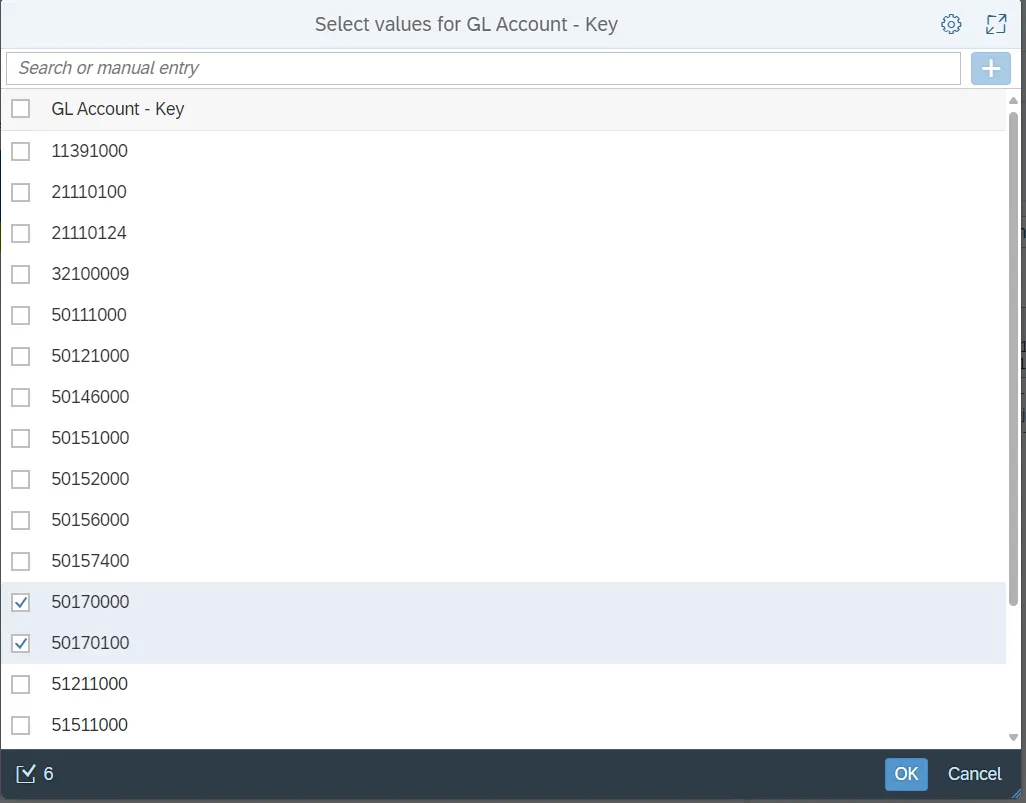
- There are six Compensated Absence Accrual accounts excluded by default.
- 50170000
- 50170100
- 51211200
- 51211210
- 21121001
- 21121002
This filter can be modified as desired:
Step 1 - Click on Design mode.
Step 2 - Highlight the GL Account column
Step 3 - Right click and choose Data, Edit filter.
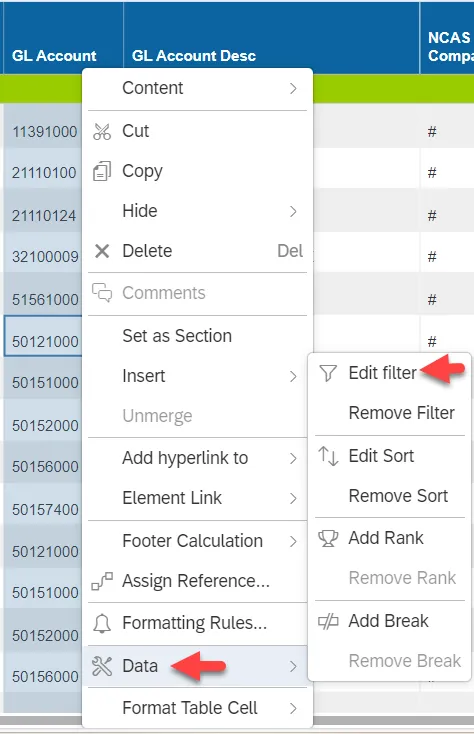
Step 4 - Check or Uncheck the box next to the account numbers.
- When trying to compare B0028 data with data from the ERP ZFIR report, please ensure that all filters represented in the ZFIR variant being used match the prompt values used on the BOBJ report.
- NCFS Accounting Segments - are available for reporting in this report as drag and drop from Available Objects.
- NCFS accounting segments here are specific to an NCFS internal order in SAP HR/Payroll ERP system. Transactions with no NCFS internal orders will not display values for the NCFS segments in the BI BOBJ report.
- NCFS Agency, NCFS Agency Program, NCFS AMU, NCFS Budget Code, NCFS Budget Fund, NCFS Funding Source, NCFS Interfund, NCFS Project, NCFS User Define 1, NCFS User Define 2, NCFS User Define 3
- Agencies (like NCDOT, DES and DWS) that do not use NCFS Internal Orders will not see the values for the above NCFS segments in reports.
- NCFS Account and Budget Funding Source (OSBM) are available for reporting. Values are corresponding crosswalk to SAP GL Account and Funding Source in SAP HR Payroll system.
- Financial Key is representative of internal order from NCFS and old NCAS systems.
- DOT specific NCFS objects viz DOT NCFS Agency Program, DOT NCFS AMU and DOT NCFS Budget Fund are added to the report as needed for NC HB199. Source of these new objects are maintained in crosswalk tables in the ERP HR Payroll system.