Purpose
The purpose of this Report Description is to describe and explain how to generate the Employee Pay by Quartile report.
Report Description
This report provides the employee’s pay level within the quartile minimum and maximum of a designated quartile and employee salary average by quartile by Job.
Report Location
PA: Compensation
Report Uses
- This report should be used to monitor employees by their job classification when comparing each by their salary within the quartiles. It can show potential areas of inequity.
- This report also provides a summary count and average salary of employees by quartile.
- Use Compa Ratio Rate to evaluate, either at a summary or detail level, how employee salaries compare to others within their specific job market.
How to Generate This Report
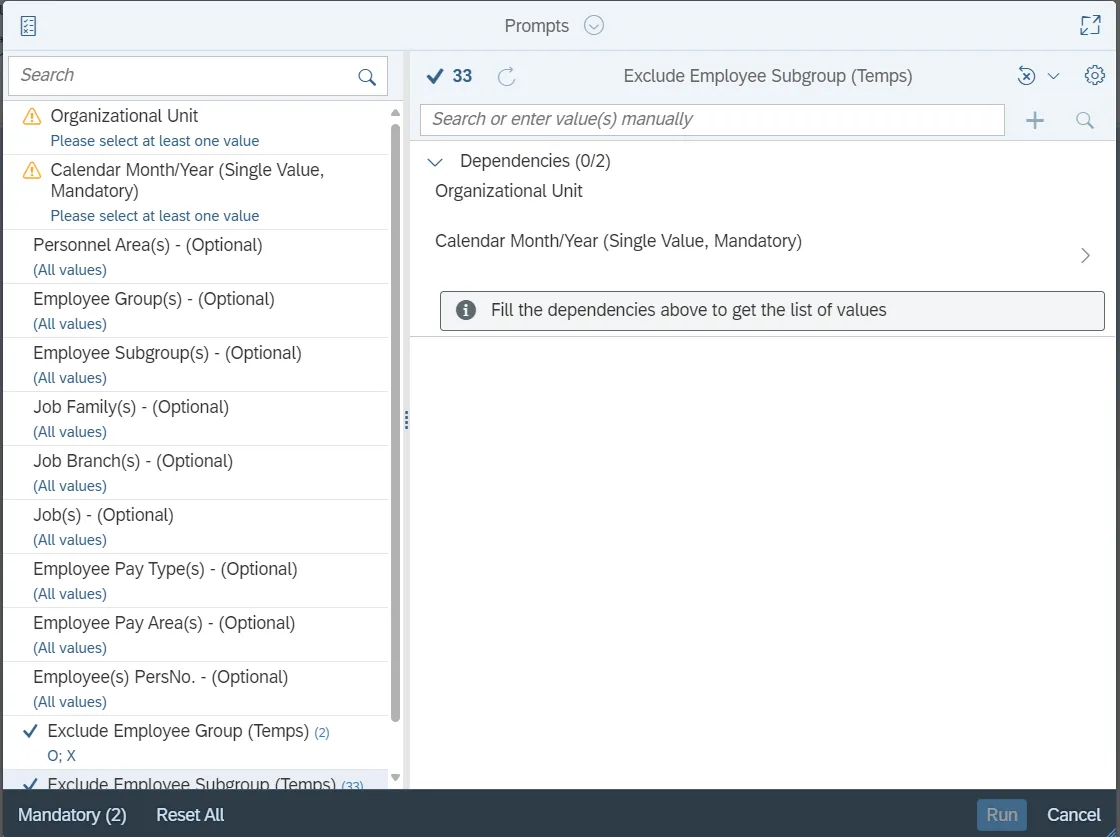
This report is generated after selecting values for the mandatory prompts. All mandatory prompts must have values selected before the Run Icon can be used to generate the report. Mandatory prompts can be identified as mandatory by the exclamation mark inside of the yellow-orange triangle, the square with the checkmark, or the display of (Mandatory). Detailed instructions for interaction with each prompt can be found on the Web Intelligence Prompt List on the OSC website.
The Mandatory prompts for this report are:
- Organizational Unit
- Calendar Month/Year (Single Value, Mandatory)
This report can also be further limited by utilizing the Optional prompts to further limiting the amount of data that retrieved into the body of the report. Optional prompts are indicated as optional in parentheses beside the prompt.
The Optional prompts are:
- Personnel Area(s) - (Optional)
- Employee Group(s) - (Optional)
- Employee Subgroup(s) - (Optional)
- Job Family(s) - (Optional)
- Job Branch(s) - (Optional)
- Job(s) - (Optional)
- Employee Pay Type(s) - (Optional)
- Employee Pay Area(s) - (Optional)
- Employee(s) PersNo. - (Optional)
Note: Since the system has a large number of employees, using broad wildcard searches can be very slow and may result in an error if the search exceeds the system limit. If you do not know the employee number and must do a name search, you can narrow down your search by using the wildcard with specific text strings when looking for an employee by name such as:
- Mickey*Mouse*
- *Mouse
If the employee number is known, it is best to use the manual entry field Employee(s) PersNo. - (Optional) to enter your selection.
Exclusion prompts exclude specified data by default while allowing customers the flexibility of changing them when necessary. Exclusion prompts are identified by the term Exclude followed by the prompt.
The Exclusion prompts are:
- Exclude Employee Group (Temps)
- Exclude Employee Subgroup (Temps)
Note: The Employee Group and the Employee Subgroup exclusions work together as a set to exclude temporary employees. To clear the Temp exclusion, both exclusions (EE Group and EE Subgroup) must be cleared.
Initial Layout
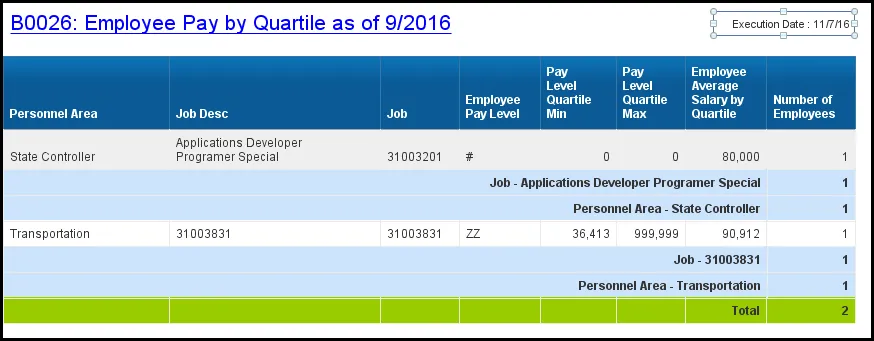
Below is the sample rendering of the report layout.
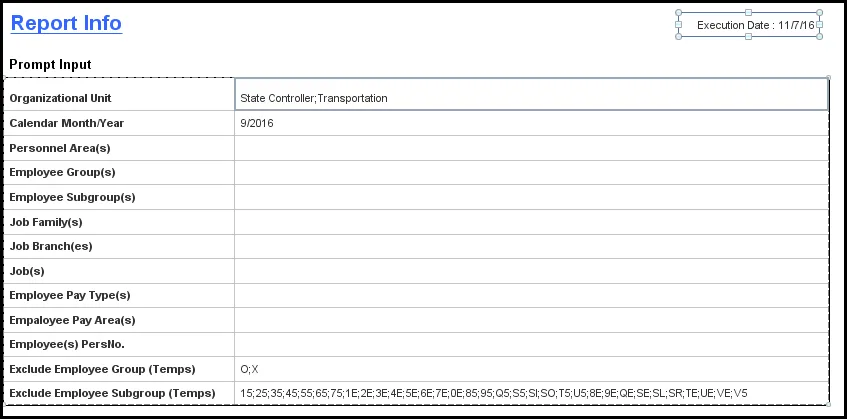
The Report Info tab displays information about the prompts entered.
Available Objects
This is a list of the available objects that can be added to the report, from the Document Dictionary once in the Design mode:
Dimensions
- Age
- Cal Mth/Yr
- Education Level
- Emp Pay Area
- Emp Pay Group
- Emp Pay Level
- Emp Pay Type
- Employee
- Employee Group
- Employee Subgroup
- Ethnic Origin
- Gender
- Job
- Job Branch
- Job Family
- Organizational Unit
- Personnel Area
- Personnel Subarea
- Position
Measures
- Age in Years
- American Indian or Alaskan Native (N-H/L)
- Annual Salary
- Asian (Non-Hispanic/Latino)
- Black or African American (N-H/L)
- Emp Pay Group Max
- Emp Pay Group Min
- Emp Reference Salary
- Ethnicity Unknown
- FTE Annual Salary
- Hispanic/Latino
- Length of Service
- Native Hawaiian or Other Pacific Islander (N-H/L)
- Number of Employees
- Number of Employees Female
- Number of Employees Male
- Related Education Month(s)
- Related Work Experience Month(s)
- Two or More Races (Non-Hispanic/Latino)
- White (Non-Hispanic/Latino)
Variables
- Employee Salary Max
- Employee Salary Min
- Prompt Response Calendar Month/Year
- Prompt Response Employee Group
- Prompt Response Employee Pay Area
- Prompt Response Employee Pay Type
- Prompt Response Employee PersNo
- Prompt Response Employee Subgroup
- Prompt Response Exclude Employee Group
- Prompt Response Exclude Employee Subgroup
- Prompt Response Job
- Prompt Response Job Branch
- Prompt Response Job Family
- Prompt Response Organizational Unit
- Prompt Response Personnel Area
- Prompt Response Position
- Average Age
- Average Length of Service
- Compa Ratio
- Emp / Job Ref Salary
- Employee Average Salary by Quartile

Special Report Considerations/Features
- Temporary employees are excluded by default, but this can be changed from the prompts.
- Report generates for active employees only.
- The ‘Emp/Job Ref Salary’ represents the Employee Reference Rate for Banded pay types; for all other pay types, it represents the Job Reference Rate.
- Data for Salary Range tab is available June 2015 and forward only. Salary range for historical months is not available.
- Report runs for the following Pay Scale Types only:
- 06 - Executive (EX)
- 07 - General (GN)
- 08 - Information Tech (IT)
- 09 - Attorney (AT)
- 10 - Education (ED)
- 11 - Medical (MG)
- 12 - State Hwy Patrol (HP)
- 16 - Correctional Officer (CO)
- 17 – Probation Parole Officer (PPO)
- 18 – North Carolina (NC)
- 19 – Digital Technology (DT)
- 20 – Legal (LG)
- 21 – Medical and Health (MH)
- 22 – Sworn (SW)
- Infotype 9822 data (Related Experience) is only available beginning August 2018.