Report Description
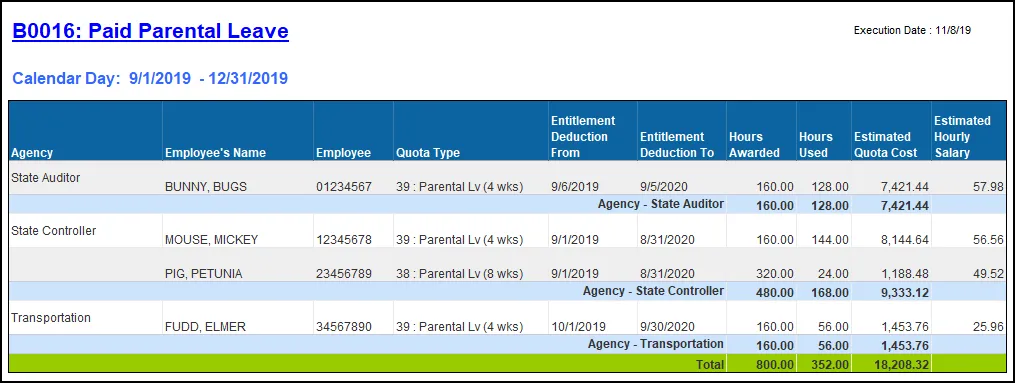
This report shows Employees who have been granted Paid Parental Leave. It provides Hours Awarded, Hours Used, Estimated Hourly Salary, and Estimated Cost by Personnel Area. Additional data elements such as Gender, Ethnicity, Age Range, and Job are also available for additional analysis.
Report Location
PA: Quota Usage
Report Uses
OSHR will use the report to provide the implementation and use of Paid Parental Leave to the Office of the Governor by September 2020. Agencies are required to collect and submit their information to OSHR by July 1, 2020, and every July thereafter. Report will be used to monitor Paid Parental Leave during the year and as an annual report.
How to Generate This Report
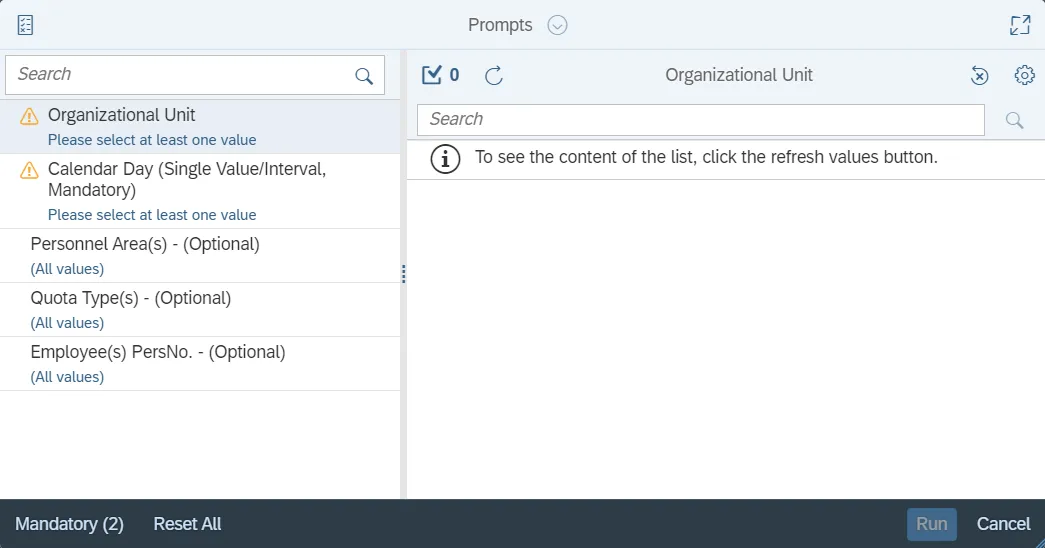
This report is generated after selecting values for the mandatory prompts. All mandatory prompts must have values selected before the Run Icon can be used to generate the report. Mandatory prompts can be identified as mandatory by the exclamation mark inside of the yellow-orange triangle, the square with the checkmark, or the display of (Mandatory). Detailed instructions for interaction with each prompt can be found on the Web Intelligence Prompt List on the OSC website.
The Mandatory prompts for this report are:
- Organizational Unit
- Calendar Day (Single Value/Interval, Mandatory)
This report can also be further limited by utilizing the Optional prompts to further limiting the amount of data that retrieved into the body of the report. Optional prompts are indicated as option in parentheses beside the prompt.
The Optional prompts are:
- Personnel Area(s) - (Optional)
- Quota Type(s) - (Optional)Employee(s)
- PersNo. - (Optional)
Note: Since the system has a large number of employees, using broad wildcard searches can be very slow and may result in an error if the search exceeds the system limit. If the employee number is not known and you must do a name search, narrow down the search by using the wildcard with specific text strings when looking for an employee by name such as:
- John*Smith*
- *Smith
- If the employee number is known, it is best to use the manual entry field in Employee(s) PersNo. - (Optional) to enter the selection.
Initial Layout
Report lists employees that have taken Parental Leave within the time period corresponding to date range selection on the prompt. Below is a sample report rendering.
Available Objects
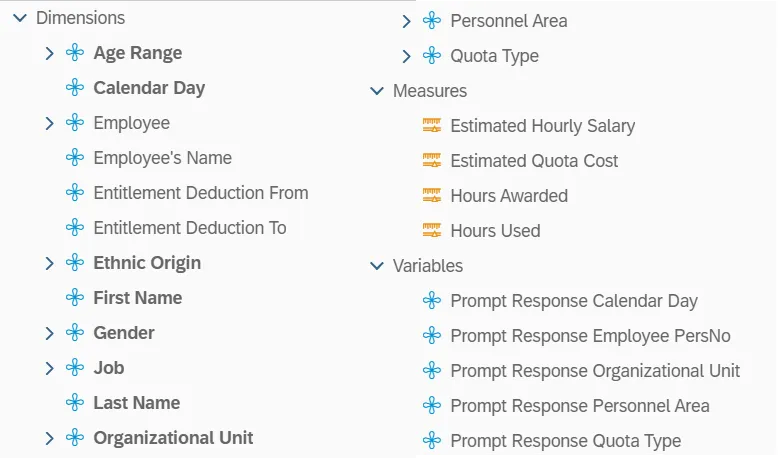
This is a list of the available objects that can be added to the report, from the Document Dictionary once in the Design mode:
Dimensions:
- Age Range
- Calendar Day
- Employee
- Employee’s Name
- Entitlement Deduction From
- Entitlement Deduction To
- Ethnic Origin
- First Name
- Gender
- Job
- Last Name
- Organizational Unit
- Personnel Area
- Quota Type
Measures:
- Estimated Hourly Salary
- Estimated Quota Cost
- Hours Awarded
- Hours Used
Variables:
- Prompt Response Calendar Day
- Prompt Response Employee PersNo
- Prompt Response Organizational Unit
- Prompt Response Personnel Area
- Prompt Response Quota Type
Special Report Considerations/Features
- The ‘Calendar Day’ date prompt is driven by leave usage. Data returned reflects Parental Leave usage in the time period corresponding to date range selected on the prompt.
- Estimated Hourly Salary is calculated as annualized salary divided by 2080.
- Estimated Quota Cost is calculated as Hours Used times Estimated Hourly Salary.