Purpose
The purpose of this job aid is to explain how to change and who should change employee and position eligibility settings using PO13, ZOMA069, ZPAA076, and PA30.
| If you want to ... | Use ... | Who should perform the transaction? |
|---|---|---|
| Change position eligibility settings and premium rates | Transaction: PO13 |
HR Master Data Maintainer OM Position Maintainer |
| Change employee settings for the Employee Subgroup field |
Transaction: ZPAA076 (workflow) Action: Appointment Change |
HR Master Data Maintainer |
| Change position settings for the Employee Subgroup field |
Transaction: ZOMA069 (workflow) Action: EG/ESG Change |
OM Position Maintainer |
| Change supervisor to employee reporting relationship |
Transaction: ZOMA069 (workflow) Action: Supervisor Change (to correct only the supervisor within the same org unit) Action: Position Transfer (changes both the supervisor and the org unit location of the position) |
OM Position Maintainer |
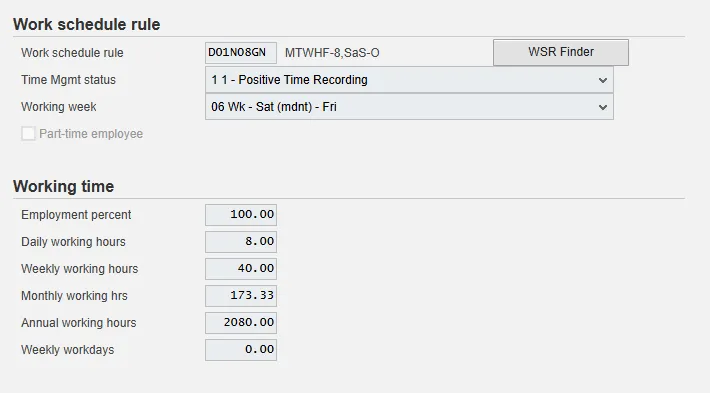
| Change Work schedule rule, Time Mgmt status, or Working week fields |
Transaction: PA30 Infotype: 0007, Planned Working Time |
HR Master Data Maintainer |
Example
- Transactions: PA30 & PA61
- Infotype: 0007 Planned Working Schedule
- File Path: Training HELP website > OM > Job Aids
Additional Information
CALLBACK ELIGIBILITY (IT9012)
Positions that are eligible for compensation under the Emergency Callback policy should have this Infotype created to indicate that eligibility. The policy provides for a minimum of two (2) hours of compensation when an employee physically returns to work due to a callback. Attendance Type 9516 - Callback should be used to indicate regular callback time. A minimum of 30 minutes compensation is provided for remote callbacks in which the employee can respond online or by phone. Attendance Type 9511 - Remote Callback should be used to indicate remote callback time. The actual time spent working should be recorded on the timesheet. The additional time needed to reach the minimum will be computed by the Integrated HR/Payroll System. The “Immediate Payout” checkbox indicates that the additional compensation will be paid immediately instead of accrued as comp time for the selected aging period.
HOLIDAY PREMIUM RATE (IT9010)
Pay rate increase for Holiday Pay. The OSHR approved rate other than the default of 50% must be entered in the rate field.
EVENING SHIFT PREMIUM (IT9008)
Stores settings for positions that are eligible for evening shift premium. OSHR approved rates other than the default of 10% must be entered in the rate field.
IT9016 - EXTENDED DUTY (IT9016)
Positions that are eligible for extended duty compensation should have this Infotype created to indicate that eligibility. OSHR policy provides for special compensation under "extended duty" situations for certain medical classes. Refer to the policy for more specific information. The Attendance Type 9510 - Additional Hours should be used on the time sheet to indicate applicable hours.
HOLIDAY PAYOUT PERIOD (IT 9006)
Indicates if overtime compensatory time is to be paid out (FLSA Subject only) or expired (FLSA Not-Subject only) at a point earlier than 12 months from when it was earned. The Comp Aging Limit field should be populated with the corresponding number of days (30 days, 60 days, etc.). The default is 365 days. If no record exists, the default value of 365 applies. If it is to be paid out immediately, the Immediate Payout checkbox should be checked.
NIGHT SHIFT PREM RATE (IT 9007)
Pay rate increase for Night Shift premium. If OSHR has approved a rate other than the default of 10%, the rate as a percentage must be entered in the rate field.
ON-CALL (IT 9011)
Stores settings for positions that are eligible for On-Call compensation. The accrued box should be checked if the time is to be collected as On-Call comp time. The rate field must be populated with the OSHR approved on-call rate.
OVERTIME COMPENSATION (IT 9005)
Stores settings related to overtime compensation.
- If time worked beyond the overtime limit (40 hours, etc.) is to be paid or accumulated as compensatory time, the position must have a valid IT9005 record.
- If overtime compensatory time is to be paid out (FLSA Subject only) or expired (FLSA Not-subject only) at a point earlier than 12 months from when it was earned, the Comp Aging Limit field should be populated with the corresponding number of days (30 days, 60 days, etc.).
- If it is to be paid out immediately, the Immediate Payout checkbox should be checked. The default is 365 days. An IT9005 record is not required if the position is not eligible for overtime pay or compensation.
WEEKEND SHIFT PREMIUM (IT 9009)
Stores settings for positions that are eligible for weekend shift premium. The OSHR approved rate other than the default of 10% must be entered in the rate field.