Purpose
This document provides instructions for completing actions with effective dates prior to 2/1/26 for employees with a 2/1/26 Range Revision - LM No Salary Adjustment action.
Important Notes
- • As has been previously communicated by OSHR via memo sent to HR Directors, some employees will have a 2/1/26 (ZE) Range Revision (05) LM No Salary Adjustment record:
Image
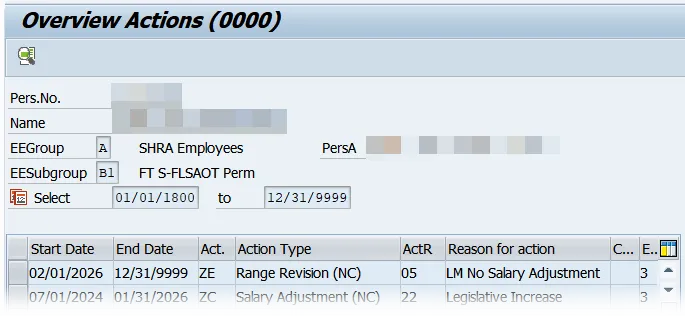
- ALWAYS review the employee actions in PA20 before processing any PCR action.
- If the action is effective 2/1/26 and does not involve a position change, the action may be worked at the agency per normal process.
- Do NOT attempt to process a new action with an effective date prior to 2/1/26 while there is a 2/1/26 Range Revision still on the employee’s record. This would be considered an insert.
- Do NOT insert any action with an effective date prior to 2/1/26. Inserting an action will result in the 2/1/26 action being overwritten. This WILL cause payroll impacting issues and can prevent an employee from being paid.
- BEST will NOT insert retro actions (non-LOA) due to the 2/1/26 Range Revision action.
- BEST will NOT reprocess 2/1/26 ZE-05 Range Revision actions, except when processing LOA - related actions (Z3/Z2).
- Please follow instructions for ticket requirements listed in the OM/PA Ticket Request Guide (Job Aid GN-9) available on the OSC site. Five or more employees can be submitted by spreadsheet.
- If another (ZE) Range Revision action type is to be processed and effective 2/1/26, the ZE-05 (LM No Salary Adjustment) action should remain on the employees’ record for reporting purposes.
Key Responsibility Reminders
- Agencies MUST ensure ALL necessary Range Revisions are back on the employee’s record prior to any Legislative Increase (LI) processing.
- If BEST deletes a 2/1/26 Range Revision action so that an agency can process a PCR with an effective date prior to 2/1/26, the agency is responsible for creating and working the Range Revision action after completing the prior date action.
- Agencies must determine Range Revision eligibility for all pre-2/1/26 hire actions using OSHR guidance. BEST cannot determine eligibility.
Instructions for completing actions after the 2/1/26 Range Revision
For any action not listed, please submit a ticket with details to BEST and instructions will be provided.
| PCRs Effective Prior to 2/1/26 | Agency Action | BEST Action |
|---|---|---|
|
(ZG) Separation (ZF) Separation Pay Continuation |
Agency must submit ticket to BEST to delete the Range Revision action and then process the Separation action. | BEST will delete the Range Revision and will advise the agency to proceed with processing the action. |
|
(ZO) New Hire (Z2) Reinstatement (Except Z@ Reinstatement from any LOA) (Z7) Non-Beacon to Beacon |
Agency must first review to determine* if a Range Revision action is needed and then create and work the Range Revision action is applicable. | |
|
(Z1) Promotion (Z8) Transfer |
|
BEST will delete the Range Revision and will advise the agency to proceed with working the actions. |
| (Z9) Appointment Change (11) Probation to Perm | Not allowed. Must be dated 2/1/26 or later. | |
|
(Z3) Leave of Absence (Z2) Reinstatement from LOA |
Agency must submit ticket to BEST requesting the LOA or Reinstatement from LOA action to be inserted. | BEST will insert the LOA or Reinstatement from LOC action. |
| (ZC) Salary Adjustment | Agency must submit ticket to BEST to delete the Range Revision action and then follow instructions from BEST. | BEST will delete the Range Revision and advise the agency to proceed with working the action. |
*Note: Any questions about whether a Range Revision action is needed should be directed to OSHR.